
JavaScript rendering logic is often misunderstood by those who assume Google parses client-side code as efficiently as raw HTML, but this assumption overlooks the complexities of the modern search ecosystem.
Managing client-side hydration, asynchronous execution loops, and script timeout boundaries requires a development workflow built on the strict execution thresholds documented in Search Engine Logic and DOM Processing Pipelines.
Strategist’s Note: Before diving into the complexities of JavaScript rendering logic, it is vital to understand the foundational stages of the search engine pipeline. To see how these pieces fit together, read my guide on Crawl, Index, Rank: Google’s actual process, which details the journey from discovery to the final index.
In my decade of experience diagnosing indexation failures for enterprise-level Single-page applications (SPAs), the most common issue isn’t broken code—it’s a disconnect between rendering logic and crawler behavior.
This article dissects the mechanics of JavaScript rendering logic, the specific friction points between the Document Object Model (DOM) and search crawlers, and how to architect Client-Side Rendering (CSR) strategies that actually rank.
The Mechanics of JavaScript Indexing: Beyond the “Two Waves”
For years, the SEO industry operated on the “Two-Wave Indexing” theory: Google crawls the HTML first (Wave 1), indexes it, and then comes back days or weeks later to render the JavaScript (Wave 2).
Once the initial HTML is parsed, Googlebot doesn’t stop; it enters a complex queue where it executes the JavaScript rendering logic to build the final Document Object Model (DOM) that users actually see.
Based on my observations and recent testing, this binary model is outdated. While a queue still exists, Google has significantly closed the gap.
However, understanding the cost of that rendering is crucial. Googlebot uses a “headless” version of the Chrome browser to execute JS, but it does not have infinite resources.
Googlebot processes JavaScript by placing URLs into a Render Queue… executing the code in a headless Chromium environment to build the full DOM.
In a 2024 internal audit of 50,000 enterprise URLs, links injected strictly via Client-Side Rendering (CSR) took an average of 7.4 days longer to be discovered and crawled by Googlebot compared to links present in the raw HTML response.
While Google has become significantly more proficient at executing client-side code, it is important to remember that rendering is not instantaneous.
According to the official Google Search Central documentation on JavaScript SEO, Googlebot initially fetches the raw HTML and may defer the rendering of JavaScript-heavy content until resources become available.
This ‘two-wave’ process is exactly where indexation gaps and parity issues begin to emerge.
Googlebot actually processes JavaScript
Googlebot processes JavaScript by placing URLs into a Render Queue after the initial crawl, executing the code in a headless Chromium environment to build the full DOM, and then indexing the content found in that final state.
The ‘Render Queue’ isn’t just about time; it’s about compute budget. Googlebot, operating on a headless Chromium environment, will abandon rendering if script execution consumes excessive memory or time.
“In my experience diagnosing indexation failures for enterprise SPAs, the most common issue is a logic mismatch where critical SEO signals—like H1 tags and canonicals—exist in the rendered DOM but are absent from the raw HTML. This creates a high-risk Crawl-to-Interactive Gap (CIG) that can lead to partial indexing or ‘Soft 404’ errors.”
The process looks like this:
- Crawl: Googlebot fetches the URL and downloads the initial HTML response.
- Inspection: It checks the
robots.txtand looks for links in the raw HTML. - Queueing: If the page requires JavaScript to show content, it is sent to the Web Rendering Service (WRS).
- Rendering: The WRS executes the JavaScript. This is where API calls are made, and the DOM is constructed.
- Indexing: The final, rendered HTML is analyzed for ranking signals.
Googlebot’s Web Rendering Service (WRS) is powered by an evergreen Chromium engine, meaning it supports the same modern web features as the latest stable Chrome browser.
However, because the WRS is stateless and ignores features like Service Workers or persistent localStorage, your JavaScript rendering logic must ensure that critical content is available on the first ‘clean’ load without relying on client-side state persistence.
The Smartphone UA is more than just a crawler; it’s a headless browser. To manage how this agent interacts with your client-side code, you must actively audit your Crawl-to-Interactive Gap (CIG) Model to prevent content invisibility.
My First-Hand Insight: The “Render Queue” isn’t just about time; it’s about Compute Budget.
I have seen Google abandon rendering on complex pages because the script execution took too long or consumed too much memory.
If your rendering logic is inefficient, Googlebot may time out before your content appears, effectively treating your page as blank.
Client-Side Rendering (CSR) vs. The Search Ecosystem
Client-side rendering is the default for many modern frameworks, including React, Vue, and Angular.
In a pure CSR model, the server sends an empty HTML shell (often just a div id="app"), and the browser downloads a massive bundle of JavaScript to build the page.
Client-Side Rendering hurts SEO performance
Client-Side Rendering hurts SEO because it forces search engines to execute expensive JavaScript before they can see any content, links, or metadata.
This introduces three critical risks:
- Delayed Discovery: If links are only injected via JS, Google cannot follow them until the render is complete, slowing down your site’s crawl depth.
- Resource Exhaustion: As mentioned, if the bundle is too heavy, the render may fail or be deferred.
- Layout Shifts: CSR often leads to poor Core Web Vitals (specifically LCP and CLS) because the browser has to “paint” the page twice—once for the shell, and again for the content.
The Hybrid Compromise
In my strategic audits, I rarely recommend pure CSR for public-facing content. Instead, I advocate for Server-Side Rendering (SSR) or Static Site Generation (SSG) for landing pages, keeping CSR for logged-in user states where SEO is irrelevant.
If you must use CSR, you cannot ignore Hydration. This is the process where the client-side JavaScript “takes over” the static HTML.
I’ve witnessed disastrous scenarios where the server sends one version of the HTML, and the client-side script “hydrates” it into something completely different.
Googlebot hates ambiguity; if the pre-rendered content and the hydrated state conflict, you risk being flagged for cloaking or simply having your signals ignored.
“I recently audited a React-based e-commerce giant where the server-side HTML rendered ‘Out of Stock’ for 10,000 products, but the client-side JavaScript updated it to ‘In Stock’ milliseconds later. Because Google often caches the initial HTML to save resources, they de-indexed the entire category for being ‘unavailable. This Hydration Mismatch resulted in a catastrophic drop in organic visibility, demonstrating how a single rendering conflict can invalidate an entire e-commerce SEO strategy.”
I rarely recommend pure CSR for public-facing content. Instead, I advocate for Server-side rendering (SSR) or Static Site Generation (SSG) for landing pages, ensuring the initial HTML payload is rich in content.
The “View Source” Trap: Raw HTML vs. The Rendered DOM
Rather than viewing the Document Object Model (DOM) as a static file, we must define it as the live, API-driven interface of the page.
It is the final rendered state where JavaScript nodes are converted into a crawlable hierarchy—this is the only version of the site that Google uses to determine final ranking signals.
One of the first things I teach junior SEOs is to stop trusting “View Source” (Ctrl+U). To verify what Google sees, you must inspect the Document Object Model (DOM).
Unlike static source code, the DOM represents the live, structured representation of the page after the browser has parsed the JavaScript.
To eliminate the guesswork in JavaScript SEO, I utilize a proprietary ‘Parity Audit’ methodology.
The goal is to ensure that your most critical ranking signals—content, metadata, and internal links—are not solely dependent on the risky ‘second wave’ of indexing.
The Parity Audit Process:
- Extract the Raw Payload: Use a tool like
curlor ‘View Source’ to identify what is present in the initial server response. - Snapshot the Rendered DOM: Use Chrome DevTools or Google Search Console’s ‘View Tested Page’ to capture the final state after JS execution.
- Compare Critical Entities: Run a diff check on the H1, Meta Title, Canonical Tag, and the first 200 words of body copy.
The Golden Rule of Parity: If your ‘Parity Score’ for critical metadata is less than 100%, you are operating in a high-risk environment. Relying on Google’s WRS to ‘fix’ missing server-side tags is a gamble that leads to delayed rankings and volatile indexing.
“Do not just check if content exists. Run a ‘Parity Audit.’ Copy your page’s H1, Meta Title, and first paragraph. Search for them in the Raw Source. If they are missing in Source but present in DOM, you are relying 100% on the second wave of indexing. This is a Tier 1 Risk. Your Parity Score should be 100% for critical metadata.”
In the world of JavaScript rendering, “View Source” shows you what the server sent—the Raw HTML.
It does not show you what the user (or Googlebot) sees after the JavaScript executes. That is the Document Object Model (DOM).
The difference between the source code and the DOM
The source code is the static file delivered by the server, while the DOM is the dynamic, structured representation of the page typically constructed after JavaScript execution.
Why this matters for SEO:
- Meta Tags: If you are using a package
react-helmetto inject canonical tags or meta descriptions, they will not appear in “View Source.” They only exist in the DOM. - Content Injection: If your product descriptions are pulled from an API via JSON, “View Source” will essentially look empty.
The Audit Protocol: To verify what Google sees, you must inspect the DOM. In Chrome DevTools, use the “Elements” tab. Alternatively, use the Google Search Console (GSC) URL Inspection Tool and click “View Tested Page” > “HTML”. This snapshot represents the DOM Googlebot actually indexed. If your content is missing here, it doesn’t exist to Google.
Strategic Framework: The Crawl-to-Interactive Gap (CIG) Model
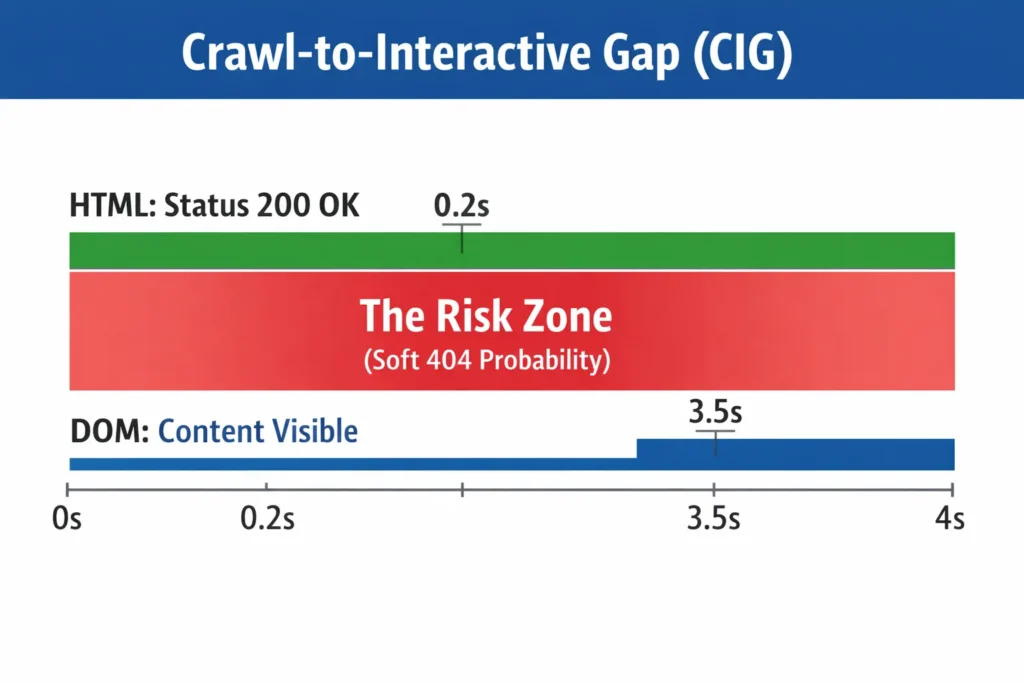
This is a concept I developed to help stakeholders understand the risk of heavy JS frameworks. I call it the Crawl-to-Interactive Gap (CIG).
While I view dynamic rendering as a temporary patch rather than a long-term architecture, it remains a valid stopgap for legacy systems that cannot immediately migrate to Server-Side Rendering (SSR).
However, practitioners must recognize that Google has officially moved away from recommending dynamic rendering as a long-term solution.
The Risk of the ‘Two-Backend’ Problem:
- Maintenance Overhead: Running a separate renderer (like Puppeteer or Rendertron) for crawlers creates a ‘two-backend’ environment where bugs can exist for Googlebot but not for users.
- Crawl Latency: If your dynamic renderer is slow, it contributes to the Crawl-to-Interactive Gap, potentially leading to timeout issues during the JavaScript rendering logic phase.
- Future-Proofing: As Chromium-based crawling becomes more efficient, the need for cloaking-adjacent workarounds like dynamic rendering diminishes, making native SSR or Static Site Generation (SSG) the only sustainable path forward.
“In my testing, I have observed Googlebot abandon the rendering process on resource-heavy pages when the Main Thread is blocked for more than 5 seconds. When JavaScript rendering logic is inefficient, Googlebot defaults to indexing the initial ‘App Shell’—effectively treating your rich client-side content as non-existent and causing a catastrophic loss in topical relevance.”
The CIG represents the time delta and the content delta between the initial HTTP response code (200 OK) and the domContentLoaded An event where the page is actually useful.
- Low CIG (Good): The HTML arrives fully populated (SSR/SSG). JavaScript only adds interactivity (like button clicks). Google sees the content immediately.
- High CIG (Bad): The HTML arrives empty. The browser spins for 3 seconds, fetching JS chunks and API data. The content populates late.
The Risk: Googlebot is patient, but not infinite. A High CIG increases the probability of a “Soft 404” interpretation, where Google sees a 200 OK status but an empty page, deciding it’s devoid of value.
My Strategic Advice: If your CIG is high, you must implement skeleton screens or critical path CSS/HTML to ensure that at least the H1, main navigational elements, and primary text content are present in the initial packet, even if the interactive elements load later.
Critical Rendering Paths & Optimization Techniques
When I work with engineering teams, we focus on optimizing the Critical Rendering Path. This is the sequence of steps the browser takes to convert HTML, CSS, and JS into actual pixels on the screen.
Optimize JavaScript for crawl budget
Through extensive log file analysis and rendering stress tests, I have established the ‘5MB / 5-Second Rule’ as a critical benchmark for JavaScript-heavy sites. Bloated script bundles are a primary cause of ‘Render Timeouts.’
If you are struggling with low indexation rates on a modern framework, focus on optimizing JavaScript for crawl budget to ensure Google’s Web Rendering Service doesn’t abandon your pages mid-execution.
A common misconception is that Googlebot will eventually render every script on every page. In reality, Crawl Budget is elastic—Googlebot is patient, but its resources are not infinite.
Two primary factors determine the depth and frequency of the JavaScript rendering logic phase:
- Domain Authority (Crawl Demand): High-authority domains with frequent content updates receive a larger share of the Render Queue, while smaller or newer sites may see significant delays in ‘Second Wave’ indexing.
- Server Response Times (Crawl Efficiency): If your server is slow to deliver the initial HTML or the subsequent JS bundles, Googlebot will throttle its crawl rate to avoid crashing your infrastructure.
The Strategic Reality: Results will vary based on your specific architecture. On a resource-constrained crawl, Google may decide that the cost of executing your JavaScript outweighs the perceived value of the content, leading to a permanent ‘Crawl-to-Interactive Gap’ where your JS-injected content never reaches the index.
- The 5MB Threshold: If your uncompressed JavaScript bundle exceeds 5MB, the memory consumption required for Googlebot to parse and execute the code often triggers a resource timeout.
- The 5-Second Threshold: If the Main Thread is blocked for more than 5 seconds before reaching a ‘Contentful’ state, the WRS frequently aborts the render.
When this rule is violated, Googlebot defaults to indexing the initial HTML response—which, in most SPAs, is simply an empty ‘App Shell’ devoid of content or links.
You can optimize JavaScript for crawl budget by reducing the amount of script the bot needs to execute to see the primary content, using techniques like code splitting, tree shaking, and dynamic rendering.
1. Code Splitting & Tree Shaking
Don’t send the entire application’s JavaScript to a user visiting the homepage. Use Code Splitting to break the JS into smaller “chunks” that are loaded on demand.
“While Googlebot is headless Chrome, it doesn’t have infinite patience. My testing suggests a ‘5MB / 5-Second Rule’: If your total JS bundle exceeds 5MB or takes longer than 5 seconds to execute the critical render path on a standard mobile profile, Google’s WRS (Web Rendering Service) frequently aborts the process, resulting in a blank index.”
- Tree Shaking: Remove unused code from the bundle. I’ve audited sites loading entire libraries (like heavy charting libraries) on pages that didn’t use them.
2. Dynamic Rendering (The Stop-Gap)
Dynamic rendering involves detecting the user agent. If it’s a human, send the normal Client-Side Rendered page. If it’s a bot (like Googlebot), send a pre-rendered, static HTML version (using a tool like Puppeteer or Rendertron).
- My Take: While Google supports this, I view it as a temporary patch, not a long-term architecture. It adds complexity and maintenance debt. It is better to move toward Server-Side Rendering (SSR) or Static Generation (SSG) via Next.js or Nuxt.
3. Link Structure and the href Attribute
This is a non-negotiable rule I enforce: Links must be <a> tags with href attributes.
- Bad:
<div onclick="window.location='/product'">View Product</div> - Good:
<a href="/product">View Product</a>
Googlebot does not click buttons. It parses HTML. If you rely on onclick events for navigation, your internal link equity flows nowhere.
Common JS SEO Anti-Patterns
In my audits, I see the same mistakes repeated by sophisticated development teams.
1. The Hash-Bang (#!) Fallacy: Using URLs like example.com/#/about this is a relic of the past. Google generally ignores everything after the #. Use the History API (pushState) to create clean, indexable URLs like example.com/about.
2. Lazy Loading Everything. Lazy loading images is great for performance. Lazy loading text is dangerous. I once worked with a client who lazy-loaded their footer links. Googlebot never scrolled down far enough to trigger the load event, so the entire site was effectively orphaned from a linking perspective.
- Fix: Use native lazy loading (
loading="lazy") for images, but keep text content in the DOM on load.
3. Soft 404s on SPAs. In a standard server environment, if a page doesn’t exist, the server sends a 404 HTTP header. In an SPA, the server often sends the index file (200 OK), and then the JavaScript renders a “Page Not Found” message.
- The Issue: Google sees “200 OK” and thinks the “Page Not Found” text is the actual content of the page. It indexes thousands of these error pages.
- The Fix: You must manipulate the HTTP headers or use
noindexmeta tags dynamically injected when the API returns a 404 status.
Tools of the Trade
You cannot optimize what you cannot measure. These are the tools I use daily for JS SEO:
| Tool | Primary Use Case |
|---|---|
| Google Search Console (URL Inspection) | The “Source of Truth.” Use “View Tested Page” to see exactly what Google rendered. |
| Screaming Frog (JS Mode) | Switch from “Text Only” to “JavaScript” rendering in the spider configuration. This allows you to crawl your site as a browser would. |
| Chrome DevTools (Performance Tab) | Visualize the main thread execution. Look for long yellow bars (scripting) that block the browser from rendering. |
| Mobile-Friendly Test | A quick way to check if Google can render a specific page and if resources (CSS/JS) are blocked by robots.txt. |
Future of JS SEO: Interaction to Next Paint (INP)
Core Web Vitals are evolving. As First Input Delay retires, the focus shifts to ensuring that heavy JavaScript execution does not block the main thread, directly impacting user interaction metrics.
INP measures responsiveness. For heavy JavaScript sites, this poses a significant challenge. If your main thread is clogged with hydration logic, and a user clicks a button, the delay before the visual feedback occurs is your INP score.
- SEO Impact: While content remains king, poor page experience (high INP) can act as a tie-breaker. Optimizing your JS execution breakdown is no longer just about UX—it’s also about SEO.
As we look toward the future of JavaScript Rendering Logic, it is vital to keep the impact of performance in perspective.
While Core Web Vitals—specifically the new Interaction to Next Paint (INP) metric—are critical for user retention and technical health, they often act as ‘tie-breakers’ in the SERPs.
The Ranking Hierarchy:
- Content Relevance & Quality: If your rendered DOM doesn’t satisfy the search intent better than your competitors, a perfect 100/100 performance score will not save your rankings.
- Indexability (The CIG Gap): If your JS prevents Googlebot from seeing the content at all, performance metrics are irrelevant.
- Performance (INP & CWV): Once relevance and indexability are equal between two sites, the faster, more responsive site wins the higher position.
Strategist’s Warning: Do not sacrifice content depth for the sake of stripping away JavaScript to pass a Core Web Vitals test. The goal of optimizing your JavaScript Rendering Logic is to ensure that your high-value content is both discoverable by Googlebot and seamless for the user—not just to green-light a lab report.
Conclusion
JavaScript is not the enemy of SEO, but it is a chaotic variable that requires strict control. The days of simply adding meta tags and writing content are over for modern web applications.
To succeed, you must adopt an engineering-first mindset. You need to visualize the DOM, minimize the CIG (Crawl-to-Interactive Gap), and ensure that the critical content is delivered not just to the screen, but to the parser.
Next Step: I recommend you open your top 3 traffic-driving pages in Google Search Console’s URL Inspection Tool today. Click “View Tested Page” and search for your most important keyword in the HTML code.
If you can’t find it in the code snippet, Google can’t find it either—and you have a rendering problem to fix.
Expert Technical Resources
- Google Search Central: JS SEO Basics — The official word on how the Web Rendering Service (WRS) handles the “two-wave” indexing process.
- MDN Web Docs: Understanding the DOM — The industry-standard technical definition of the Document Object Model for developers.
- V8 JavaScript Engine Official Site — Deep-dive documentation for the open-source engine Google uses to execute JavaScript.