

A mobile rendering budget refers to the strict hardware and software resource constraints—specifically CPU processing power, memory allocation, and main-thread blocking time.
Network bandwidth is imposed by mobile devices and search engine crawlers when parsing, compiling, and executing client-side JavaScript.
Unlike robust desktop environments, mobile browsers and mobile user agents (such as Googlebot-Mobile) operate under tight resource limitations.
Exceeding this rendering budget leads to delayed Largest Contentful Paint (LCP), poor Interaction to Next Paint (INP) scores, incomplete rendering states during crawling, and severe algorithmic ranking penalties.
What Is a Mobile Rendering Budget?
The concept of a rendering budget bridges frontend engineering and advanced technical SEO. While traditional crawl budget focuses on how many URLs a crawler requests within a given timeframe, a mobile rendering budget dictates how much computational work Googlebot and mobile users can handle before the browser becomes unresponsive or abandons execution.
Mobile devices vary drastically in hardware capability. While a high-end smartphone handles heavy client-side rendering with ease, a mid-to-low-tier mobile device, which accounts for a massive share of global web traffic and mirrors the hardware profile simulated by standard mobile testing environments, struggles with oversized JavaScript bundles.
When a browser exhausts its main-thread capacity processing JavaScript, rendering is deferred, critical DOM elements fail to materialize, and search engines index an incomplete page state.
For deeper context on related performance metrics, review our comprehensive Core Web Vitals Optimization Guide.
How Googlebot-Mobile Allocates and Enforces Rendering Budgets
Googlebot uses a headless Chromium-based rendering engine to process JavaScript-heavy web pages. However, rendering consumes significantly more server and computational resources than simple HTML retrieval.
To manage infrastructure costs and ensure rapid indexing, Google enforces strict computational caps per rendering queue, as outlined in Google’s guide to Understanding JavaScript SEO Basics.
To manage infrastructure costs and ensure rapid indexing, Google enforces strict computational caps per rendering queue:
- Time-Out Thresholds: Googlebot does not wait indefinitely for slow scripts to execute. If critical content or hydration scripts take too long to resolve on mobile viewports, the crawler times out and captures a partial DOM snapshot.
- Resource Throttling: The mobile rendering pipeline simulates constrained CPU and network conditions to match median mobile user experiences. Heavy DOM manipulation or synchronous layout thrashing instantly triggers execution bottlenecks.
- Queue Prioritization: Sites that consistently exceed mobile rendering thresholds find their rendering requests pushed to lower-priority queues, resulting in delayed indexing of dynamic updates, e-commerce inventory changes, and programmatic content.
To align your site architecture with modern indexing standards, explore our insights on Mobile-First Indexing Strategies.
Key Metrics Defining Your Mobile Rendering Budget
Optimizing your mobile rendering budget requires monitoring three foundational technical pillars that directly dictate browser main-thread capacity.
1. Main-Thread Execution Time and Long Tasks
Any task running on the main thread that exceeds 50 milliseconds is classified as a “Long Task”. On mobile devices with constrained processors, sequences of chained long tasks lock up the UI thread, preventing scroll responsiveness, delaying touch input handling, and stalling visual rendering. For architectural advice on resolving these bottlenecks, consult the web.dev guide on how to Optimize Long Tasks.
2. DOM Node Count and Depth Thresholds
An overly bloated Document Object Model (DOM) directly inflates memory consumption. When mobile browsers parse thousands of nested HTML nodes, memory spikes, and layout calculations become computationally expensive. To understand the direct performance trade-offs, review web.dev’s research on How Large DOM Sizes Affect Interactivity. Keeping total DOM node counts below 800 nodes with a maximum depth of 32 levels preserves the mobile rendering budget.
3. JavaScript Payload and Parse/Compile Costs
The sheer file size of a JavaScript bundle is only part of the equation; the parsing and compilation cost on mobile CPUs is often the primary bottleneck. A 500KB JavaScript bundle requires substantial CPU cycles just to parse before execution can even begin.
For strategies on streamlining scripts and managing crawler efficiency alongside rendering limits, refer to our guide on JavaScript SEO Best Practices and Crawl Budget Management.
Technical Audit Framework: Measuring Mobile Rendering Impact
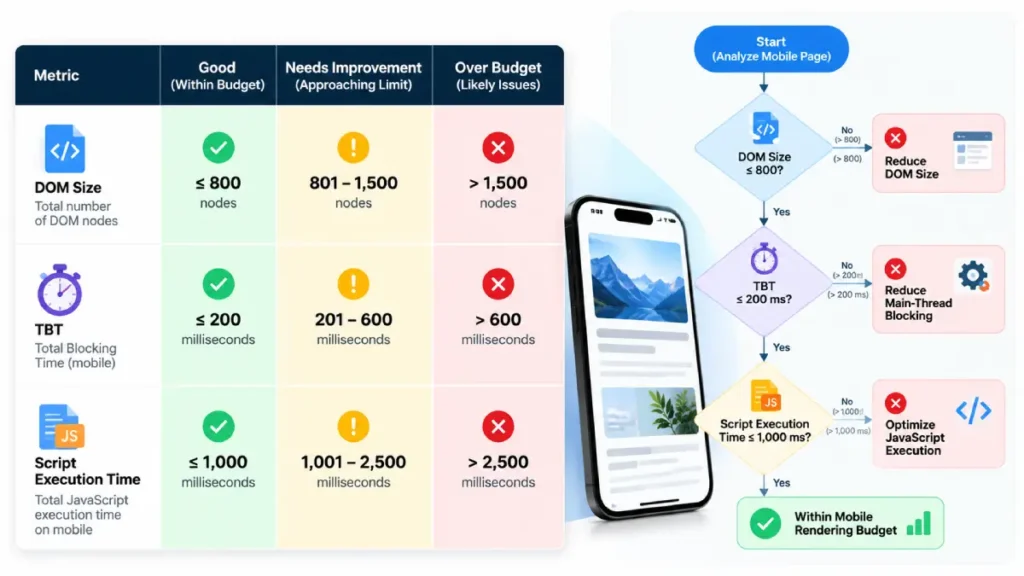
To diagnose and rectify mobile rendering budget overages, technical SEO professionals must evaluate specific performance thresholds across mobile simulation tools.
| Performance Metric | Optimal Threshold | Mobile Rendering Impact |
| Total Blocking Time (TBT) | < 200 ms | Measures main-thread responsiveness during startup, directly indicating script processing load. |
| DOM Size (Nodes) | < 800 nodes | Reduces memory footprint and accelerates layout/style calculation phases on mobile chips. |
| Script Evaluation Time | < 1.5 seconds | Limits CPU burnout during initial parse and compile phases on median mobile hardware. |
| First Contentful Paint (FCP) | < 1.8 seconds | Ensures visual feedback is delivered before mobile users or crawlers abandon the session. |
Advanced Optimization Strategies for High-JS Mobile Environments
Overcoming mobile rendering constraints requires architectural shifts rather than surface-level tweaks. Implement these core engineering patterns to protect your rendering budget:
- Adopt Server-Side Rendering (SSR) or Static Generation (SSG): Deliver fully realized HTML payloads on initial response. This eliminates the dependency on client-side JavaScript execution for core content visibility, satisfying both mobile users and Googlebot instantly.
- Implement Progressive Hydration: Instead of hydrating the entire application tree at once, prioritize hydration for above-the-fold interactive components while deferring off-screen or non-critical widgets.
- Aggressive Code Splitting and Tree Shaking: Audit your module dependencies to strip dead code and bundle only the exact JavaScript modules required for a given route.
- Offload Heavy Computations: Move complex data manipulation, formatting, and analytics processing off the main thread using Web Workers.
Conclusion
Managing your mobile rendering budget is no longer optional for competitive search visibility. As Google’s rendering systems and mobile Core Web Vitals algorithms place heavier emphasis on real-world device performance, bloated JavaScript architectures and oversized DOM trees will directly suppress organic growth.
By treating mobile CPU and memory capacity as finite resources, engineering and SEO teams can ensure rapid rendering, flawless indexing, and superior user engagement across every mobile device.




