
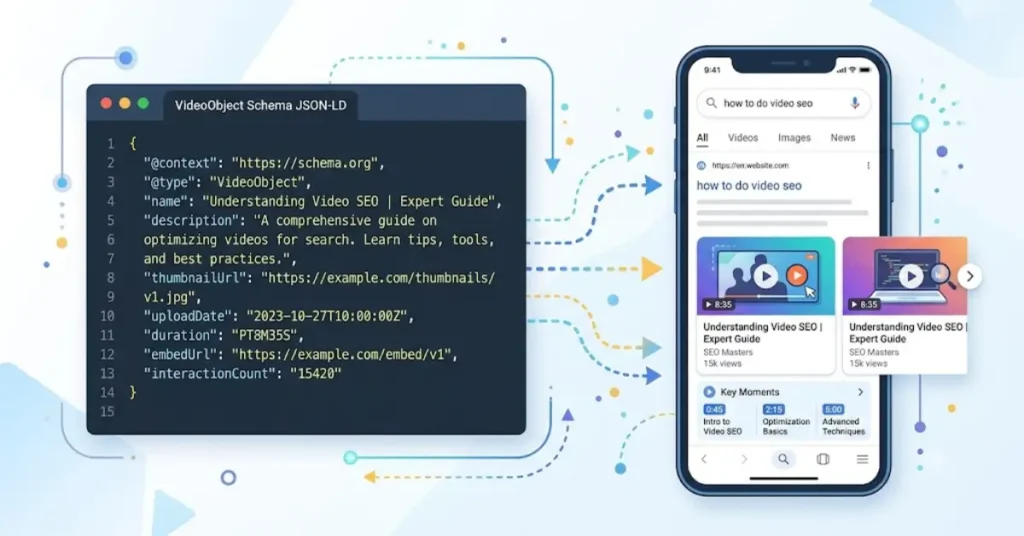
Video Object Schema is a specialized Schema.org structured data format that explicitly communicates video metadata—such as title, description, duration, thumbnail URLs, and playback URLs—to search engines like Google.
For SEO professionals, implementing VideoObject markup is essential for securing rich media snippets, video carousel placements, and automated “Key Moments” timestamps in search engine results pages (SERPs).
By feeding search engine crawlers machine-readable parameters rather than relying entirely on heuristic video detection, sites can significantly improve video indexing speed, enhance click-through rates (CTR), and maximize visibility across both standard web search and dedicated video search tabs.
Anatomy of a Production-Ready Video Object Schema
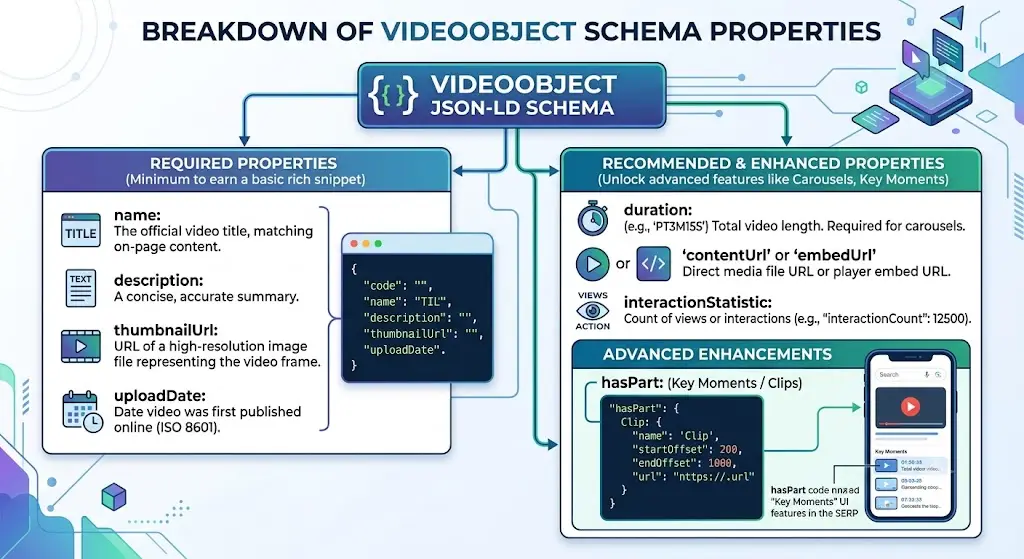
Deploying valid VideoObject JSON-LD requires strict adherence to Google’s structured data guidelines. Missing even a single mandatory property can disqualify a page from earning rich result features.
Required Properties
name: The official title of the video. It must match the on-page title of the video content.description: A concise, accurate summary of the video’s contents (recommended between 50 and 150 characters).thumbnailUrl: At least one URL pointing to a high-resolution image file representing the video frame (minimum width of 120px; 16:9 aspect ratios preferred).uploadDate: The precise date and time the video was first published online, formatted in ISO 8601 standard (YYYY-MM-DDTHH:MM:SS+TZD).
Recommended and Conditional Properties
duration: The exact length of the video formatted in ISO 8601 duration format (e.g.,PT1H30M15Sfor 1 hour, 30 minutes, and 15 seconds). This property is mandatory if the video appears in standard search result carousels.contentUrl: A direct URL to the actual video media file (e.g., an MP4 or WebM file).embedUrl: A URL pointing to a player for the specific video (such as an iframe embed URL from YouTube or Vimeo).
JSON
{
  "@context": "https://schema.org",
  "@type": "VideoObject",
  "name": "Advanced Technical SEO Auditing Masterclass",
  "description": "Learn how to conduct enterprise-level technical SEO audits, diagnose crawl budget waste, and fix JavaScript rendering bottlenecks.",
  "thumbnailUrl": "https://example.com/thumbnails/technical-seo-audit.jpg",
  "uploadDate": "2026-04-12T08:00:00+00:00",
  "duration": "PT45M12S",
  "contentUrl": "https://example.com/videos/technical-seo-audit.mp4",
  "embedUrl": "https://www.youtube.com/embed/example123",
  "interactionStatistic": {
    "@type": "InteractionCounter",
    "interactionType": { "@type": "WatchAction" },
    "userInteractionCount": 14250
  }
}
Advanced Optimization: Unlocking Key Moments with hasPart
Google automatically attempts to identify key segments in long-form videos, but relying entirely on algorithmic extraction leaves control out of the SEO professional’s hands.
By manually specifying timestamps using the hasPart property nested within your VideoObject schema, you can define precise “Clips” or “Key Moments” that surface directly beneath your search listing.
To implement clip markup effectively, structure each timestamp as a Clip type object:
JSON
"hasPart": [
  {
    "@type": "Clip",
    "name": "Introduction to Log File Analysis",
    "startOffset": 0,
    "endOffset": 315,
    "url": "https://example.com/video?t=0"
  },
  {
    "@type": "Clip",
    "name": "Identifying Crawl Budget Bottlenecks",
    "startOffset": 315,
    "endOffset": 940,
    "url": "https://example.com/video?t=315"
  }
]
This level of granularity keeps users engaged longer on the page, increases topical relevance signals, and captures additional vertical SERP real estate.
For deeper architectural strategies regarding structured data deployment, review our comprehensive Structured Data Implementation Guide.
Common Implementation Pitfalls & Validation Workflows
Even experienced developers run into validation errors when scaling video schema across large digital publishing platforms. Avoiding these common traps ensures consistent rich result eligibility.
| Pitfall | Impact | Resolution Strategy |
| Mismatched Durations | Schema validation failure; loss of rich snippet eligibility. | Programmatically sync your database video duration metadata with the ISO 8601 string generator. |
| Low-Resolution Thumbnails | Manual penalty risk or failure to render in mobile video carousels. | Enforce a strict minimum resolution floor of 1280×720 pixels for all source thumbnail uploads. |
| Orphaned Embed URLs | Googlebot fails to verify video accessibility behind authentication gates. | Ensure host pages and embedded video players are publicly indexable without required user logins. |
| Incorrect ISO 8601 Formatting | Schema parser ignores duration or timestamp parameters entirely. | Utilize automated unit tests to validate duration strings against strict regex patterns before deployment. |
Before pushing schema templates to production environments, always test your code using the Google Rich Results Test and validate semantic accuracy against the official Schema.org VideoObject Documentation.
For broader technical audits on related site elements, consult our Technical SEO Optimization Handbook.
Measuring Video SEO Impact in Google Search Console
Deploying markup is only half the battle; measuring return on investment requires analyzing performance data inside Google Search Console (GSC).
To isolate and track video performance:
- Navigate to the Performance report in GSC.
- Filter the search type from Web to Video.
- Evaluate metrics including total video impressions, clicks, average click-through rate (CTR), and average search ranking position.
- Cross-reference pages with newly added
VideoObjectschema against the Video Indexing Report to verify that Googlebot successfully discovered, processed, and indexed the embedded video assets without throwing critical warnings.
By combining flawless JSON-LD execution with rigorous GSC monitoring, SEO professionals can turn video assets into high-converting organic traffic drivers.




