

Crawl budget SEO is the amount of crawling Google can and wants to perform for a website. Google describes it through two components: crawl capacity limit how much crawling your server can handle, and crawl demand how much Google wants to crawl based on factors such as site size, update frequency, quality, relevance, popularity, and the URLs Google knows about.
For most small websites, crawl budget is not a problem to solve. Google explicitly positions crawl-budget optimization as an advanced concern, primarily for very large sites, rapidly changing sites, and sites with substantial numbers of URLs classified as “Discovered – currently not indexed.”
The practical goal is therefore not to “get more Googlebot.” It is to make the site’s crawlable URL inventory cleaner, the server healthier, and important content easier to discover.
What Is Crawl Budget SEO?
A useful model is:
Crawl budget = what Google can crawl + what Google wants to crawl.
Google defines a site’s crawl budget as the set of URLs Google can and wants to crawl. Crawl capacity protects the server from excessive crawler load, while crawl demand determines which URLs deserve crawling attention.
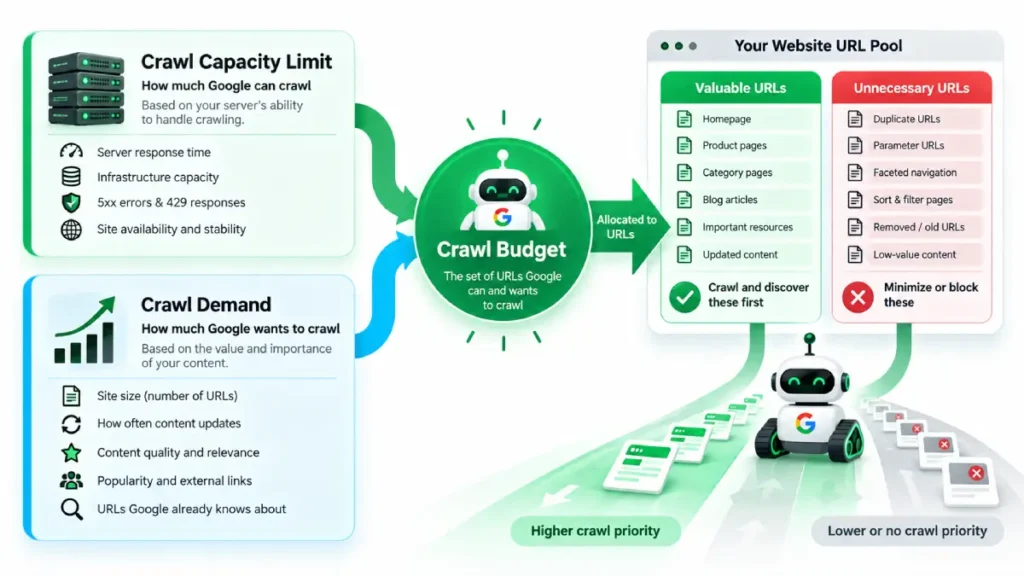
These two components behave differently:
| Component | What it means | What can affect it |
|---|---|---|
| Crawl capacity limit | How much crawling your infrastructure can support | Server response time, latency, 5xx errors, 429 responses |
| Crawl demand | How much Google wants to crawl | Site size, updates, popularity, quality, relevance, known URL inventory |
| Crawl budget | The resulting set of URLs Google can and wants to crawl | The interaction between capacity and demand |
Importantly, crawling and indexing are not the same thing. Google can crawl a URL without indexing it. After crawling, Google evaluates the page and determines whether it should be included in the index.
Does Your Website Actually Have a Crawl-Budget Problem?
This is the question to answer before changing robots.txt, deleting pages, or restructuring a site.
Google says its crawl-budget documentation is primarily intended for:
- Sites with 1 million+ unique pages that change moderately often.
- Sites with 10,000+ unique pages that change very rapidly.
- Sites with a substantial portion of URLs classified as Discovered – currently not indexed.
Google also states that these are rough guidelines rather than rigid thresholds.
For smaller websites, Google says that if pages are generally crawled around the time they are published, there is usually no need to perform dedicated crawl-budget optimization. Keeping the sitemap current and monitoring Page Indexing is generally sufficient.
Diagnostic rule: don’t optimize crawl budget because the concept sounds important. Optimize it when your crawl data shows that Google is spending crawling resources inefficiently or important URLs are not being discovered efficiently.
The Two Biggest Crawl-Budget Levers
1. Clean the URL Inventory
Google identifies unnecessary URL inventory as one of the most controllable sources of crawl inefficiency. If Google knows about large numbers of duplicate, removed, or otherwise unnecessary URLs, crawling can be spent on URLs that provide little value.
Common examples include:
- Duplicate URL variants
- Unnecessary parameter combinations
- Infinite or faceted URL spaces
- Removed URLs
- Long redirect chains
- URLs returning errors
- Unimportant sortable or filtered versions
- Large numbers of URLs that should never have been crawl targets
The objective is not to make the site contain fewer URLs simply for the sake of having fewer URLs.
The objective is to make the crawlable URL inventory correspond more closely to the URLs that deserve crawler attention.
2. Keep the Server Healthy
Google’s crawl capacity limit responds to the health of the site. Stable response times can allow the limit to increase, while increasing latency, 5xx errors, and rate limiting such as HTTP 429 can cause it to decrease.
This makes server performance part of crawl efficiency—not because “page speed is a ranking factor for crawl budget,” but because crawler-server interaction determines how efficiently Google can fetch your URLs.
Monitor:
- Server response time
- TTFB
- 5xx errors
- 429 responses
- Availability problems
- Timeout patterns
- Infrastructure capacity during crawler activity
How to Optimize Crawl Budget
1. Consolidate Duplicate URLs
Where multiple URLs represent substantially the same content, consolidate them where appropriate rather than allowing search engines to repeatedly encounter unnecessary URL variants.
Google specifically recommends consolidating duplicate content as part of URL-inventory management.
For canonicalization implementation, see SearchEngineZine’s Canonical Tags Explanation.
2. Use Robots.txt for URLs You Do Not Want Crawled
Google recommends using robots.txt when you genuinely want to prevent crawling of particular URLs or resources.
A critical distinction matters here:
robots.txt controls crawling; noindex controls indexing after Google has accessed the URL.
Google specifically warns that using noindex does not save crawl resources because Google must request the URL to see the directive.
Therefore, do not use robots.txt as a blanket mechanism for “temporarily moving” crawl budget from one group of URLs to another. Google says it will not necessarily redirect the freed capacity to other URLs unless the site was already hitting its crawl-capacity limit.
For implementation details, see Robots.txt explained briefly.
3. Return 404 or 410 for Permanently Removed Pages
When a URL has been permanently removed, returning the appropriate 404 or 410 status is preferable to leaving unnecessary crawlable destinations in the site’s URL ecosystem.
Google notes that a 404 is a strong signal not to crawl that URL again, whereas blocked URLs can remain in Google’s crawl queue for longer and may be revisited if the block is removed.
4. Keep XML Sitemaps Clean
Your XML sitemap should represent the URLs you actually want Google to discover and crawl.
Google recommends keeping sitemaps up to date and including content that you want crawled. For updated content, Google recommends using the lastmod value where appropriate.
A useful operational principle is:
Sitemap inventory should reinforce your canonical URL strategy—not contradict it.
SearchEngineZine’s broader sitemap architecture can be explored through its XML vs. HTML Sitemaps guide.
5. Eliminate Long Redirect Chains
Redirect chains create additional requests between the crawler and the final destination.
Google explicitly recommends avoiding long redirect chains as part of crawl-budget optimization.
Whenever possible:
old URL → final URL
is preferable to:
old URL → redirect 1 → redirect 2 → redirect 3 → final URL
6. Improve Server Response Efficiency
Google recommends making pages efficient to load and specifically highlights server response times and resource efficiency. It also recommends supporting HTTP caching and 304 Not Modified responses where appropriate.
A 304 response tells Google that a resource has not changed since the previous retrieval, allowing the cached version to be reused and reducing unnecessary transfer and server resource consumption.
7. Strengthen Internal Discovery
Important pages should not depend exclusively on XML sitemaps for discovery.
Internal links create actual crawl paths between documents. SearchEngineZine’s technical architecture already emphasizes crawl/index relationships and structured content discovery through its Technical SEO Hub.
Think of the system this way:
XML sitemap → tells Google what exists
Internal links → provide navigational pathways and contextual relationships
Both can contribute to a cleaner discovery system, but neither guarantees indexing.
A Practical Crawl-Budget Diagnostic Framework
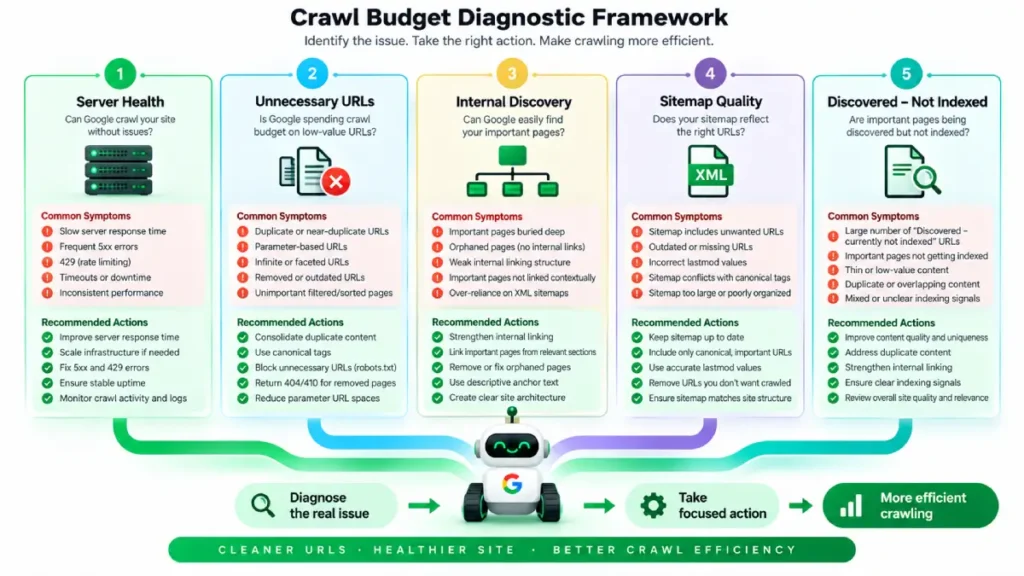
Instead of asking “How do I increase crawl budget?”, ask these five questions:
| Diagnostic question | If the answer is “yes” |
|---|---|
| Are important pages slow or frequently unavailable? | Investigate infrastructure and response performance |
| Does Google know about large numbers of unnecessary URLs? | Clean the URL inventory |
| Are important URLs difficult to discover internally? | Improve internal linking and architecture |
| Does the sitemap contain URLs you don’t actually want indexed? | Clean and reconcile sitemap inventory |
| Are important pages repeatedly classified as discovered but not indexed? | Investigate the broader discovery, quality, and indexing situation |
This prevents a common SEO mistake: treating crawl budget as an isolated ranking lever instead of a systems problem involving infrastructure, URL architecture, discovery, and content quality.
[IMAGE-02: Crawl-budget diagnostic matrix mapping symptoms to technical actions]
How Do You Increase Crawl Budget?
There is no reliable “increase crawl budget” button.
Google identifies two broad ways crawl resources can increase:
- Increase server capacity when infrastructure is limiting crawling.
- Improve content quality and value for the relevant Google product, because crawl demand considers factors such as popularity, user value, content uniqueness, and serving capacity.
That means the better objective is not:
“How can I make Google crawl more URLs?”
It is:
“How can I make Google able and willing to spend its available crawling resources on the URLs that matter?”
That distinction changes the entire optimization strategy.
Crawl Budget vs. Indexing: Don’t Confuse the Two
A page can be:
Discovered → Crawled → Evaluated → Indexed
Crawl budget primarily concerns the crawling stage.
If Google crawls a page but does not index it, repeatedly increasing crawl activity may not solve the underlying problem.
This is why crawl-budget work should not become a substitute for investigating:
- Content quality
- Duplicate content
- Canonicalization
- Search intent
- Internal linking
- Technical accessibility
- Indexing signals
Google explicitly states that crawling a page does not guarantee that the page will be indexed.
The Bottom Line
Crawl budget matters most when a website is large, changes rapidly, generates substantial URL inventory, or shows evidence that important URLs are not being crawled efficiently.
For most smaller sites, the priority is simpler:
- Keep the server healthy.
- Keep the URL inventory clean.
- Maintain accurate XML sitemaps.
- Avoid unnecessary redirects and duplicate URLs.
- Build strong internal discovery paths.
- Investigate indexing separately from crawling.
Google’s current guidance is particularly clear: if your site is not large or rapidly changing and its pages are being crawled around publication time, dedicated crawl-budget optimization is usually unnecessary.
The real technical SEO skill, therefore not maximizing crawling. It is making crawling efficient.




