
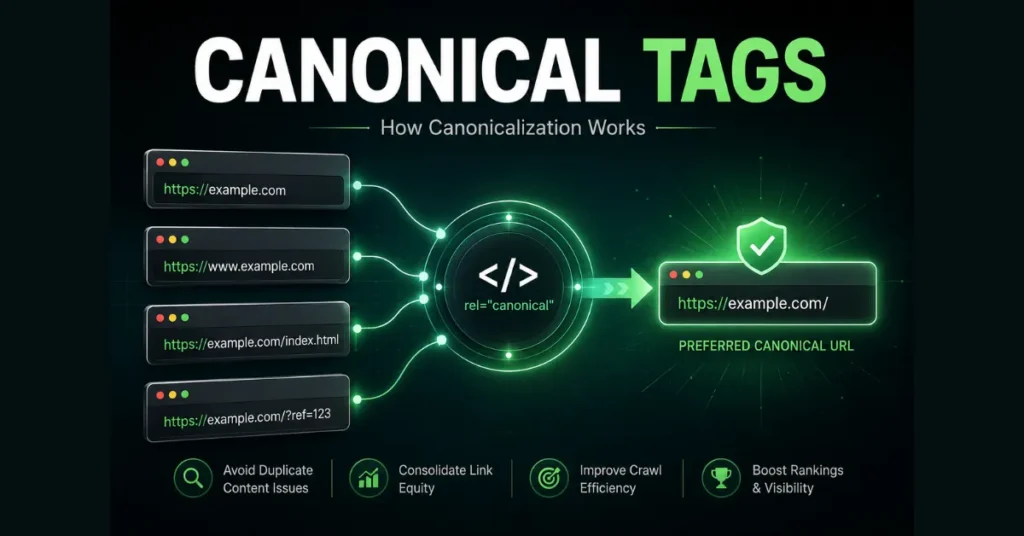
Canonical Tags Explained in a Simple Manner: A canonical tag tells Google which URL you prefer to represent a page when multiple URLs contain duplicate or very similar content. It is usually added to the HTML <head> with rel="canonical":
<link rel="canonical" href="https://example.com/preferred-page/" />For example, these URLs might display the same content:
https://example.com/seo-guide/
https://example.com/seo-guide/?utm_source=email
https://example.com/seo-guide/?ref=homepage
You can declare the clean URL as the preferred version:
<link rel="canonical" href="https://example.com/seo-guide/" />The critical point is that a canonical is a signal, not a rule. Google evaluates your preference alongside other signals and can select a different URL as canonical. Source: Google for Developers
When Should You Use a Canonical Tag?
Use a canonical when multiple URLs represent the same or very similar content, the URLs need to remain accessible, and one URL should represent that content in Google Search.
Common examples include:
- tracking parameters that do not change the main content;
- duplicate URLs created by a CMS;
- certain sorting or filtering variations;
- alternate URL paths serving substantially the same content;
- duplicate versions created by site architecture.
The practical question is:
Do these URLs need to remain accessible while one URL should represent the content?
If yes, canonicalization may be appropriate.
If the old URL has been permanently replaced, a permanent redirect is generally the better mechanism. Source: Google for Developers
Canonical vs 301 vs Noindex vs Robots.txt
These mechanisms are often confused because they can all affect how URLs are handled by search engines. They do different jobs.
| Situation | Appropriate mechanism | Main purpose |
|---|---|---|
| Duplicate or very similar URLs should remain accessible, but one should represent the content | Canonical | Declare a preferred representative URL |
| An old URL has permanently moved to a replacement | 301/308 redirect | Send users and crawlers to the new location |
| A page should not appear in Google Search | noindex | Prevent the page from appearing in Search |
| You need to control whether crawlers can request particular URLs or paths | robots.txt | Control crawling access |
Google currently describes permanent redirects and rel="canonical" as strong canonicalization signals, while sitemap inclusion is a weaker signal.
Canonical vs 301 Redirect
Use a canonical when the alternate URL still needs to exist.
Use a permanent redirect when the old URL has been replaced.
https://example.com/old-guide/
              │
              │ 301
              ▼
https://example.com/seo-guide/
A permanent redirect tells users and Google that the resource has moved. Google uses permanent redirects as a signal that the destination should become canonical.
A canonical does not perform that move. The alternate URL can remain accessible.
Canonical vs noindex
Use a canonical when you want another URL to represent substantially similar content.
Use noindex when the page itself should not appear in Google Search.
Google specifically recommends rel="canonical" rather than noindex when the objective is selecting a canonical within a duplicate group. Source: Google for Developers.
Canonical vs robots.txt
Robots.txt is not a canonicalization mechanism.
A robots.txt rule controls whether crawlers can request a URL. It does not tell Google which URL should be canonical. Google warns against using robots.txt for canonicalization because a blocked URL can still be indexed without Google seeing its content.
Likewise, blocking a page can prevent Google from seeing a noindex directive placed on that page.
Canonical Tag Examples: Common URL Scenarios
Think about the role of each URL, rather than applying a canonical automatically.
| URL situation | Likely approach | Reason |
|---|---|---|
/guide/ and /guide/?utm_source=email contain the same content | Canonical | Both URLs can remain accessible while one represents the content |
/old-guide/ has permanently moved to /new-guide/ | Permanent redirect | The old location has been replaced |
| Two URLs serve substantially the same page and both need to remain accessible | Canonical | One URL can represent the group |
| A page should not appear in Google Search | noindex | The objective is search exclusion |
| Faceted URLs create duplicate or near-duplicate versions | Depends on the site | Canonicalization and crawling controls may have different roles |
| A URL structure has been permanently replaced during a migration | Permanent redirects | Users and crawlers should be sent to the replacement |
Google’s documentation recognizes sorting and filtering as possible sources of duplicate URLs, but the appropriate solution depends on how those URL variants are intended to function. Source: Google for Developers
What About a Site Migration?
Suppose:
https://example.com/old-page/has been permanently replaced by:
https://example.com/new-page/The normal architecture is:
old-page → permanent redirect → new-pageA canonical tag alone does not provide the same user-facing “this page has moved” behavior.
Google recommends redirects for situations such as moving pages, changing domains, merging sites, or replacing old URLs.
Why Google May Ignore Your Canonical
This is one of the most important canonical concepts.
Your declared canonical and Google’s selected canonical are not necessarily the same URL.
Google evaluates signals including redirects, sitemap inclusion, rel="canonical" annotations, HTTPS and other site signals. It can select a different URL when its systems determine that another version is a better representative.
If Search Console reports a different Google-selected canonical, check:
- Are the pages actually similar enough to belong together?
- Does your canonical point to the URL you genuinely want represented?
- Do redirects point somewhere else?
- Do internal links consistently use the preferred URL?
- Does your sitemap contain the preferred URL?
- Is your CMS or SEO plugin generating a different canonical?
- Are different canonical signals pointing to different URLs?
Google recommends the URL Inspection tool for checking which URL Google considers canonical. If you correct a canonicalization problem, Google says re-evaluation can take up to two weeks. Source: Google for Developers
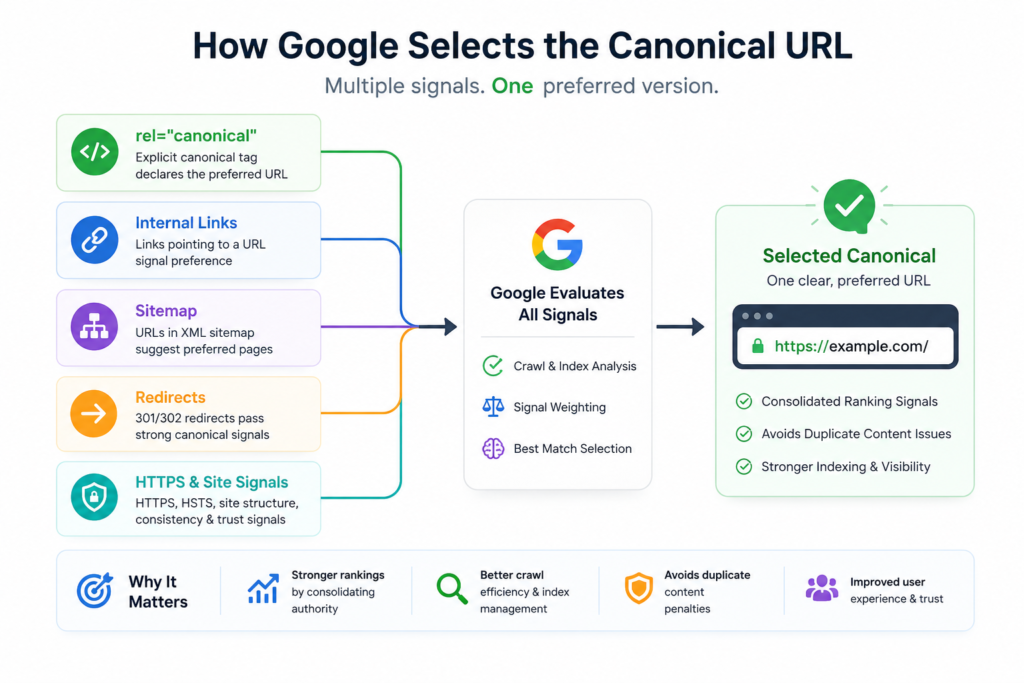
Caption: Google evaluates multiple canonicalization signals rather than treating rel="canonical" as an absolute command.
Common Canonical Mistakes
1. Canonicalizing genuinely different pages
A canonical is not a general-purpose way to tell Google which page you prefer.
If two pages have substantially different primary content or search purposes, first determine whether they actually belong in the same canonical group.
2. Pointing the canonical to the wrong URL
The canonical target should be the URL you genuinely want representing the content.
3. Creating conflicting signals
For example:
canonical → URL A
sitemap → URL B
redirect → URL C
This creates an inconsistent architecture.
Google recommends keeping canonicalization methods consistent.
4. Assuming Google must obey the tag
A canonical is a preference, not a guarantee.
5. Using noindex to solve a canonical-selection problem
If your objective is to consolidate duplicate URLs rather than remove a page from Search, noindex addresses a different problem.
6. Letting your CMS generate an unexpected canonical
CMS or plugin configuration can create incorrect canonical elements. Google recommends inspecting the HTML when an unexpected canonical preference appears.
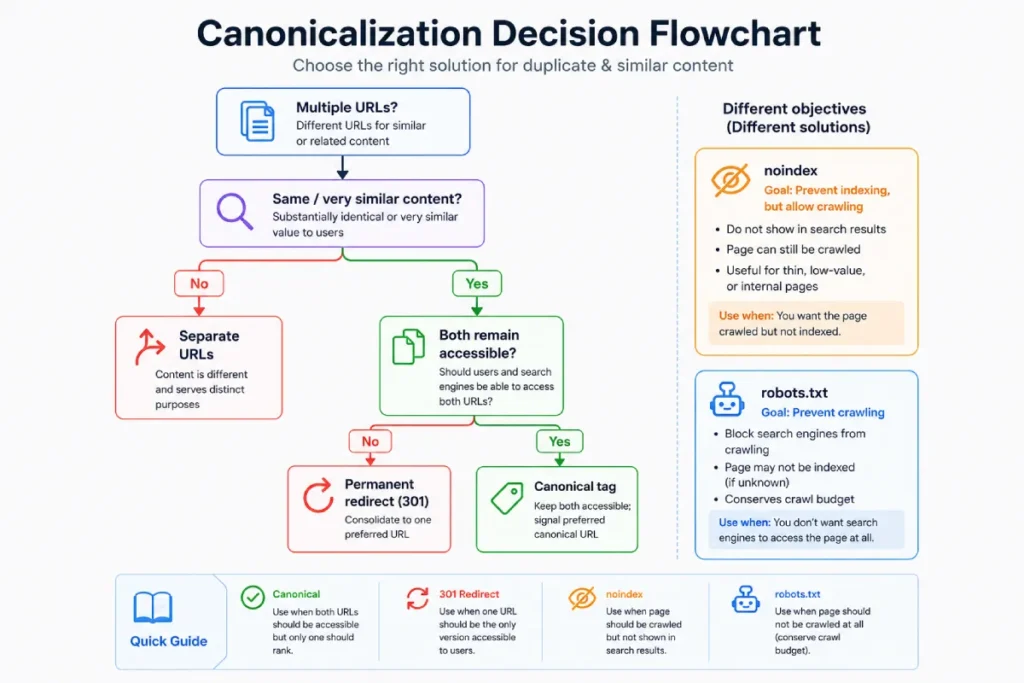
A Simple Canonical Decision Framework
Instead of memorizing isolated SEO rules, start with the desired outcome.
                 Multiple URLs?
                       │
             ┌─────────┴─────────┐
             │                   │
            NO                  YES
             │                   │
             ▼                   ▼
      No canonical issue    Same or very
                            similar content?
                              │       │
                             NO      YES
                              │       │
                              ▼       ▼
                       Treat URLs   Should both
                       separately   remain accessible?
                                      │       │
                                     NO      YES
                                      │       │
                                      ▼       ▼
                              Was the content   Use a
                              permanently       canonical
                              replaced?
                                │
                               YES
                                │
                                ▼
                       Permanent redirect
Then ask:
What are you actually trying to accomplish?
- Represent duplicate or similar URLs with one preferred URL → canonical
- Replace an old URL with a new one → permanent redirect
- Keep a page out of Google Search →
noindex - Control crawler access to URLs or paths → robots.txt
This is the simplest way to choose the mechanism based on the URL’s intended role rather than the SEO terminology.
How to Implement Canonical Tags Correctly
For a standard HTML page, place the canonical in the <head>:
<link rel="canonical" href="https://example.com/preferred-page/" />Google recommends:
- using an absolute URL;
- placing the canonical in the HTML
<head>; - adding a self-referencing canonical to the preferred page;
- linking internally to the canonical URL;
- keeping sitemap and canonical signals consistent.
For non-HTML resources such as PDFs, Google also supports the rel="canonical" HTTP response header.
Canonical Tags Explained Checklist
Before considering a canonical setup complete:
Check each item as you verify your canonical setup.
Google identifies redirects, rel="canonical", and sitemap inclusion as canonicalization signals and recommends using them consistently.
For a related SearchEngineZine resource, see XML vs HTML Sitemaps.
The simplest mental model is:
A canonical tag says, “These URLs represent the same or very similar content; this is the URL I prefer to represent them.”
Google then evaluates that preference against the other signals it sees.
Canonicalization is therefore not simply an HTML tag to add and forget. It is a URL architecture decision: identify which URLs represent the same content, decide which URL should represent that group, and then choose the mechanism that matches the intended outcome.




