
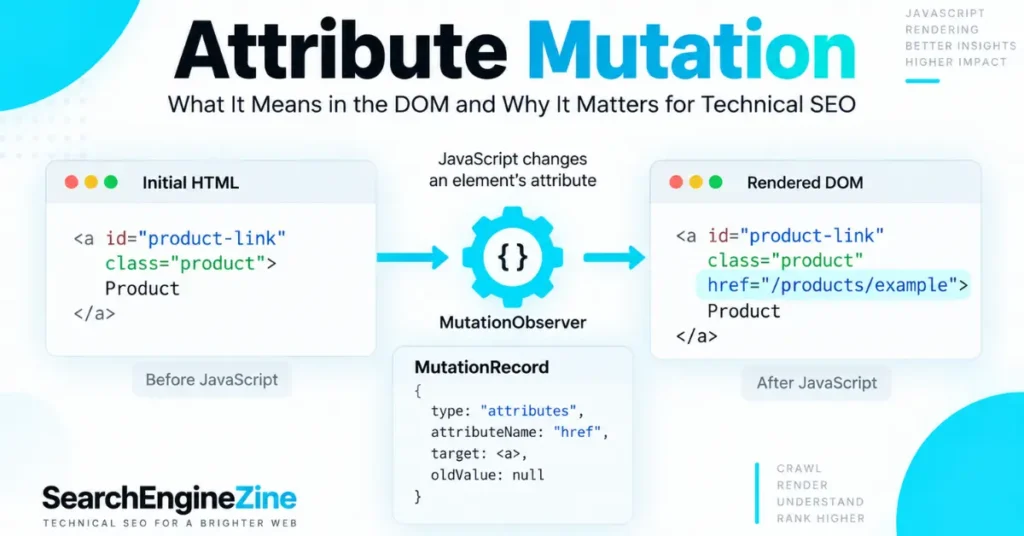
An attribute mutation is a change to an HTML element’s attribute that is detected by a MutationObserver. In a MutationRecord, the mutation is identified with type === "attributes", while attributeName tells you which attribute changed—for example, class, style, aria-expanded, or data-state. MDN Web Docs
For technical SEOs, the important distinction is this: attribute mutation itself is not an SEO ranking factor. Its significance is diagnostic. JavaScript can mutate attributes after the initial HTML response, and those changes can affect the rendered DOM that search engines process.
Google states that its systems crawl, render JavaScript, and use the rendered HTML for indexing. Google for Developers
That makes attribute mutations useful when auditing raw HTML versus rendered DOM, especially on JavaScript-heavy sites.
What Is an Attribute Mutation?
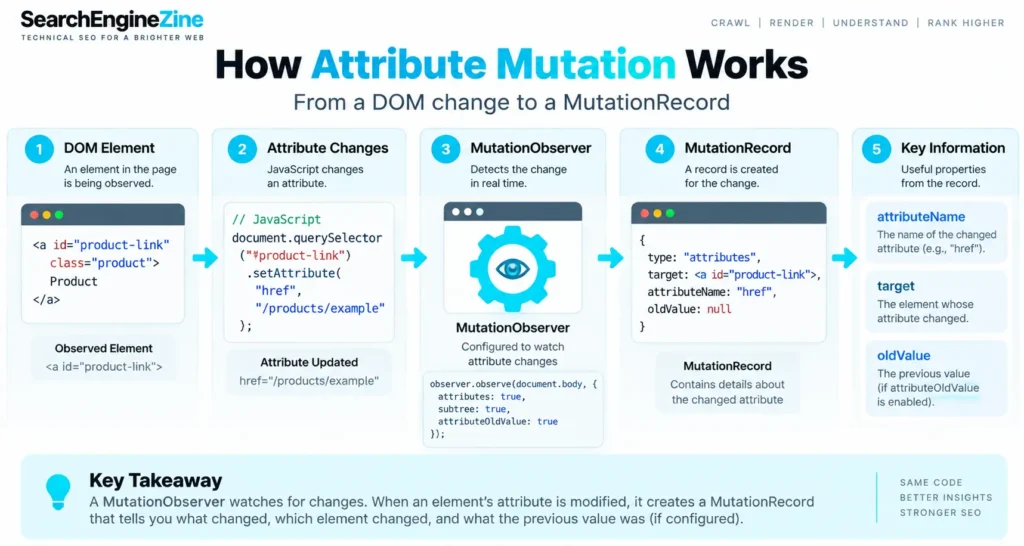
An attribute mutation occurs when JavaScript changes an attribute belonging to an observed DOM element.
For example:
<a id="product-link" class="product">Product</a>JavaScript can later change the element:
document.querySelector("#product-link")
  .setAttribute("href", "/products/example");
The href attribute has been mutated.
A MutationObserver configured to watch attributes can receive a MutationRecord describing that change. For attribute mutations, the record exposes the changed element through target, identifies the mutation with type: "attributes", and exposes the changed attribute through attributeName. MDN Web Docs
The DOM Standard defines the same model: an attributes mutation represents a change to an element’s attributes, and attributeName returns the local name of the changed attribute. DOM Standard
The Core MutationRecord Fields
| Property | What it tells you |
|---|---|
type | The mutation category; "attributes" identifies an attribute mutation |
target | The element whose attribute changed |
attributeName | The name of the changed attribute |
oldValue | The previous attribute value, when configured |
attributeNamespace | The attribute’s namespace, when applicable |
oldValue is only populated for attribute mutations when attributeOldValue is enabled in the observer configuration. MDN Web Docs
How MutationObserver Detects Attribute Changes
The observer must explicitly be configured to monitor attributes.
const observer = new MutationObserver((mutations) => {
  for (const mutation of mutations) {
    if (mutation.type === "attributes") {
      console.log("Changed:", mutation.attributeName);
      console.log("Element:", mutation.target);
    }
  }
});

observer.observe(document.body, {
  attributes: true,
  subtree: true
});
attributes: true tells the observer to watch attribute changes. subtree: true extends observation to descendants of the target node. You can also restrict monitoring to particular attributes with attributeFilter. MDN Web Docs
For example:
observer.observe(document.body, {
  attributes: true,
  subtree: true,
  attributeFilter: ["class", "href", "aria-expanded"]
});
This is often a better diagnostic configuration than observing every attribute on a large DOM.
Why Attribute Mutation Matters to Technical SEO
The SEO connection is not that Google sees an attribute mutation and assigns a ranking boost or penalty.
The useful connection is the relationship between:
Initial HTML → JavaScript execution → DOM mutation → rendered HTML → indexing
Google documents crawling, rendering, and indexing as separate stages. Googlebot first processes the HTTP response, then renders JavaScript when appropriate, and uses the rendered HTML for indexing.
That means a technical SEO audit should ask:
Does JavaScript mutate an SEO-critical attribute between the initial HTML response and the rendered DOM?
Consider a canonical:
<link rel="canonical" href="https://example.com/page-a">A script could later change it:
canonical.href = "https://example.com/page-b";The mutation itself is not the SEO problem. The resulting discrepancy is.
Google specifically recommends keeping a JavaScript-generated canonical consistent with the canonical specified in the original HTML.
The same diagnostic principle applies to attributes involved in:
- internal links
- canonical URLs
robotsdirectives- structured-data elements
- accessibility states
- lazy-loaded content
- dynamically generated navigation
- application state that controls whether content is exposed
Attribute Mutation vs. Content Mutation
These are related but different DOM events.
| Mutation type | Example | SEO relevance |
|---|---|---|
| Attribute mutation | class, href, src, aria-* changes | Can alter how an element behaves or is interpreted |
childList mutation | Element added or removed | Can change visible content or links |
characterData mutation | Text node changes | Can change rendered text |
The DOM Standard explicitly distinguishes these three MutationRecord.type values.
This distinction matters during debugging. If an SEO audit reports “DOM changed,” that is not enough information. You need to identify what changed and whether the change affects an important search-facing element.
A Practical Attribute-Mutation Audit for SEO
For senior SEOs, the most useful workflow is not to monitor every DOM mutation indefinitely. Instead, isolate mutations affecting critical elements.
1. Capture the initial HTML
Record the server-delivered HTML before JavaScript execution.
Check:
<title>- canonical
- robots directives
- primary content
- internal
<a href>links - structured data
- important image attributes
2. Capture the rendered DOM
Use browser developer tools or Google’s URL Inspection tools to examine the rendered state.
Google’s JavaScript troubleshooting documentation specifically recommends tools such as the URL Inspection Tool and Rich Results Test for examining rendered DOM, loaded resources, and JavaScript problems. Google for Developers
3. Identify attribute mutations
Monitor only the attributes that matter.
For example:
const observer = new MutationObserver((records) => {
  records.forEach(record => {
    console.log({
      type: record.type,
      attribute: record.attributeName,
      oldValue: record.oldValue,
      element: record.target
    });
  });
});

observer.observe(document.documentElement, {
  attributes: true,
  attributeOldValue: true,
  subtree: true,
  attributeFilter: [
    "href",
    "src",
    "rel",
    "content",
    "class",
    "aria-expanded"
  ]
});
4. Classify the mutation
A useful diagnostic classification is:
Benign
A visual class changes without affecting search-critical content.
Potentially relevant
An attribute controls whether important content or links become available.
SEO-critical
The mutation changes a canonical, robots directive, crawlable URL, or other important search-facing implementation.
The classification should be based on the resulting behavior—not simply on the fact that a mutation occurred.
The Important SEO Qualification
Do not make the common mistake of treating DOM mutation = SEO problem.
Google explicitly supports JavaScript-generated content and links when implemented correctly. Google says JavaScript can inject links into the DOM as long as those links follow crawlable-link best practices. Google also renders JavaScript using an evergreen version of Chromium.
Therefore:
An attribute mutation is a technical event, not inherently an SEO defect.
The real question is whether the mutation produces a rendered state that is incomplete, contradictory, inaccessible, or materially different from the intended search-facing implementation.
For a broader understanding of how JavaScript changes the DOM during search processing, see SearchEngineZine’s JavaScript Rendering SEO and JavaScript Rendering Logic.
A Senior SEO’s Diagnostic Model
When you discover an attribute mutation, trace it through five questions:
- What attribute changed?
- Which element changed?
- What caused the mutation?
- What is different between raw and rendered HTML?
- Does that difference affect crawling, rendering, indexing, or user experience?
This prevents a common auditing error: reporting thousands of harmless DOM mutations while missing one dynamically changed canonical or important internal link.
Example
Suppose an application initially returns:
<a href="/category/seo">SEO</a>JavaScript later changes it to:
<a href="/category/seo?session=123">SEO</a>The attribute mutation is technically valid. But if the resulting URL creates unwanted URL variants, the SEO issue is the URL architecture, not MutationObserver itself.
Conversely, a class mutation such as:
element.classList.add("active");may have no meaningful SEO consequence whatsoever.
The mutation must therefore be evaluated in context.
Attribute Mutation and Google Search
Google’s current documentation makes an important point for JavaScript SEO: Google processes JavaScript through crawling, rendering, and indexing, and the rendered HTML can be used for indexing.
That creates a practical audit principle:
Do not ask only whether an attribute exists in the source. Ask whether the final rendered state contains the correct value and produces the intended search-facing behavior.
For critical SEO directives, however, server-delivered HTML remains preferable where practical. Google recommends using HTML for canonicalization and notes that server-side or pre-rendering can make sites faster for users and crawlers.
Conclusion
Attribute mutation is a DOM-level change to an element’s attribute, detected through MutationObserver as a MutationRecord with type: "attributes". The attributeName property identifies the changed attribute, while target identifies the affected element.
For technical SEO, the value of understanding attribute mutation is diagnostic rather than algorithmic. It helps you identify how JavaScript transforms the page between the initial HTML response and the rendered DOM.
The correct audit question is therefore not:
“Does this page have attribute mutations?”
It is:
“Do any JavaScript-driven attribute mutations change an SEO-critical element or create a meaningful difference between the intended HTML and rendered state?”
That distinction turns DOM mutation monitoring from a noisy developer metric into a useful technical SEO debugging method.




