
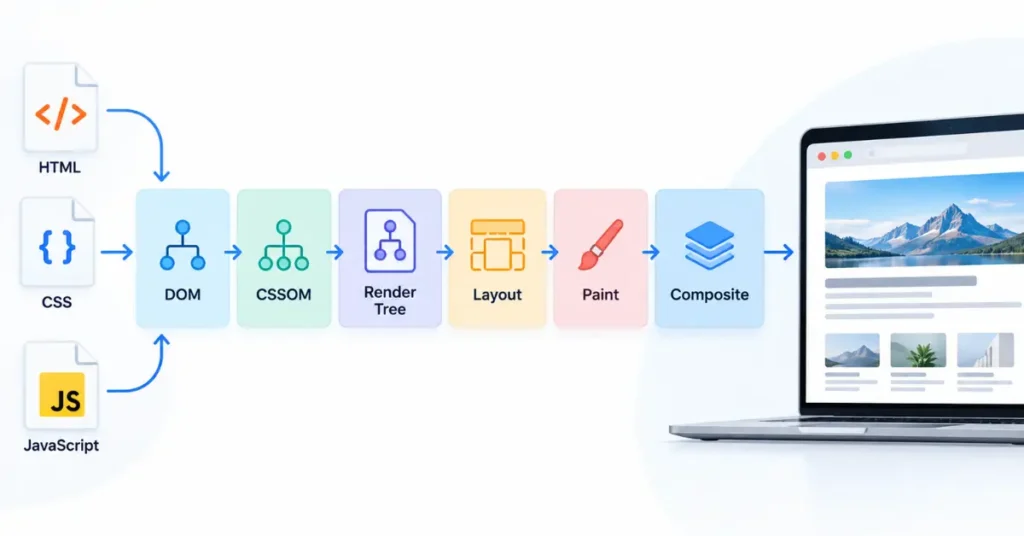
The critical rendering path (CRP) is the sequence of browser operations required to produce the page’s initial visible rendering.
In simplified terms, the browser receives HTML, constructs the DOM, processes CSS into the CSSOM, combines them into a render tree, calculates layout, and paints pixels to the screen.
JavaScript can modify the DOM or CSSOM during this process and can therefore affect when rendering can proceed.
For SEO professionals, the important point is not simply knowing this sequence. It is identifying which resources actually delay the first useful rendering.
Render-blocking CSS, parser-blocking JavaScript, slow HTML delivery, and resources required for meaningful content can all extend the path. Optimizing CRP therefore means reducing unnecessary blocking work and prioritizing the resources needed for the initial view.
What Is the Critical Rendering Path?
A browser does not receive a finished visual webpage from a server. It receives resources and progressively processes them.
A simplified rendering sequence is:
HTML → DOM + CSS → CSSOM → Render Tree → Layout → Paint → Composite → Screen
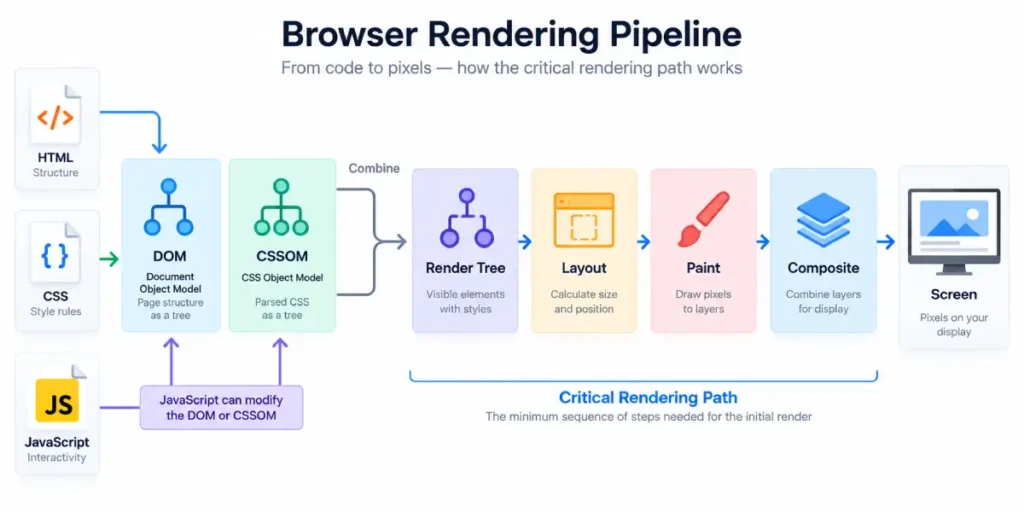
The browser parses HTML into the Document Object Model (DOM) and builds the CSS Object Model (CSSOM) from CSS.
It then combines the information into a render tree containing the visible elements, calculates their positions and dimensions during layout, and paints the resulting pixels. Modern rendering also includes compositing before the final pixels are displayed.
The practical definition is therefore:
The critical rendering path is the minimum sequence of resources and processing required for the browser to perform the initial render.
It is not the same thing as the complete page-load process. The browser does not necessarily wait for every image, font, script, or piece of HTML before showing something.
How the Critical Rendering Path Works
| Stage | What happens | Why it matters |
|---|---|---|
| HTML | Browser receives and parses HTML | Creates the DOM and discovers resources |
| DOM | HTML becomes a document tree | Provides page structure |
| CSS | Styles are downloaded and parsed | Builds the CSSOM |
| JavaScript | Scripts may execute and modify the DOM/CSSOM | Can block parsing or alter rendering |
| Render tree | DOM and CSSOM are combined | Determines visible content |
| Layout | Browser calculates size and position | Establishes geometry |
| Paint | Pixels are generated | Produces visible output |
| Composite | Layers may be combined | Finalizes what reaches the screen |
The exact implementation is more complex than this simplified model, but it is sufficient for diagnosing the most common rendering bottlenecks. web.dev also notes that the rendering process can run repeatedly as additional resources arrive and affect what the user sees.
Which Resources Are Actually Critical?
One of the most useful distinctions is between critical resources and resources that can arrive after the initial render.
For an initial render, browsers generally need:
- part of the HTML;
- render-blocking CSS, particularly CSS discovered in the
<head>; - parser-blocking JavaScript when it affects the parsing/rendering sequence.
They generally do not need all HTML, all images, all fonts, or non-render-blocking JavaScript before beginning the initial render.
This distinction matters because removing a resource from the critical path simply because it is large or inconvenient can be counterproductive if that resource is actually required to produce a usable initial view.
The goal is therefore not “load nothing.” The goal is to load the minimum necessary resources in the right order.
Render-Blocking CSS vs. Parser-Blocking JavaScript
CSS is render-blocking by default
When the browser encounters CSS that applies to the current rendering conditions, it generally waits for that CSS to be downloaded and processed before rendering the affected content. This is necessary because later CSS rules can change how earlier HTML should appear.
That makes unnecessary CSS a potential critical-path cost.
Useful approaches include:
- reducing unused CSS;
- separating non-critical styles;
- keeping critical styling efficient;
- avoiding unnecessarily large stylesheets for the initial viewport.
Synchronous JavaScript can block HTML parsing
A normal <script> encountered during HTML parsing can stop the parser while the browser downloads and executes the script.
This happens because JavaScript can modify the DOM or CSSOM, so the browser cannot safely assume what the remaining document will look like.
Using defer or async can change this behavior, but they are not interchangeable:
deferallows parsing to continue and preserves execution order for deferred scripts.asyncallows scripts to execute as soon as they are ready, without guaranteeing execution order.
The correct choice depends on whether the script is required for the initial page and whether other scripts depend on it.
The Critical Rendering Path and LCP
For an SEO professional, CRP becomes especially useful when diagnosing Largest Contentful Paint (LCP).
Traditional CRP analysis focuses on the initial rendering process. Modern performance analysis also asks a more practical question:
When does the user’s main content actually become visible?
web.dev describes this as the critical contentful rendering path concept. Resources that are not technically render-blocking can still matter if they are necessary to display the page’s meaningful content, including the LCP element.
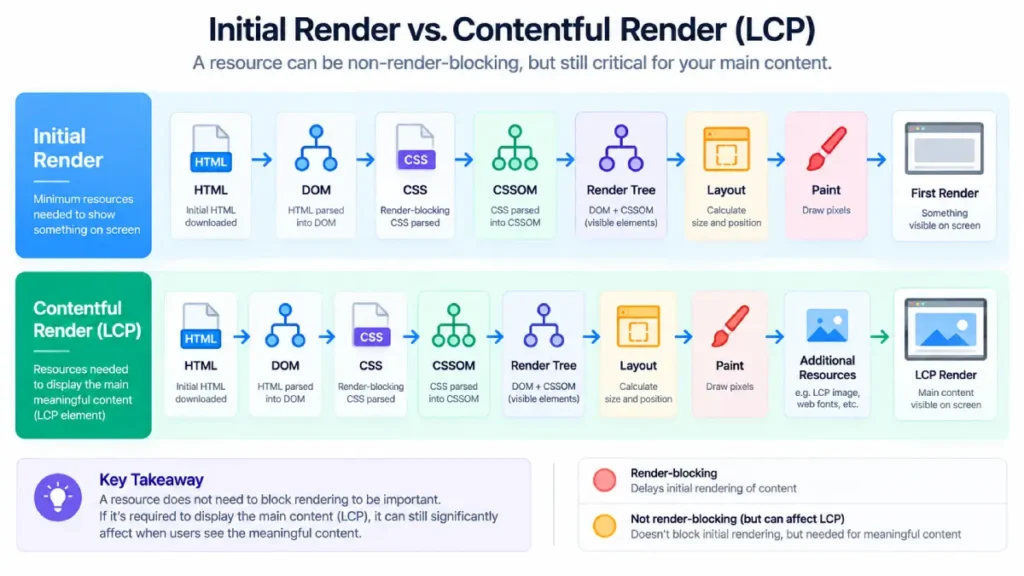
This creates an important diagnostic distinction:
A resource can be non-blocking but still important to LCP.
For example, an image may not prevent the browser from displaying text, but if that image becomes the LCP element, its discovery, download, and rendering can determine when the main visual content appears.
For a deeper explanation of how LCP measures the largest visible content and how its resource type affects optimization, see Chrome’s documentation on Largest Contentful Paint.
SearchEngineZine’s existing LCP optimization guide explores this relationship from a WordPress perspective, including resource discovery, critical CSS, and JavaScript deferral.
How to Optimize the Critical Rendering Path
A practical CRP optimization process can be reduced to four questions.
1. Reduce unnecessary blocking resources
Inspect the <head> for CSS and JavaScript that are not required for the initial view.
The objective is not to remove everything. It is to determine what the browser genuinely needs before it can produce a useful first render.
2. Shorten the critical request chain
If resource A must arrive before resource B can be discovered, and B must arrive before the browser can render the main content, you have created a dependency chain.
Long chains increase latency.
Look for resources that are:
- discovered late;
- dependent on other resources;
- unnecessarily loaded before critical content;
- injected through JavaScript when they could be discoverable in HTML.
Lighthouse can help identify critical request chains and rendering-related delays.
3. Defer non-essential JavaScript
JavaScript that is not needed for the initial rendering should generally not be allowed to delay the parser unnecessarily.
Typical candidates include:
- analytics;
- non-essential widgets;
- secondary interactions;
- below-the-fold functionality;
- third-party features that are not required immediately.
But deferral must be tested carefully. A script that creates essential navigation or primary content may be genuinely part of the rendering path.
4. Prioritize the resources required for meaningful content
Once unnecessary work has been removed, focus on the resources that actually determine when the primary content appears.
For example:
HTML delivery → critical CSS → LCP resource discovery → resource download → rendering
This is more useful than treating every resource on the page as equally important.
A Simple CRP Audit for SEO Professionals
When auditing a slow page, use this sequence:
- Measure TTFB.
Determine whether the server is delaying the initial HTML response. - Inspect the HTML response.
Check whether important content is already present or depends on JavaScript. - Inspect the
<head>.
Identify render-blocking CSS and parser-blocking scripts. - Open the network waterfall.
Look for long dependency chains and late-discovered critical resources. - Identify the LCP element.
Determine what resource ultimately controls the meaningful visual render. - Check JavaScript execution.
Look for scripts that delay parsing, layout, or painting. - Retest after each change.
Optimization should be based on measured bottlenecks rather than assumptions.
This measurement-first approach is particularly important because MDN notes that micro-optimizations such as selector specificity are unlikely to be the most significant performance bottleneck; developers should measure before deciding what deserves optimization effort.
Critical Rendering Path vs. Page Load
These terms are related but should not be treated as synonyms.
Page load can include the entire process of downloading and processing the page’s resources.
Critical rendering path focuses on the resources and processing necessary for the initial rendering.
LCP focuses on when the largest relevant piece of visible content is rendered.
That means a page can have:
- a relatively short initial rendering path;
- but a slow LCP because the main content arrives late;
or:
- a fast initial paint;
- but significant additional work before the page becomes visually complete.
For SEO and performance analysis, looking at only one of these concepts can hide the actual bottleneck.
The Practical SEO Takeaway
The critical rendering path is fundamentally an order-of-operations problem.
The browser needs enough HTML, CSS, and JavaScript to produce a usable initial view—but it does not need every resource immediately.
The performance opportunity comes from identifying what is genuinely critical, making those resources discoverable and efficient, and moving unnecessary work out of the initial path.
For an SEO professional, the most useful workflow is therefore:
Measure → identify the critical path → find blocking resources → shorten dependency chains → prioritize meaningful content → retest.
CRP optimization should not be reduced to blindly deferring JavaScript, removing CSS, or adding preload directives. The correct optimization depends on what the page actually needs to render and what the performance waterfall shows.
For broader technical SEO work, the SearchEngineZine Technical SEO Hub provides the site’s related coverage across crawl/indexing, Core Web Vitals, mobile, schema, and technical architecture.




