

Mastering robots txt syntax is essential for SEO professionals managing large-scale websites, complex parameterised environments, and enterprise applications.
A single syntax error or precedence misunderstanding can inadvertently block vital search engine crawlers from indexing revenue-generating pages, or conversely, leave sensitive directory paths exposed to automated discovery.
This guide breaks down the technical grammar, directive precedence rules, wildcard behaviors, and advanced validation techniques required to build robust exclusion files for modern search engines.
Core Syntax Rules and Fundamental Directives
The Robots Exclusion Protocol (REP) relies on a plain text file named robots.txt located in the root directory of a host (e.g., [https://example.com/robots.txt](https://example.com/robots.txt)), governed by Google’s official Robots Exclusion Protocol specifications.
The file consists of one or more records, each separated by blank lines. Every record contains groups of rules targeting specific user-agents, followed by specific access permissions.
1. The User-agent Directive
The User-agent line specifies which web crawler the subsequent rules apply to according to standard robots.txt protocol guidelines. Crawler names are case-insensitive.
- Specific Crawlers: Target individual bots like
Googlebot,Bingbot, orGPTBot. - Universal Wildcard (
*): Applies rules to all compliant web crawlers unless overridden by a named user-agent group.
User-agent: Googlebot
Disallow: /private/

User-agent: *
Disallow: /
2. Disallow and Allow Directives
Disallow: Instructs crawlers not to access URLs that begin with the specified path. A blankDisallow:line (i.e.,Disallow:) means “allow access to everything” for that user-agent group.Allow: Explicitly permits access to subdirectories or file paths underneath a restricted parent directory.
3. Comments and Whitespace
Lines beginning with a hash symbol (#) are treated as comments and ignored by parsers. Comments can appear on their own lines or at the end of a directive line. Leading and trailing whitespace around paths is strictly parsed; extra spaces can corrupt rule matching.
Wildcards and Pattern Matching in Modern Crawlers
While early robots.txt implementations only recognized basic prefix matching, modern search engine parsers (including Googlebot) support powerful wildcards that allow engineers to write concise rules for complex URL structures.
The Asterisk (*) Wildcard
The asterisk matches any sequence of zero or more characters. It is commonly used to target dynamic URL patterns, session IDs, or specific file extensions across directory trees.
# Block all URLs containing dynamic session identifiers
Disallow: /*?session_id=*

# Block direct access to all PDF downloads across the domain
Disallow: /*.pdf$
The Dollar Sign ($) Anchor
The dollar sign indicates the end of the URL string. When combined with the asterisk, it ensures that rules match exact file terminations rather than general directory prefixes.
# Blocks URLs ending precisely in .php, preventing unintended over-blocking
Disallow: /*.php$
Group Precedence, Specificity, and Conflict Resolution
When multiple rules apply to a single URL path, search engine parsers resolve conflicts using strict algorithmic precedence. Understanding these rules prevents catastrophic indexing drop-offs.
Group-Level Precedence
A crawler will process only one user-agent group per URL evaluation. If a crawler matches both a specific user-agent group (e.g., User-agent: Googlebot) and the universal wildcard group (User-agent: *), only the most specific group is applied. The universal group is entirely ignored for that crawler.
Line-Level Precedence (The Longest Match Rule)
Within a single applicable user-agent group, conflicting Allow and Disallow directives are evaluated based on specificity via string length. The rule with the longest matching character sequence wins, regardless of the order in which the lines appear in the file.
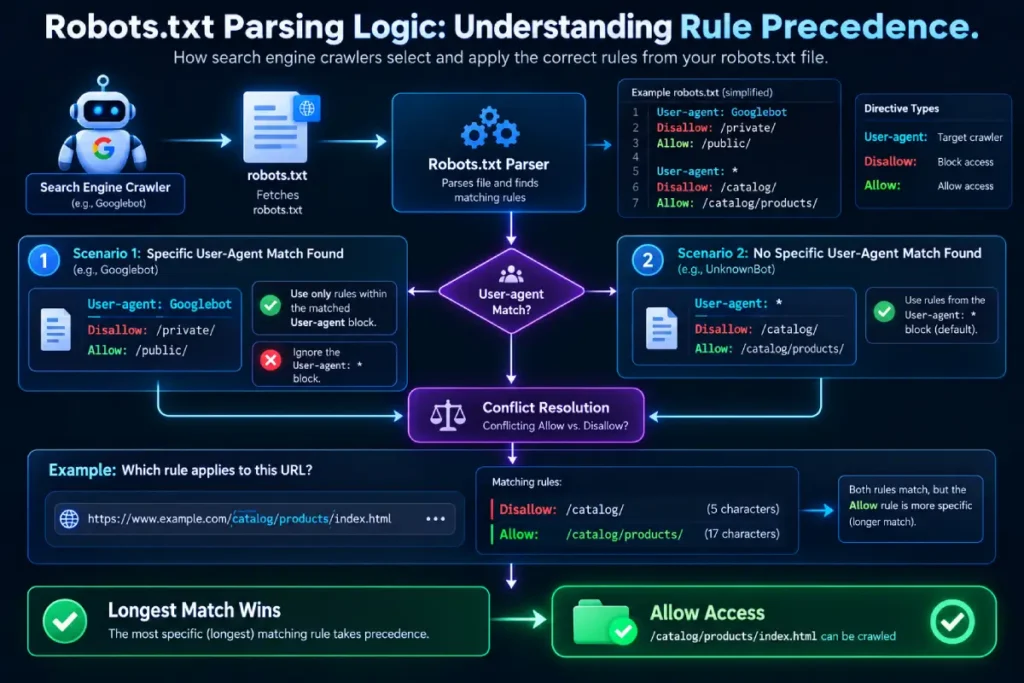
User-agent: Googlebot
Disallow: /catalogue/
Allow: /catalogue/seasonal-sale/
In this configuration, even though /catalogue/ disallows the parent directory, Googlebot will successfully crawl /catalogue/seasonal-sale/ because the matching Allow path string is longer and more specific.
Proper crawl budget optimization relies heavily on mastering these specificity hierarchies to prevent wasted server processing.
Common Syntax Pitfalls for SEO Professionals
Even seasoned technical SEOs encounter recurring parsing traps. Reviewing your server logs against these common errors ensures maximum search engine efficiency.
Trailing Slash Ambiguity
In robots.txt syntax, slashes matter immensely.
Disallow: /folderblocks/folder,/folder.html,/folder/file.php, and/folderset.Disallow: /folder/strictly blocks the contents inside the directory/folder/.
Relative Path Misinterpretations
All paths must be absolute relative to the domain root, beginning with a forward slash (/). Omitting the leading slash causes crawlers to ignore the rule entirely.
Mismanaging Static Assets and Rendering Resources
Historically, blocking CSS and JavaScript files prevented Googlebot from rendering pages correctly. While modern rendering engines can bypass some restrictions if blocked resources are critical, leaving stylesheets and scripts open ensures complete, unhindered rendering during indexation troubleshooting frameworks.
Validating and Deploying Your Robots.txt File
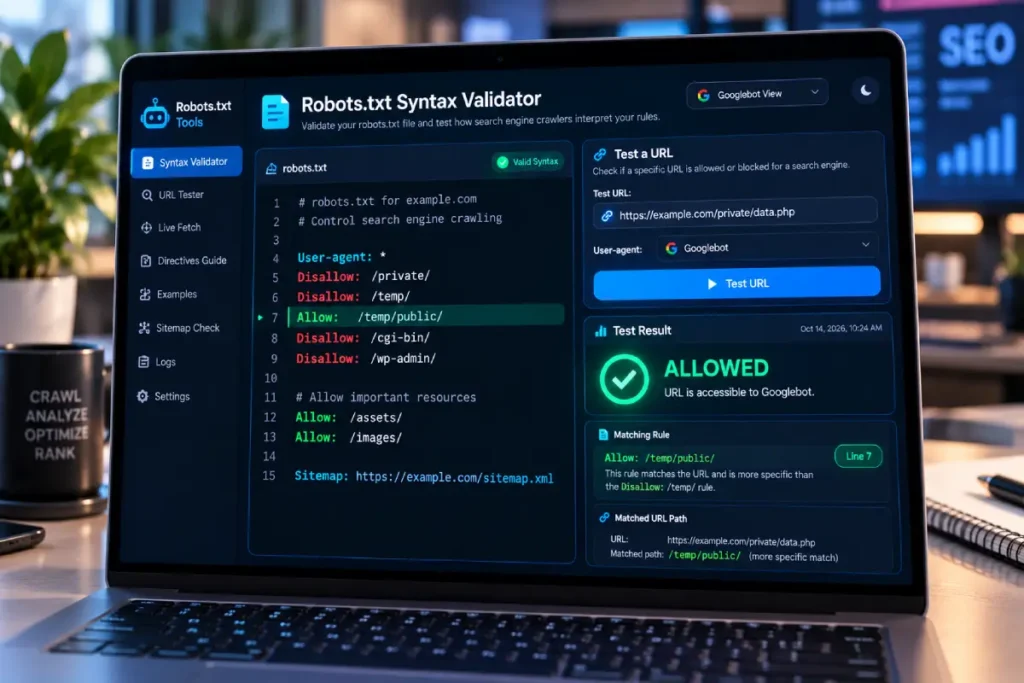
Before pushing exclusion rules to production, rigorous validation is required.
- Check Response Headers: Ensure your server returns a
200 OKstatus code for the/robots.txtURL. If the server returns a404 Not Found, search engines assume an open-door policy (allow all). If it returns a permanent5xxserver error, crawlers will suspend crawling entirely to protect server load. - Leverage Official Testing Tools: Utilize the robots.txt tester within Google Search Console to simulate real-world crawler evaluation against specific URLs across your site architecture.
- Verify XML Sitemaps Integration: Always declare your sitemap location at the bottom of your robots.txt file to guide discovery alongside proper XML sitemap configuration:
Sitemap: https://example.com/sitemap.xml



