
A Service Area Business GBP audit is a systematic evaluation of a hidden-address business listing to ensure compliance with Google’s guidelines, verify accurate service radius configurations, optimize map pin placement integrity, and eliminate suspension triggers like residential zoning conflicts or duplicate listings.
Unlike storefront businesses, SABs do not display their physical address publicly, relying entirely on designated service areas, accurate NAP (Name, Address, Phone) citation consistency, and hyper-local review velocity to rank in the Local Pack.
Conducting a comprehensive SAB GBP audit requires verifying backend address masking settings, inspecting service area polygon configurations, auditing driving directions velocity data, and resolving proximity suppression issues without violating Google’s Terms of Service.
Mastering local visibility for a service area business requires moving beyond traditional storefront tactics. Because Google treats hidden-address listings with heightened scrutiny regarding spam and fake locations, your audit workflow must bridge technical compliance and local signal strength.
1. Core Architecture of a Service Area Business GBP Profile
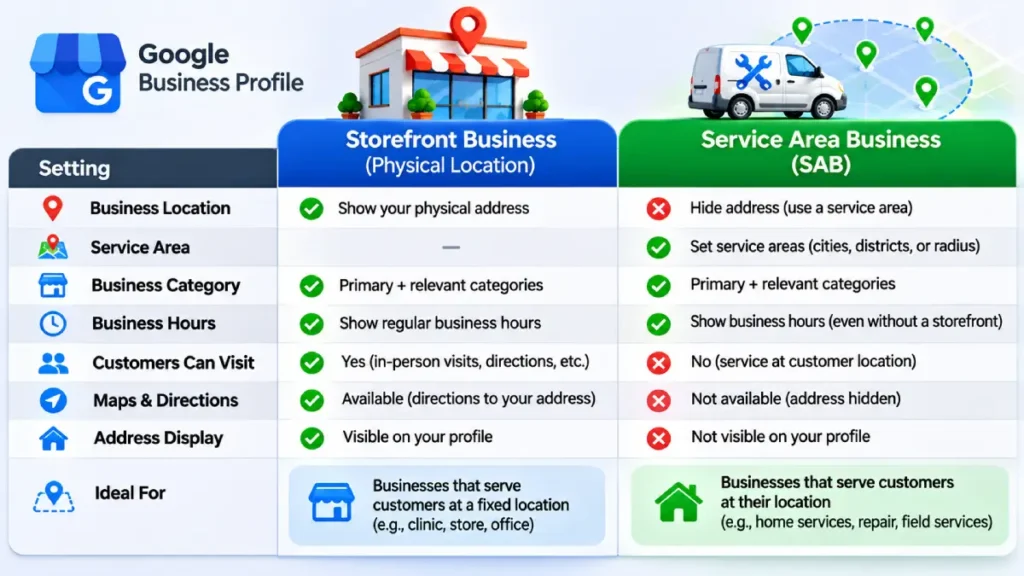
Before diving into diagnostic tests, you must understand how Google parses SAB signals versus physical storefronts. When a business selects “I deliver goods and services to my customers” during setup, the physical street address is permanently suppressed on Google Maps and Search, replaced by a designated geographic service boundary (up to a 2-hour driving radius or specific zip codes/cities).
| Component | Storefront GBP | Service Area Business (SAB) GBP | Primary Audit Focus |
| Address Display | Publicly visible street address | Hidden address (masked on frontend) | Ensure address is a real, non-virtual office/PO Box |
| Service Radius | Not applicable (fixed location) | Configured via cities/zip codes | Verify radius matches actual operational range |
| Proximity Weight | High reliance on pin center | Calculated from centroid of service area | Assess centroid positioning vs. target market |
| Suspension Risk | Moderate (signage, storefront proof) | High (residential zoning, utility bills) | Strict compliance with Google’s API/dashboard rules |
For deeper foundational insights into local visibility architectures, review our comprehensive Local SEO Guide.
2. The 7-Step Service Area Business GBP Audit Checklist
Executing a thorough audit safeguards your listing against algorithmic downgrades and manual penalties. Follow this rigorous 7-step sequence:
Step 1: Verify Address Masking and Business Type Integrity
Navigate to your Google Business Profile dashboard and check your address settings.
- Rule: If you meet customers at your location, you are a hybrid or storefront. If you travel exclusively to your customers (e.g., plumbers, mobile detailers, locksmiths, HVAC contractors), the address must be hidden.
- Audit Action: Confirm that the checkbox “I deliver goods and services to my customers” is active and that your street address is hidden from public view. Never use a UPS Store, PO Box, or virtual coworking space, as these trigger automated suspensions.
Step 2: Audit Service Area Boundaries and Polygon Overlaps
Google allows up to 20 service areas (cities, postal codes, or counties).
- Pitfall: Many operators blanket entire states or hundreds of zip codes, diluting local relevance.
- Optimization: Restrict your service area to regions where you hold legitimate licensing, insurance, and realistic travel times. Align your service area configuration with your onsite landing page geo-modifiers (e.g.,
/service-area/city-name/).
Step 3: Inspect NAP Consistency Across Local Citations
For SABs, inconsistent address formatting on third-party directories (Yelp, YellowPages, Better Business Bureau) is the #1 catalyst for unverified status or ranking suppression.
- Audit Action: Run a citation audit to verify that your hidden address or registration address matches your state business filings precisely. Utilize our Local Citation Audit Framework to identify and purge duplicate NAP variations.
Step 4: Evaluate Category Selection and Service Menu Density
Your primary category dictates up to 80% of your unbranded local pack rankings.
- Audit Action: Verify that your primary category is hyper-specific (e.g., “Plumber” instead of “Contractor”). Populate all relevant secondary categories. Build out your “Services” tab manually with custom descriptions containing semantic LSI keywords rather than accepting generic pre-populated service lists.
Step 5: Analyze Review Velocity, Sentiment, and Keyword Density
Reviews are both a conversion driver and a ranking factor.
- Audit Action: Audit your review profile for velocity and keyword richness. Encourage customers to naturally mention the specific service performed and the city served in their reviews (e.g., “Great emergency water heater repair in Austin, TX”). Respond to 100% of reviews within 24 hours using keyword-contextual phrasing.
Step 6: Audit Geo-Tagged Photo Assets and Metadata
SABs lack physical storefront geotags from customer check-ins.
- Audit Action: Regularly upload high-resolution, original photos of completed projects, team members in branded vehicles, and equipment. Ensure EXIF data contains valid timestamp and coordinate metadata matching your active service zones.
Step 7: Cross-Reference Website Local Landing Pages
Your GBP must link to a dedicated, localized landing page on your website rather than a generic homepage.
- Audit Action: Ensure your website features embedded Google Maps pointing to your central service hub, schema markup (
LocalBusinessor specific trade schema withareaServed), and localized NAP matching your offline registration.
For advanced schema deployment strategies, consult our guide on Google Business Profile Optimization.
3. Common Suspension Triggers & Compliance Pitfalls
Service Area Businesses experience the highest suspension rates across local search. Understanding these triggers prevents costly downtime:
[SAB Suspension Triggers]
 ├── 1. Address Violation ──> Using PO Box, UPS Store, or Virtual Office
 ├── 2. Profile Editing ────> Bulk editing name, category, or address fields simultaneously
 ├── 3. Ownership Changes ──> Transferring primary ownership to a new email account
 └── 4. Duplicate Listings ──> Creating multiple profiles for the same legal entity in one metro
According to official Google Business Profile Guidelines, businesses operating in service areas must strictly adhere to eligibility standards. If your listing gets suspended, prepare reinstatement documentation immediately, including state business registration licenses, utility bills bearing the exact business name and address, and vehicle insurance policies.
4. Measuring Success: Tracking SAB Local Pack Performance
Traditional rank tracking tools often fail to capture true SAB visibility because rankings fluctuate based on the exact geocoordinate of the searcher.
- Grid-Based Rank Tracking: Implement local grid trackers (such as Local Falcon or Whitespark) centered over your key service neighborhoods to measure share of local voice (SoLV).
- Performance Dashboard Metrics: Monitor Google Business Profile Insights closely, tracking “Calls,” “Direction Requests” (even for SABs, users request routes to service hubs or technician starting points), and “Website Clicks.”
- Attribution Modeling: Use dedicated call tracking numbers and UTM parameters on your GBP website URL to isolate organic map traffic from direct and paid search channels.
By maintaining rigorous adherence to these audit protocols, SEO professionals and local business owners can insulate their service area listings against algorithmic volatility and secure dominant local pack visibility.