
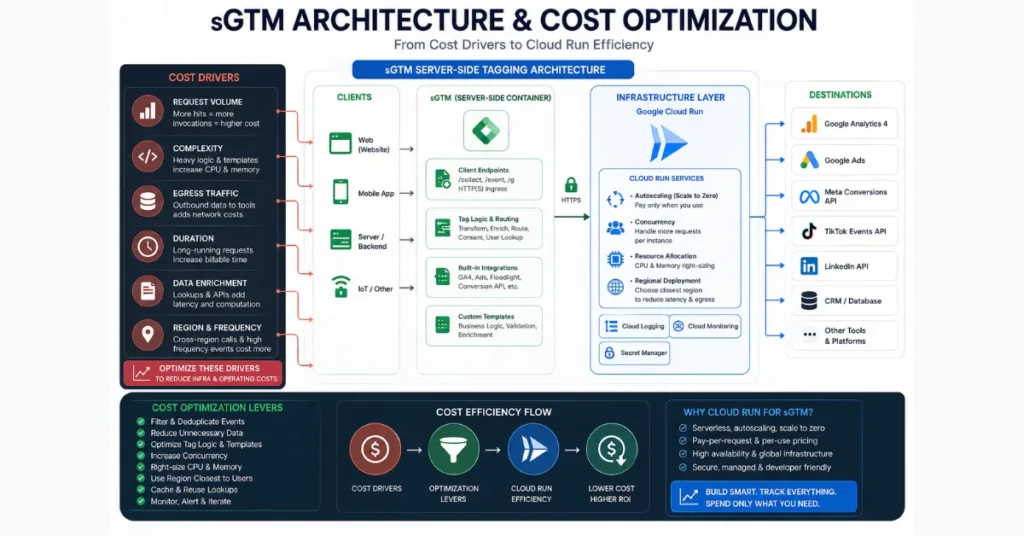
Server-side Google Tag Manager (sGTM) cost optimization goes beyond reducing request volume. The total cost of an sGTM setup is influenced by several factors, including the compute required to process requests, memory allocation, logging, network traffic, and the number and configuration of Cloud Run instances.
Understanding these cost drivers is essential for reducing infrastructure expenses without compromising the data and measurement capabilities your implementation depends on.
For a new or lightly used deployment, Google’s current documentation says a default single-server GCP deployment is free in most cases, although traffic and other projects sharing the billing account can push it beyond the free tier.
Once upgraded, Google estimates roughly $30–$50 per server per month, with network traffic potentially increasing the bill. Google’s server-side tagging cost guidance
The practical way to reduce sGTM costs is therefore not simply to “reduce requests.” First identify where the money is going, then optimize unnecessary traffic → processing per request → logging → networking → scaling.
This preserves useful measurement signals while attacking the infrastructure costs that do not contribute to your analytics objectives.
What Actually Determines sGTM Cost?
A typical sGTM deployment processes incoming requests through a server-side container running on Cloud Run.
Google states that Cloud Run charges according to resources used, including CPU, memory, and requests, with additional networking considerations. Google Cloud Run pricing
| Cost area | What increases cost | Optimization priority |
|---|---|---|
| CPU | Complex processing and longer execution | High |
| Memory | Oversized instances or heavy payloads | Medium |
| Requests | Unnecessary or duplicated traffic | High |
| Logging | High-volume request/debug logs | High |
| Network | Egress and cross-region traffic | Medium–High |
| Instances | Excessive minimum/max instances | High |
| Load balancing | Additional infrastructure in larger deployments | Medium |
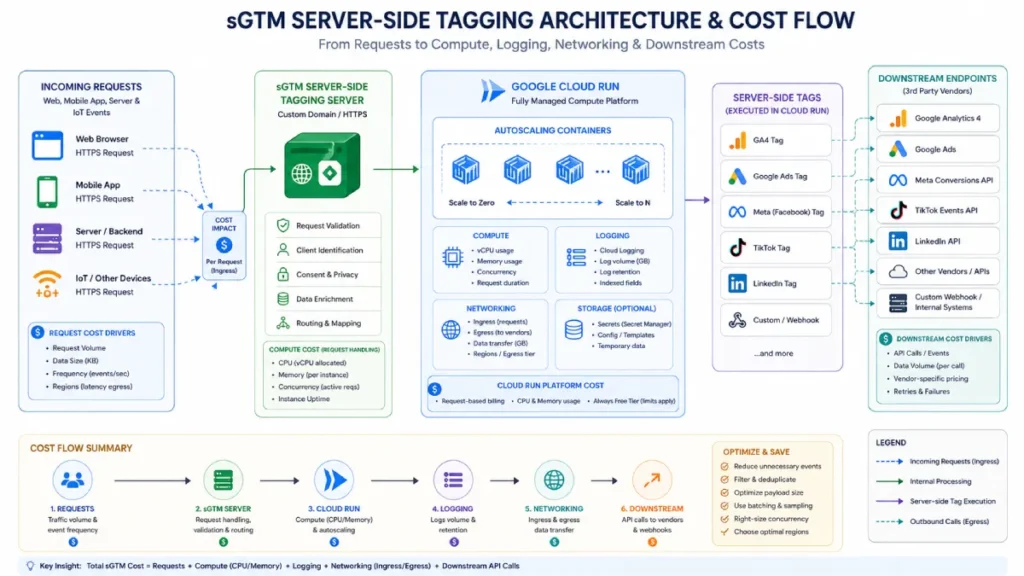
The important distinction is that 1 million requests are not necessarily equivalent to another 1 million requests. Two implementations can receive similar traffic but have very different bills because one performs substantially more computation, logging, or outbound networking per request.
TRKKN’s analysis of billing data from more than 100 sGTM implementations found total costs commonly around $3.47–$8.10 per million requests, while also reporting that CPU was typically the largest cost component.
That is industry-observed data rather than a Google pricing guarantee, so actual costs can vary substantially by architecture and workload. TRKKN’s 2026 sGTM cost analysis
1. Establish Your Cost Baseline Before Changing Anything
Do not begin by changing Cloud Run settings.
First determine what you are actually paying for.
Record at least:
- Requests per day and month
- CPU usage
- Memory usage
- Instance count
- Minimum and maximum instances
- Request latency
- Logging volume
- Network/egress charges
- Cloud Run configuration
- Major server-side tags and clients
Then compare the billing data with actual sGTM request volume.
This prevents a common optimization mistake: changing infrastructure when the real problem is excessive traffic, duplicated events, or unnecessary logging.
2. Remove Unnecessary Requests Before Optimizing Infrastructure
Reducing a request before it reaches the tagging server can be more valuable than making the server slightly cheaper to run.
Investigate:
- Duplicate
page_viewevents - Repeated SPA history-change events
- Duplicate purchase events
- Broken retry loops
- Unnecessary vendor requests
- Automated traffic reaching the tagging endpoint
- Development or preview traffic leaking into production
Do not automatically block traffic simply because it looks unusual. Some legitimate applications, webviews, and automated business processes can resemble non-human traffic.
The safer approach is to identify clearly invalid or unnecessary traffic first and validate the rule before deploying it broadly.
Cost principle: eliminate waste before tuning capacity.
3. Reduce the Work Per Request
Once unnecessary requests have been removed, make the remaining requests cheaper to process.
Look for:
- Unnecessary transformations
- Repeated lookups
- Complex regular expressions
- Excessive variable processing
- Large payloads
- Unused fields
- Tags firing on events that do not require them
- Repeated calculations that could be reused
For example, if a vendor only needs a small set of fields for a conversion event, there may be little value in sending a large payload containing unrelated product or page data.
The objective is not to remove data blindly. It is to remove data and processing that provide no measurable business value.
4. Reduce Server-Side Tag Fan-Out
One incoming event can trigger multiple downstream requests.
A server-side container might receive an event and then send information to GA4, Google Ads, Meta, and several other vendors.
That architecture can increase:
- Processing work
- Outbound requests
- Network traffic
- Failure/retry handling
- Logging volume
Review every server-side tag and ask:
Does this destination need this event?
A useful optimization model is:
Core measurement → conditional measurement → remove unused measurement
Keep business-critical destinations active. Make secondary destinations conditional where appropriate. Remove integrations that no longer serve a real measurement requirement.
This is particularly important on high-volume events where a small reduction in unnecessary fan-out can be repeated across millions of requests.
5. Treat Logging as a Real Cost Center
Logging is one of the easiest sGTM costs to overlook.
Google’s current Cloud Run server-side tagging documentation explicitly warns that request logging can become significant at higher request volumes; by default, information about individual requests is logged, and Google notes that deployments handling more than 1 million requests per month may incur significant logging charges. See Google’s Cloud Run server-side tagging setup guide
That does not mean logging should be disabled. Instead, separate useful observability from noise.
Keep:
- Errors
- Important warnings
- Deployment diagnostics
- Targeted debugging
- Logs required for operational investigations
Reduce unnecessary:
- High-volume successful request logs
- Long-lived debug logging
- Repetitive payload information
- Logs that are never reviewed
Google provides configuration options for disabling request logging, so logging should be treated as an intentional operational decision rather than an automatic default.
6. Tune Cloud Run Concurrency Carefully
Cloud Run allows you to configure the maximum number of concurrent requests an instance handles. The current default for Cloud Run services is 80, although you can change the setting for a specific service. Read Google Cloud Run concurrency documentation
Higher concurrency can potentially allow fewer instances to handle the same workload, but that does not mean “maximum concurrency = minimum cost.”
If the workload becomes CPU-bound, excessive concurrency can increase latency or reduce performance.
A safer optimization process is:
- Establish current p95 latency and error rate.
- Increase concurrency gradually.
- Monitor CPU utilization.
- Monitor instance count.
- Compare cost before and after the change.
- Keep the setting only if performance remains acceptable.
Treat concurrency as a performance-cost tradeoff, not a magic cost-reduction switch.
7. Right-Size CPU and Memory
Over-provisioning resources can increase the cost of a server that does not actually need them.
Google’s Cloud Run pricing is based on allocated resources and billing configuration, while its sGTM setup documentation provides a specific example of approximately $45 per month per server for a configuration using 1 vCPU and 0.5 GB memory with CPU always allocated.
That $45 figure should not be treated as a universal sGTM price. Actual cost depends on configuration, traffic, and region.
Before reducing resources, examine actual usage during:
- Normal traffic
- Peak traffic
- Campaign spikes
- Large events
- Deployment periods
Then right-size based on observed requirements rather than assumptions.
8. Control Autoscaling Instead of Letting It Run Unchecked
Google’s Cloud Run deployment supports minimum and maximum instance settings. The maximum-instance setting represents the upper limit of resource consumption; Cloud Run does not automatically provision that maximum unless demand requires it.
That makes max-instances an important financial guardrail.
But setting it too low can create another problem: insufficient capacity during legitimate traffic spikes.
The better approach is to establish:
Expected traffic → required capacity → acceptable latency → maximum financial exposure
Then configure scaling around those constraints.
For production sGTM, Google recommends multiple instances for redundancy; its current documentation recommends a minimum of three instances per container for redundancy, while its Cloud Run setup guide recommends at least two in the specific configuration described there.
That difference illustrates why infrastructure recommendations should be evaluated against the exact deployment architecture rather than copied as a universal rule.
9. Watch Network and Regional Costs
Network traffic can become more important as an sGTM deployment becomes geographically distributed.
TRKKN reports that networking represented a relatively small share of costs for regional implementations but could become a much larger component for globally distributed workloads.
Google’s Cloud Run pricing documentation also confirms that Google Cloud bills outbound internet data transfer under its networking pricing, while traffic between Cloud Run and certain Google Cloud resources in the same region does not incur the same transfer charge.
Therefore, investigate:
- Where users are located
- Where tagging servers run
- Where downstream vendors are located
- Cross-region traffic
- Outbound response volume
- Multi-region architecture
Do not deploy multiple regions simply because “global” sounds better. Additional infrastructure can increase cost without providing meaningful business value for every implementation.
A Practical sGTM Cost Optimization Order
If you need a simple sequence, use this:
| Step | Action | Main objective |
| 1 | Analyze billing | Find the real cost drivers |
| 2 | Remove duplicate traffic | Reduce unnecessary requests |
| 3 | Reduce processing | Lower CPU work per request |
| 4 | Prune tag fan-out | Reduce downstream processing |
| 5 | Control logging | Reduce observability waste |
| 6 | Tune concurrency | Improve resource utilization |
| 7 | Right-size resources | Avoid over-provisioning |
| 8 | Control scaling | Prevent unnecessary capacity |
| 9 | Review networking | Reduce avoidable egress |
This ordering is deliberately conservative. It prioritizes changes that can reduce waste without immediately modifying the infrastructure that protects production availability.
The Most Important Rule: Do Not Optimize Away Your Measurement
A lower sGTM bill is not automatically a successful optimization.
Before and after every significant change, compare:
- Purchase/event counts
- Conversion delivery
transaction_iddeduplication- Consent behavior
- GA4 event volumes
- Advertising-platform event delivery
- 4xx/5xx errors
- p95 latency
- Cloud Run resource usage
- Total monthly cost
If costs fall but conversion data disappears, the optimization failed.
The goal is lower infrastructure waste while preserving the measurement signals the business actually needs.
Conclusion
sGTM cost optimization is primarily an architecture and workload-management exercise.
The highest-value opportunities usually come from eliminating unnecessary requests, reducing processing per request, controlling logging, tuning Cloud Run resources, and preventing uncontrolled scaling.
Google provides a free tier for many low-volume default deployments, while larger or upgraded environments introduce recurring infrastructure costs that rise with workload and configuration.
The right question is therefore not:
“How can I make sGTM cheaper?”
It is:
“Which part of my sGTM architecture is consuming money without creating equivalent measurement value?”
Find that layer first. Then optimize it without compromising the data your business depends on.




