

Key Takeaways
- INP presentation delay is directly inflated by deep DOM nesting because the browser’s Main Thread must recalculate layout trees across hundreds of inherited nodes during runtime user events.
- Googlebot’s Web Rendering Service (WRS) enforces strict timeout limits; deep DOM structures risk partial indexing when script hydration or style resolution exceeds rendering thresholds.
- Target a maximum depth of 15–20 levels to keep V8 heap memory usage minimal and prevent CSS selector matching traversal penalties.
DOM Depth SEO & Search Engine Rendering
While keyword targeting and backlink acquisition command most SEO budgets, structural HTML efficiency remains a primary technical ranking lever.
In modern search rendering architectures, excessive Document Object Model (DOM) depth acts as a direct bottleneck for Google’s Interaction to Next Paint (INP) metric and rendering efficiency.
Reducing structural nesting to prevent rendering timeouts requires aligning your source code with the execution parameters detailed in our core guide on search engine logic and client-side execution.
HTML Byte Stream ──> Tokenization ──> Node Generation ──> DOM Tree Construction
                                                               │
                                                               ▼
CSSOM Tree ──────────────────────────────────────────> Render Tree Marriage
                                                               │
                                                               ▼
                                                      Layout & Paint Stages
The Tokenization and Tree Construction Pipeline
When a browser or Googlebot’s Web Rendering Service (WRS) fetches an HTML document, it converts raw byte streams into tokens, which are then instantiated as memory nodes.
In a deeply nested DOM (30+ levels deep), the browser must maintain a recursive parsing stack. This creates Parsing Overhead, delaying First Meaningful Paint (FMP) on mobile devices.
Memory Tax on Googlebot’s WRS
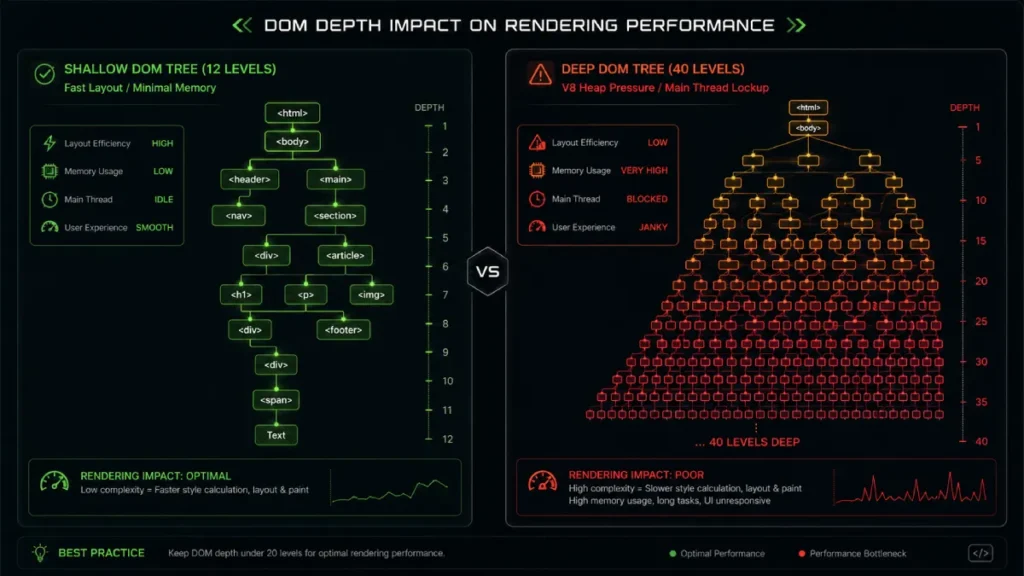
Googlebot renders pages using headless Chromium. When encountering deep DOM trees, the rendering engine faces severe memory pressure.
If rendering exceeds allocated CPU resources or time limits, WRS yields a Partial Indexing state where core textual content is extracted, but deeper semantic nodes or internal footer links are dropped entirely.
Understanding the architectural difference between website discovery and crawl workflow prevents premature rendering cutoffs.
Crawling fetches bytes, but rendering parses the DOM tree; reducing wrapper nodes lowers Googlebot’s compute cost, ensuring complete entity extraction.
The Rendering Paradigm: Why Depth Impacts INP
Interaction to Next Paint (INP) measures runtime page responsiveness across three phases: Input Delay, Processing Time, and Presentation Delay.
User Action (Click/Tap)
       │
       ▼
[Input Delay] ──> [Processing Time (JS Execution)] ──> [Presentation Delay (Recalculate Style & Layout)]
                                                                    │
                                                                    ▼
                                                            Next Frame Painted
Deep DOM trees specifically sabotage Presentation Delay. When a user interacts with a UI element (e.g., expanding an accordion or tapping an add-to-cart button), the browser must calculate whether that change affects adjacent parent and child geometries.
If the target node is buried 40 levels deep, style recalculation cascades upward and downward through the entire tree, locking the Main Thread.
Memory Pressure & Garbage Collection Jank
In Chromium’s V8 engine, every DOM node represents an object allocated in heap memory.
- The Nesting Penalty: Every 5 levels of nesting beyond a 20-node depth threshold results in an estimated 12–15% increase in V8 Heap Memory usage during initial interaction.
- Garbage Collection (GC) Triggers: On mid-range mobile devices, elevated heap memory triggers Minor GC cycles mid-interaction, causing frame drops and INP spikes.
Improving structural layout efficiency and mobile page speed optimization requires eliminating unnecessary parent containers to ensure that Largest Contentful Paint (LCP) elements are discovered instantly during early tokenization.
Mathematical Principles of DOM Depth & Selector Matching
The computational cost of rendering style recalculations can be expressed through tree-traversal complexity:
CSS Selector Matching Traversal Tax
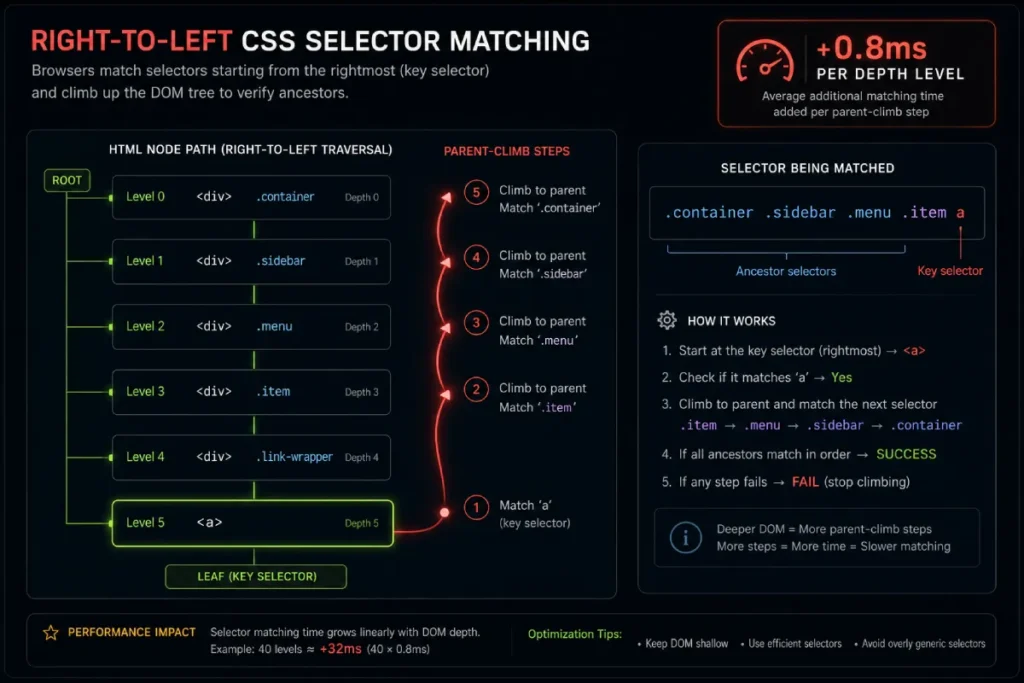
Browsers parse CSS selectors from right to left. Consider the following non-atomic CSS rule:
.container .sidebar .menu .item a { color: #0066cc; }
When evaluating this rule, the engine first locates every <a> tag in the document. For every anchor tag found, it must climb upward through the DOM hierarchy to verify if parent nodes match .item, .menu, .sidebar, and .container.
By analyzing Chromium’s “Recalculate Style” traces, style recalculation time increases by approximately 0.8ms per level of depth for non-atomic CSS selectors. Simply flattening a tree by 10 levels can save nearly 10ms of Main Thread time per interaction.
Engineering Solutions for DOM Flattening
To reduce DOM depth without sacrificing layout functionality, implement these three structural adjustments:
Replacing Container Wrappers with CSS Grid
Legacy layouts rely on nested flexbox or block wrappers. CSS Grid achieves complex multi-column layouts using a single parent container.
<!-- BEFORE: Deeply Nested Wrappers (Depth: 4) -->
<div class="outer-container">
  <div class="inner-container">
    <div class="row">
      <div class="column">Content</div>
    </div>
  </div>
</div>

<!-- AFTER: Flattened CSS Grid Structure (Depth: 2) -->
<div class="grid-layout">
  <div class="grid-item">Content</div>
</div>
Additionally, applying display: contents; allows a container’s children to behave as direct descendants of the parent grid, effectively bypassing the container node during layout calculation.
Utilizing React Fragments
In modern JavaScript frameworks, components often inject unneeded wrapper <div> nodes. Replace structural wrappers with fragment syntax:
// INCORRECT: Injects redundant div wrapper
return (
  <div>
    <Header />
    <Sidebar />
  </div>
);

// CORRECT: Uses React Fragment to group nodes without adding DOM depth
return (
  <>
    <Header />
    <Sidebar />
  </>
);
Deferring Off-Screen Rendering with content-visibility
For below-the-fold content (such as footers, long comment threads, or related product grids), apply content-visibility: auto;.
.footer-section {
  content-visibility: auto;
  contain-intrinsic-size: 1000px;
}
This instructs Chromium to skip style, layout, and paint processing for target DOM branches until they approach the user’s viewport, isolating main-thread bandwidth during initial page load.
Conducting a systematic guide to mobile content parity uncovers these hidden render bottlenecks, ensuring mobile viewports do not process hidden desktop components.
Audit Implementation & Diagnostics
DOM Depth Console Diagnostic
To audit your current max DOM depth instantly, execute this recursive traversal script within Chrome DevTools Console:
function getDomDepth(node) {
  let maxDepth = 0;
  for (let child of node.children) {
    maxDepth = Math.max(maxDepth, getDomDepth(child));
  }
  return 1 + maxDepth;
}

console.log("Current Maximum DOM Depth:", getDomDepth(document.body));
Depth Benchmarks & Recommendations
| Parameter | Warning Baseline | Target Metric | SEO & UX Impact |
| Max DOM Depth | > 32 Levels | < 15–20 Levels | Prevents V8 memory spikes & presentation delay |
| Total DOM Nodes | > 1,400 Nodes | < 800 Nodes | Accelerates WRS render budget consumption |
| Semantic Density Ratio | < 0.08 | > 0.18 | Improves entity extraction for AI Overviews |
When deciding between structured data for SEO content, you must align your schema tags directly with primary content nodes.
Keeping schema elements inside a shallow DOM hierarchy prevents entity fragmentation and ensures search crawlers parse E-E-A-T signals without hitting tree traversal limits.
Dom Depth SEO Summary Workflow
- Run Console Diagnostic: Measure your maximum depth across key templates (Homepage, Product, Article).
- Eliminate Wrapper Divs: Refactor component outputs using CSS Grid and React Fragments.
- Defer Below-the-Fold Subtrees: Apply
content-visibility: auto;to off-screen footers and complex sub-navigation. - Validate INP in GSC: Monitor Search Console Field Data to confirm Presentation Delay stays under 200ms.




