
What is Dynamic Rendering Mobile SEO
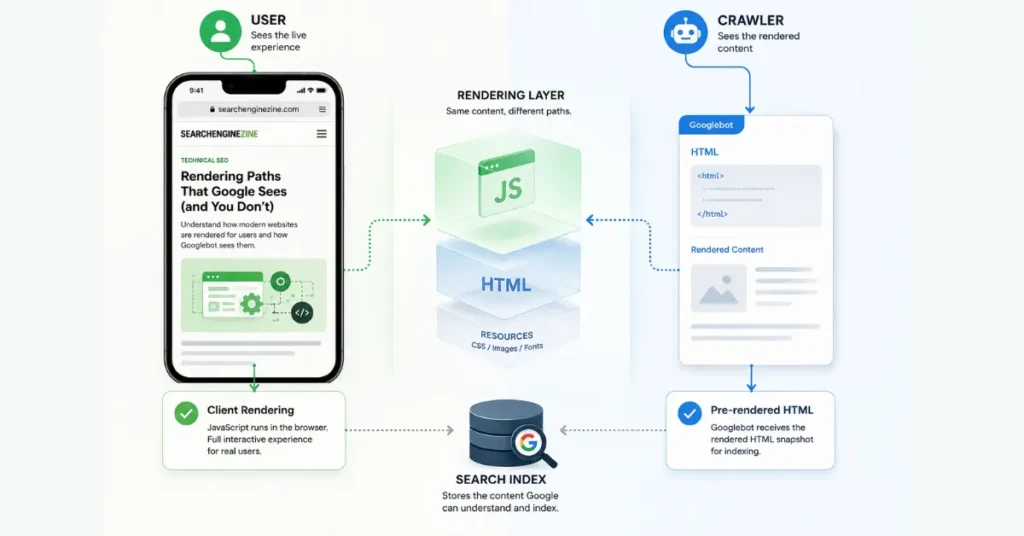
Dynamic rendering is a crawler-specific rendering strategy. With client-side rendering (CSR), the initial HTML may contain an application shell while JavaScript generates the page content.
Google Search can execute JavaScript, but it processes JavaScript through separate crawling, rendering, and indexing stages, and some implementations can prevent important content from appearing in rendered HTML.
Dynamic rendering adds a rendering server. When a request from a crawler that may have JavaScript limitations is detected, the request can be routed to that renderer, which returns a rendered HTML version.
Users can continue receiving the normal client-rendered experience. For a deeper explanation of JavaScript rendering and indexability, see JavaScript Rendering Logic.
Dynamic rendering mobile SEO serves pre-rendered HTML to crawlers, while users may receive a client-rendered JavaScript experience.
Google currently describes it as a workaround, not a long-term solution, and recommends server-side rendering, static rendering, or hydration instead.
For mobile SEO, the key point is simple: a mobile website does not automatically need dynamic rendering.
The real question is whether Google can reliably crawl, render, and index the content that matters. Google uses the mobile version of a site’s content for indexing and ranking under mobile-first indexing.
Does a Mobile Website Actually Need Dynamic Rendering?
Usually, no.
Being mobile, responsive, or JavaScript-heavy is not, by itself, a reason to implement dynamic rendering.
Google Search renders JavaScript with its Web Rendering Service and processes pages through crawling, rendering, and indexing.
Google’s current JavaScript guidance also says server-side or pre-rendering can be beneficial because it makes content more directly available to users and crawlers.
The better diagnostic question is:
Can Google reliably access the important content and links after rendering?
If yes, adding a separate crawler-rendering layer may introduce complexity without solving a demonstrated SEO problem.
Google’s mobile-first indexing guidance says Google uses the mobile version of a page for indexing and ranking, and emphasizes that Google must be able to access and render the important mobile content and resources. SearchEngineZine’s Mobile-First Indexing guide provides deeper context.
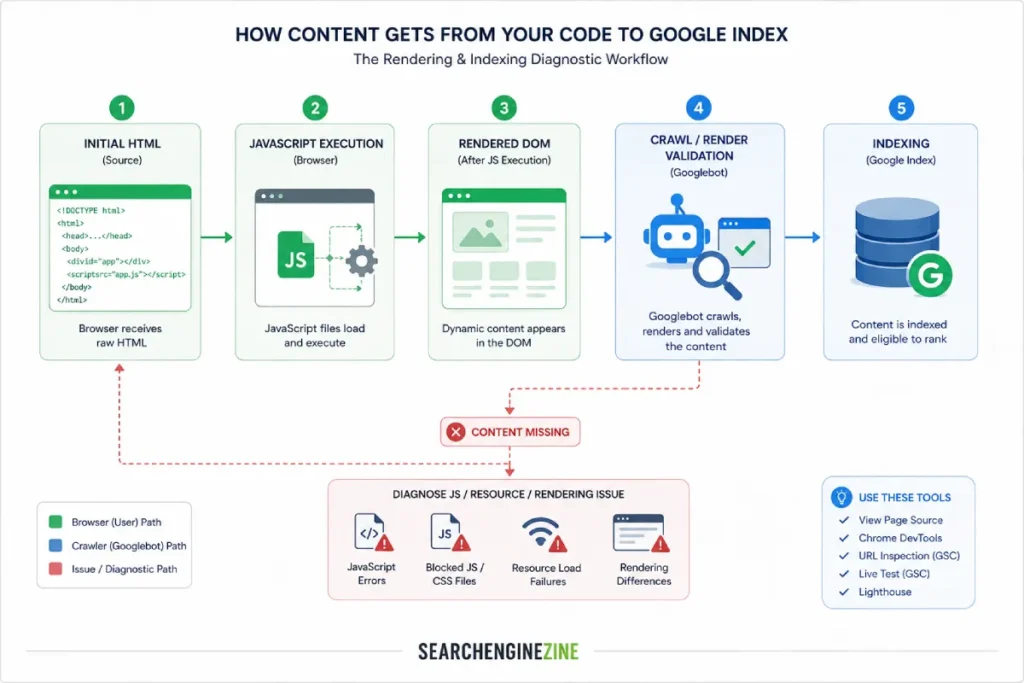
If important content fails to appear after rendering, JavaScript errors interfere with content generation, or required resources cannot be retrieved, then the rendering architecture deserves investigation.
Google recommends tools such as URL Inspection and the Rich Results Test for diagnosing JavaScript-related search problems.
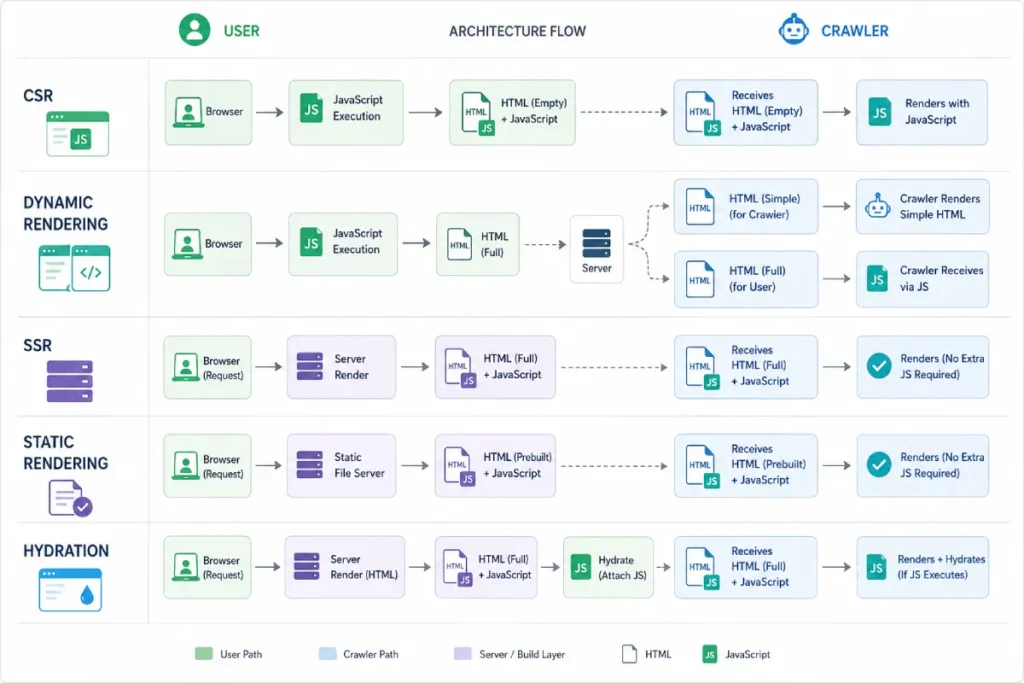
Dynamic Rendering vs. SSR, Static Rendering, and Hydration
| Architecture | How it works | SEO role | Typical use |
|---|---|---|---|
| Client-side rendering | Browser generates much of the content with JavaScript | Can work when rendering is reliable | Interactive applications |
| Dynamic rendering | Crawlers receive a rendered version while users may receive CSR | Workaround | Specific JavaScript/search problems |
| Server-side rendering | Server generates HTML for requests | Makes important content available directly | Strong general approach |
| Static rendering | HTML is generated ahead of requests | Provides crawlable content directly | Stable or pre-generatable content |
| Hydration | Server/static HTML is enhanced with client-side behavior | Combines accessible HTML with interactivity | Modern web applications |
Google explicitly recommends server-side rendering, static rendering, or hydration rather than adopting dynamic rendering as a long-term solution.
When Dynamic Rendering Still Makes Sense
Dynamic rendering can still be useful in limited situations, particularly for public, indexable JavaScript content that changes rapidly or depends on JavaScript features that target crawlers cannot adequately process.
Google identifies these as potential use cases while still recommending alternative rendering architectures for the long term.
That makes dynamic rendering better understood as a workaround or transitional architecture than a default mobile SEO configuration.
Content parity also matters. Google says dynamic rendering does not constitute cloaking when the crawler receives substantially similar content to users, but materially different content can create a cloaking problem.
How to Tell Whether Rendering Is the Real SEO Problem
1. Inspect the rendered HTML.
Use Google’s URL Inspection Tool or Rich Results Test to determine whether important content appears after rendering.
2. Check the mobile representation.
Google uses the mobile version for indexing and ranking, so verify that important content, links, and resources remain available to Googlebot Smartphone.
3. Check JavaScript errors and blocked resources.
A page can return successfully while scripts or resources still prevent important content from becoming available to the rendered page.
4. Compare the initial and rendered states.
Identify important content or SEO signals that exist only after JavaScript execution. For a broader mobile/desktop comparison, see Parity Audits Desktop vs Mobile.
5. Fix the underlying architecture where practical.
When SSR, static rendering, or another architecture can expose important content more directly, it is generally a more durable approach than maintaining a separate crawler-rendering system.
The Practical SEO Decision Rule
Use this sequence:
Mobile site + JavaScript ≠ automatic need for dynamic rendering.
Instead:
Can Google access the important content?
→ Yes: Don’t add dynamic rendering merely because the site is mobile.
→ No: Diagnose the rendering problem.
→ SSR/static rendering/hydration is practical: Prefer the more direct architecture.
→ A crawler-specific workaround is genuinely necessary: Dynamic rendering may still be appropriate as a transitional solution.
The central principle is diagnose first, change architecture second.
Dynamic rendering is therefore not a special mobile SEO optimization. It is a workaround for specific JavaScript-rendering problems, while Google’s current guidance favors architectures that make important content available directly to users and crawlers.




