
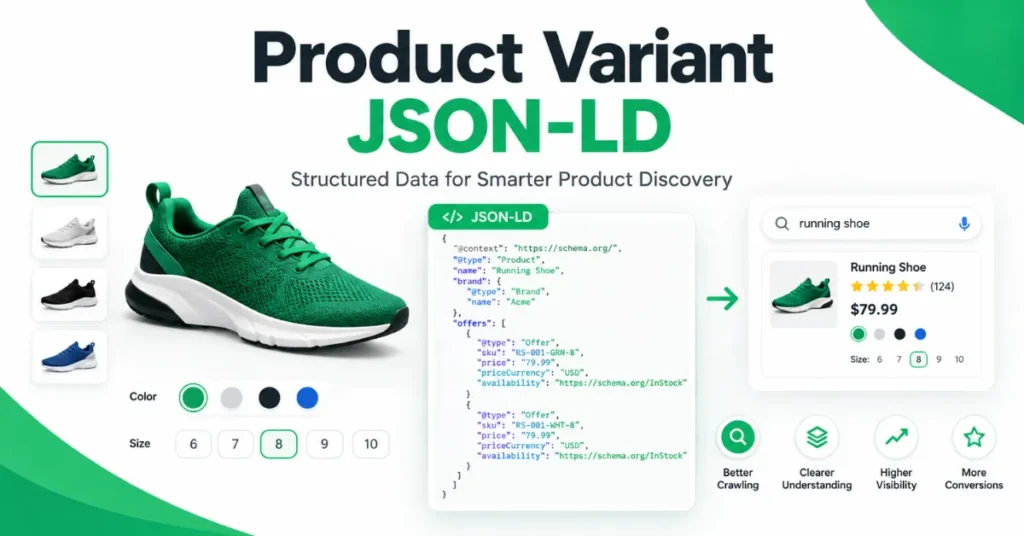
Product Variant JSON-LD tells search engines how individual product variations belong to a common parent product.
The recommended model uses Schema.org’s ProductGroup as the parent and Product for each variant, with hasVariant, variesBy, and productGroupID defining the relationship.
Google introduced support for this model specifically to help Search understand variants such as different sizes, colors, materials, patterns, and configurations, as documented in Google’s Product variant structured data documentation.
For an ecommerce site, the conceptual structure is:
ProductGroup
├── Product — Small / Green
├── Product — Small / Blue
└── Product — Large / Blue
The important point is that the markup should represent the actual product architecture, not simply generate multiple Product objects for SEO.
If you are new to JSON-LD, start with SearchEngineZine’s JSON-LD for Beginners before implementing a more complex product graph.
How Product Variant JSON-LD Works
Schema.org defines ProductGroup as a group of products that vary in explicitly described dimensions such as size, color, or material.
The group itself represents the common product concept, while the individual Product entities represent the variants that can be offered for sale.
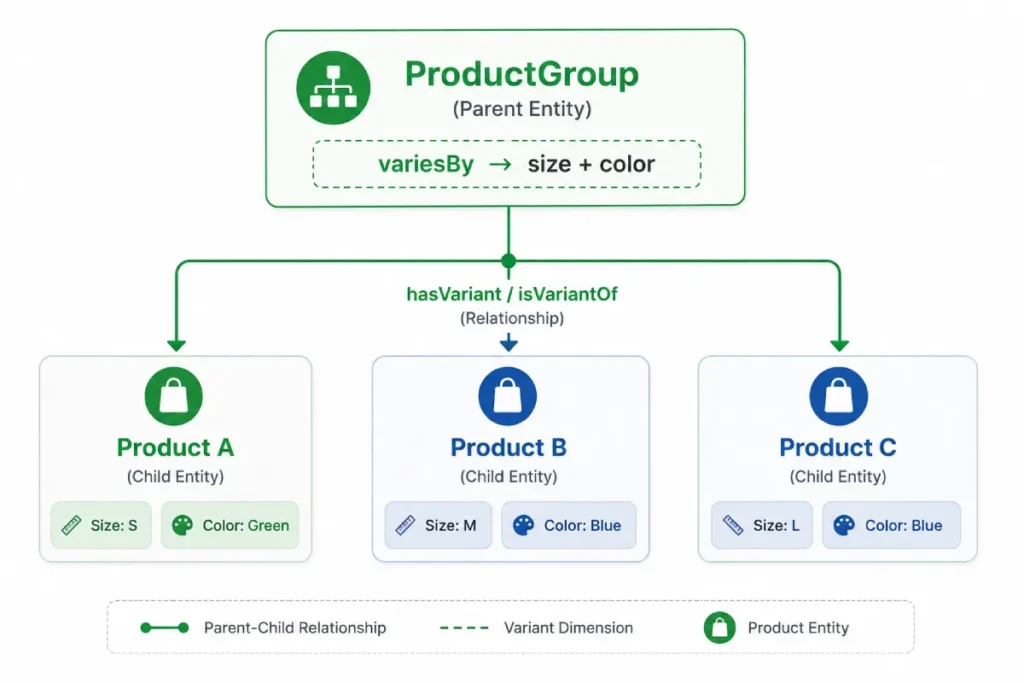
Schema.org’s ProductGroup definition describes the group as a collection of products that vary in specific, clearly defined ways such as size, color, or material.
Google’s implementation centers on three ProductGroup properties:
| Property | What it communicates |
|---|---|
hasVariant | Which Product entities belong to the group |
variesBy | Which properties distinguish the variants |
productGroupID | The identifier for the parent product group |
The individual variant can also use isVariantOf to point back to the parent ProductGroup. Schema.org defines hasVariant as the property used on ProductGroup to indicate that a Product belongs to the group.
This relationship model is the core of Product Variant JSON-LD.
The Core Product Variant JSON-LD Structure
A simplified single-page implementation looks like this:
Product Variant JSON-LD
A practical example showing how individual product variants can be represented with structured product data, including SKU, color, size, pricing, availability, and variant-specific URLs.
[
  {
    "@type": "Product",
    "name": "Wool Winter Coat - Small Green",
    "sku": "COAT-100-S-GREEN",
    "image": "https://example.com/images/coat-green.jpg",
    "color": "Green",
    "size": "Small",
    "offers": {
      "@type": "Offer",
      "url": "https://example.com/wool-winter-coat?size=small&color=green",
      "priceCurrency": "USD",
      "price": 89.99,
      "availability": "https://schema.org/InStock"
    }
  },

  {
    "@type": "Product",
    "name": "Wool Winter Coat - Large Blue",
    "sku": "COAT-100-L-BLUE",
    "image": "https://example.com/images/coat-blue.jpg",
    "color": "Blue",
    "size": "Large",
    "offers": {
      "@type": "Offer",
      "url": "https://example.com/wool-winter-coat?size=large&color=blue",
      "priceCurrency": "USD",
      "price": 94.99,
      "availability": "https://schema.org/InStock"
    }
  }
]Wool Winter Coat — Small Green
Wool Winter Coat — Large Blue
The values above are illustrative. Production markup should use the site’s real product information, URLs, identifiers, prices, availability, and variant attributes.
Google’s own product-variant documentation uses this nested ProductGroup → hasVariant model as a compact way to represent variants on a single page.
For a broader look at interconnected structured-data entities, SearchEngineZine’s Advanced Schema Markup guide provides additional context.
What variesBy Actually Does
variesBy tells Google which properties define the variation dimensions within the product group.
For example:
"variesBy": [
  "https://schema.org/size",
  "https://schema.org/color"
]
Schema.org’s variesBy definition specifies that the property identifies the property or properties by which the variants in a ProductGroup vary, such as size or color. The important implementation principle is simple:
Only declare dimensions that actually distinguish the variants.
If a product varies by color and size, don’t add material merely because the product has a material attribute. variesBy should describe the dimensions that define the variant set.
productGroupID vs. Variant SKU
The parent product group and individual variants need different identifiers.
Consider:
ProductGroup:
COAT-100

Variants:
COAT-100-S-GREEN
COAT-100-L-BLUE
The parent identifier can be represented as:
"productGroupID": "COAT-100"while each Product has its own SKU.
Google’s product-variant documentation describes productGroupID as the ID of the ProductGroup, also referring to it as the parent SKU.
Don’t use the same identifier for every variant if your underlying catalog treats those variants as separate SKUs.
hasVariant vs. isVariantOf
There are two ways to express the parent-child relationship.
Parent-to-variant
ProductGroup + hasVariant
The ProductGroup entity acts as the parent structure, while hasVariant connects individual Product entities representing specific product variations.
{
  "@type": "ProductGroup",

  "hasVariant": [

    {
      "@type": "Product",

      "name":
        "Small Green Coat"
    }

  ]
}ProductGroup
Represents the overall product family or group that contains related variants.
Product
Represents an individual variation, such as the Small Green Coat.
This says that the ProductGroup contains the product.
Variant-to-parent
Product + isVariantOf
The isVariantOf property connects an individual Product entity to the parent product or product group it belongs to.
{
  "@type": "Product",

  "name":
    "Small Green Coat",

  "isVariantOf": {
    "@id":
      "#coat-parent"
  }
}Coat Parent
The parent product or product group identified by the referenced ID.
#coat-parentSmall Green Coat
This Product entity identifies the specific variant within the parent structure.
This says that the individual product is a variant of the identified parent.
Schema.org explicitly defines hasVariant and isVariantOf as inverse properties.
Google documents both nested and separately defined approaches, which is particularly useful for ecommerce systems where a CMS naturally generates separate product entities.
Single-Page vs. Multi-Page Product Variants
This is one of the most important implementation decisions.
Single-page variants
In a single-page implementation, the variants are selections within one product experience.
For example:
https://example.com/wool-coatThe page might dynamically change the displayed image, size, color, price, or availability as the shopper selects a variant.
Google recommends a distinct canonical URL for the overall ProductGroup in this model, with the variants represented within the product-group structured data.
Multi-page variants
A multi-page implementation gives variants their own URLs:
https://example.com/wool-coat/green
https://example.com/wool-coat/blue
In this architecture, each page needs appropriate product information, and the structured data can connect individual Product entities to the common ProductGroup.
Google’s documentation provides a separate model for multi-page variant sites and explains how the pages can reference the parent group and related variants.
The key lesson is:
Don’t choose the JSON-LD architecture before understanding the URL architecture.
The URL model, canonicalization strategy, internal navigation, visible product content, and structured data should describe the same product system.
For the underlying canonicalization principles, see SearchEngineZine’s Canonical Tags Explained.
Product Variant Markup Still Needs Product Data
ProductGroup does not replace Product. Google’s Product documentation explains that product structured data can support both product snippets and merchant listings, while product variant structured data helps Google understand which products are variations of the same parent product.
For ecommerce pages, the individual variants should therefore carry the appropriate product-specific information.
Depending on the implementation, this can include:
nameimageskugtincolorsizematerialpatternofferspricepriceCurrencyavailability- variant-specific URL
The exact requirements depend on the Google Search feature being targeted. Google’s Product documentation separates product snippets from merchant listings, so the implementation should be evaluated against the appropriate feature requirements rather than treating all Product markup as identical.
Don’t Let JavaScript Become the Weak Link
Product variants frequently depend on JavaScript because ecommerce interfaces dynamically update prices, inventory, images, and selections.
Google specifically warns in its JavaScript structured data guidance that dynamically generated Product markup can make Shopping crawls less frequent and less reliable, especially for rapidly changing information such as price and availability.
For important ecommerce data, a stronger implementation makes the structured data available in the rendered HTML without unnecessary dependence on a late client-side execution step.
This is especially relevant for large catalogs where variant prices and inventory change frequently. SearchEngineZine’s Crawl Efficiency Hygiene provides broader context on crawl and rendering architecture.
Validate Product Variant JSON-LD Before Publishing
A valid JSON document is not enough. You should validate the implementation at several levels:
- Check JSON syntax.
- Confirm that every variant corresponds to a real product variation.
- Verify that
variesBymatches the actual variant dimensions. - Check parent and variant identifiers.
- Verify variant URLs.
- Confirm price and availability accuracy.
- Test representative URLs with Google’s Rich Results Test.
- Inspect the rendered page and structured data.
- Monitor Search Console after deployment.
Google recommends using the Rich Results Test and URL Inspection when testing structured-data implementations. Google also notes that structured-data eligibility does not guarantee that a search feature will actually appear.
For a practical structured-data workflow, SearchEngineZine also provides the Article Schema Architect as a structured-data generation resource, although product-variant implementations should still be validated against Google’s product-specific documentation.
Product Variant JSON-LD Implementation Checklist
Work through each verification point and manually check the box when the implementation has been completed and verified.
The Practical SEO Takeaway
Product Variant JSON-LD is fundamentally a relationship model, not simply another schema snippet. The implementation should communicate:
ProductGroup
│
├── Product Variant A
├── Product Variant B
└── Product Variant C
ProductGroup defines the common product family. variesBy identifies the dimensions that distinguish the variants. productGroupID identifies the parent group. hasVariant connects the group to its products, while isVariantOf provides the reverse relationship.
The strongest implementation is therefore not the one containing the largest amount of JSON-LD. It is the one where the catalog, visible content, variant attributes, URLs, canonicalization, offers, and structured-data relationships all describe the same underlying product system.
Google’s product-variant support is designed to help Search understand that relationship. It should therefore be implemented as an accurate representation of the ecommerce architecture—not as a separate SEO layer disconnected from it.




