
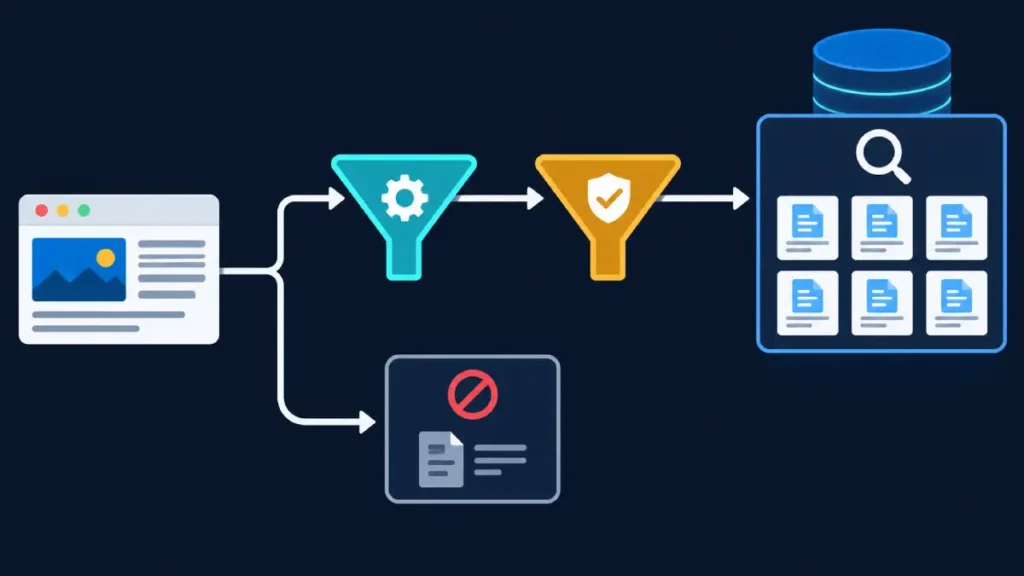
Indexation directives are explicit instructions embedded in a webpage’s HTML, HTTP response headers, or site configuration files that tell search engine crawlers how to index, display, and follow links on a URL.
For SEO professionals managing enterprise architectures, faceted navigation, or dynamic parameters, indexation directives are the primary mechanism for preventing index bloat, preserving crawl efficiency, and consolidating ranking signals on canonical URLs.
Unlike crawling controls—such as robots.txt Disallow rules, which prevent search engines from requesting a resource—indexation directives govern what happens after a crawler fetches and parses a response.
Misunderstanding this boundary is one of the most common causes of accidental de-indexing or persistent indexation of low-value URLs.
How Search Engines Process Indexation Directives
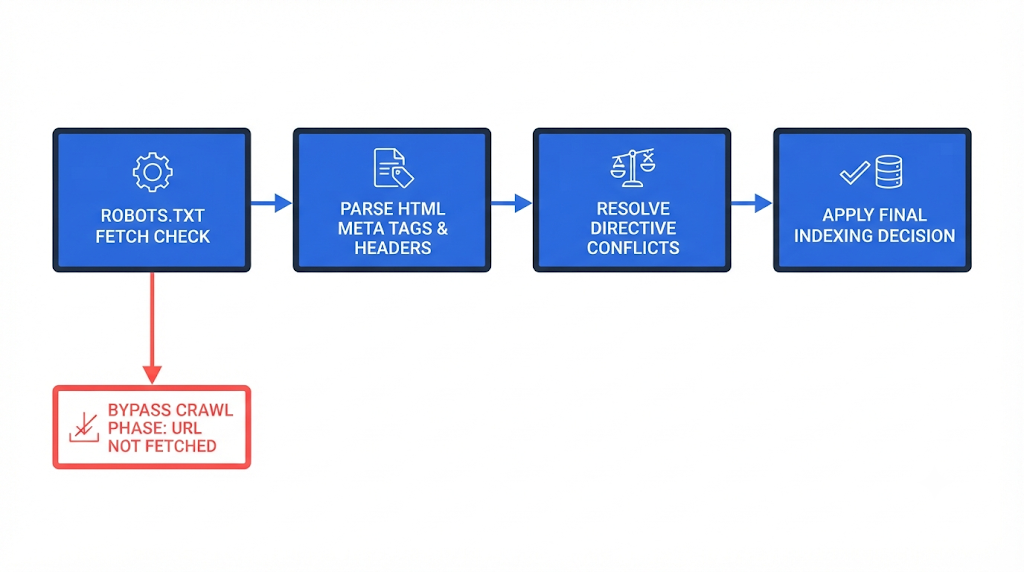
When a search engine crawler such as Googlebot requests a URL, it evaluates access and indexing rules in a strict sequence. Understanding this pipeline prevents conflicting signals from neutralizing your technical SEO strategy.
- Fetch Authorization (
robots.txt): Before requesting a page, the crawler checks/robots.txtin accordance with the IETF Robots Exclusion Protocol (RFC 9309). If aDisallowdirective matches the URL path, the crawler stops and does not fetch the page content or HTTP headers. - Header and Markup Parsing: If crawling is permitted, the crawler downloads the resource and inspects both the HTTP response headers (specifically
X-Robots-Tag) and the HTML<head>section (<meta name="robots">or bot-specific meta tags). - Signal Consolidation and Precedence: When multiple directives appear across headers and HTML tags, search engines resolve conflicts using a “most restrictive wins” rule for indexing. For instance, if the HTML meta tag specifies
indexwhile theX-Robots-TagHTTP header specifiesnoindex, Google honorsnoindex. - Canonicalization and Clustering: After confirming that a URL is eligible for indexing, search engines evaluate
rel="canonical"annotations, internal links, redirects, and sitemaps to select a single representative URL for duplicate or near-duplicate clusters.
Because crawlers must fetch a URL to read noindex or canonical directives, blocking a URL in robots.txt prevents the search engine from seeing those directives.
If a blocked URL accumulates external backlinks, search engines may still index the URL without its content—displaying a bare URL in search results—because they were forbidden from reading the noindex tag.
Core Indexation Directives and Implementation Methods
SEO professionals deploy indexation directives through two primary delivery mechanisms: HTML <meta> tags for standard webpages and X-Robots-Tag HTTP headers for non-HTML assets or server-level rule enforcement.
The Meta Robots Tag
The <meta name="robots"> tag resides inside the <head> element of an HTML document. It applies to all compliant search engine crawlers unless targeted to a specific user agent (e.g., <meta name="googlebot" content="noindex">).
<meta name=“robots” content=“noindex, follow”>
<!– Targeted directive restricting snippet length for Google only –>
<meta name=“googlebot” content=“max-snippet:160, max-image-preview:large”>
When targeting specific bots, note that Google combines rules from both robots and googlebot tags, applying the more restrictive rule whenever a conflict occurs.
The X-Robots-Tag HTTP Header
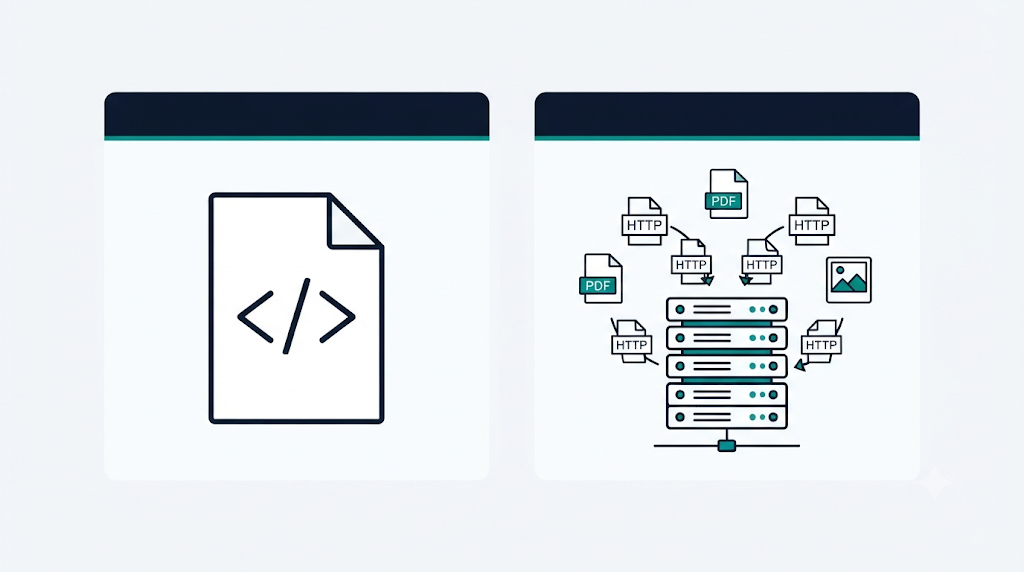
The X-Robots-Tag operates at the HTTP protocol level rather than the document markup level. This makes it indispensable for controlling indexation on PDFs, images, videos, JSON endpoints, and legacy templates where modifying HTML <head> code is impractical.
In an Apache .htaccess or server configuration file, you can apply directives by file extension:
Header set X-Robots-Tag “noindex, nofollow”
</FilesMatch>
In Nginx configurations, the equivalent rule uses add_header:
add_header X-Robots-Tag “noindex, nofollow”;
}
Primary Directive Values Reference
Search engines support a standardized vocabulary of rule values across both meta tags and X-Robots-Tag headers, as detailed in Google’s robots meta tag and X-Robots-Tag specifications.
| Directive Value | Functional Behavior | Primary SEO Use Case |
noindex | Prevents the URL from appearing in search results. | Internal search results, staging environments, thin parameter pages, thank-you pages. |
index | Explicitly permits indexation (default behavior if omitted). | Rarely required; useful only when overriding a broader server-level header rule. |
nofollow | Instructs crawlers not to follow or pass link equity through outbound links on the page. | Untrusted user-generated content pages, login portals, or paid link directories. |
follow | Permits crawlers to follow links on the page (default behavior). | Paginated archives or category filters marked noindex, follow to preserve link discovery. |
none | Shorthand equivalent to noindex, nofollow. | Private utility endpoints, administrative panels, or quarantined pages. |
noarchive | Prevents search engines from storing and serving a cached copy of the page. | Rapidly changing pricing pages, time-sensitive paywalled content, or compliance-restricted pages. |
nosnippet | Prohibits displaying a text snippet or video preview in search results. | Pages containing proprietary excerpts where click-through requires hiding preview text. |
max-snippet:[number] | Caps the text snippet length at a specified character count (0 equals nosnippet; -1 sets no limit). | Publisher content testing snippet lengths for CTR optimization. |
max-image-preview:[setting] | Sets maximum thumbnail image size (none, standard, or large). | Articles and product pages targeting Google Discover (large is generally required). |
max-video-preview:[number] | Limits video preview duration in seconds (0 disables; -1 sets no limit). | Video landing pages managing preview exposure in SERPs. |
notranslate | Prevents search engines from offering automated translation links in SERPs. | Brand-specific legal copy, localized technical documentation, or idiom-heavy creative pages. |
noimageindex | Prevents images embedded on the page from being indexed in image search. | Proprietary photography or licensed visual assets hosted on public articles. |
unavailable_after:[date/time] | Schedules automatic de-indexing after a specified RFC 850 timestamp. | Limited-time promotional landing pages, expired job postings, or event listings. |
Directives vs. Hints: Navigating Signal Ambiguity
A frequent architectural error in technical SEO is treating all indexation-related tags as binding commands. Search engines categorize page-level instructions into two distinct classes: strict directives and strong hints.
- Strict Directives (
noindex,nofollowin meta/headers,unavailable_after): Compliant search engines treat these as binding rules. Unless blocked byrobots.txtfrom seeing the tag, Google will drop anoindexURL from its index. - Strong Hints (
rel="canonical",hreflang, XML sitemaps,robots.txtcrawl-delay): Search engines treat these as high-priority recommendations rather than absolute commands. If a page specifiesrel="canonical"pointing to Page B, but internal links, redirects, and content similarity strongly favor Page A, Google may ignore the canonical hint and index Page A instead.
Furthermore, combining noindex with rel="canonical" pointing to a different URL sends contradictory signals. noindex tells the search engine to remove the URL from the index, while rel="canonical" tells it to consolidate signals onto a target URL.
When Google encounters both on the same page, it frequently drops the page from the index without consolidating link equity to the canonical target. As outlined in Google’s documentation on blocking search indexing with noindex , use rel="canonical" when consolidating duplicate content and noindex only when the page should not exist in search results at all.
Enterprise Architecture Scenarios and Best Practices
Deploying indexation directives effectively requires aligning technical controls with site architecture and crawl budget realities.
Faceted Navigation and URL Parameters
E-commerce and directory sites often generate millions of parameter combinations (e.g., ?color=blue&size=large&sort=price_asc). Allowing search engines to crawl and index every combination dilutes site quality signals and wastes crawl capacity.
- Low-value sorting and session parameters (
?sort=,?view=,?sessionid=): Block crawling viarobots.txtor handle via URL parameter configurations so crawlers never waste bandwidth fetching duplicate views. - Combinatorial filter facets (2+ active filters): Apply
<meta name="robots" content="noindex, follow">dynamically once a user selects more than one non-canonical filter attribute, ensuring crawlers do not index thin intersections while still discovering product links. - High-demand single-attribute facets (e.g.,
/shoes/running/): Convert into clean, static URLs with self-referencing canonicals (index, follow) and unique metadata.
Pagination Series
Modern search engine handling of paginated archives relies on self-referencing canonicals rather than canonicalizing page 2, 3, and beyond back to page 1. Pointing all paginated pages to page 1 tells search engines that pages 2+ are duplicates of page 1, which can cause crawlers to stop indexing deeper product or article links.
Keep paginated URLs (?page=2) set to index, follow with self-referencing canonicals, or use noindex, follow only if deep archive pages generate severe index bloat and product links are already reachable through primary category paths and XML sitemaps.
Staging, QA, and Pre-Production Environments
Relying solely on noindex to hide a staging environment from public search results is insufficient. While noindex prevents SERP appearance, the URLs remain publicly accessible to users and bots.
- Protect staging environments with HTTP Basic Authentication or IP allowlisting at the server or CDN level.
- Add a global
X-Robots-Tag: noindex, nofollowheader as a secondary safeguard in case authentication is temporarily disabled during testing. - Ensure staging
robots.txtfiles do not block crawlers if you are actively trying to purge accidentally indexed staging URLs vianoindex.
Long-Term Impact of noindex, follow
Historically, SEO practitioners used noindex, follow indefinitely to allow link equity to flow through non-indexed pages. However, Google has confirmed that over extended periods, URLs consistently marked noindex are eventually treated similarly to noindex, nofollow—meaning Google stops crawling outbound links on those pages altogether. Treat noindex, follow as a transitional state rather than a permanent PageRank sculpting mechanism; if a page contains important internal links, link to those destinations directly from indexable hub pages.
Auditing and Troubleshooting Indexation Directives
Regular technical audits prevent silent regressions caused by CMS updates, CDN header overrides, or staging configurations leaking into production.
- Inspect Live HTTP Headers and Rendered DOM: Use the Google Search Console URL Inspection tool or
curl -Ito verify both the raw HTTP response headers and the rendered HTML<head>. JavaScript frameworks frequently inject or alter<meta name="robots">tags client-side; if a server deliversnoindexin the initial HTML and JavaScript removes it later, Googlebot will honor the initialnoindexand skip rendering. - Audit
robots.txtvs.noindexConflicts: Cross-reference URLs flagged as “Indexed, though blocked by robots.txt” in Google Search Console. If you want those URLs removed from search results, temporarily remove therobots.txtDisallowrule, ensure the pages servenoindex, allow Googlebot to recrawl and drop them, and only re-apply therobots.txtblock afterward. - Verify XML Sitemap Hygiene: Audit your XML sitemaps to confirm every listed URL returns a
200 OKstatus code, has a self-referencing canonical, and contains nonoindexdirective. SubmittingnoindexURLs in an XML sitemap creates conflicting signals and degrades sitemap trust. - Monitor Response Header Consistency Across CDNs: Edge caching layers (such as Cloudflare, Fastly, or Akamai) can strip, duplicate, or override
X-Robots-Tagheaders. Test live production URLs directly rather than relying solely on origin server configuration files.
Actionable Next Steps for Technical SEO Teams
- Establish a Directive Governance Matrix: Document which page templates (core landing pages, faceted filters, internal search, PDFs, pagination) require
index, follow,noindex, follow, orrobots.txtblocks, and enforce those rules via automated CI/CD checks. - Run a Crawl-to-Index Reconciliation: Compare a full site crawl (via Screaming Frog or Sitebulb) against Google Search Console’s Page Indexing report to identify mismatches between intended directives and actual Google indexation states.
- Eliminate Mixed Signals: Remove
rel="canonical"tags pointing to external targets onnoindexpages, stripnoindexURLs from XML sitemaps, and unblocknoindexpages inrobots.txtuntil de-indexation completes.