
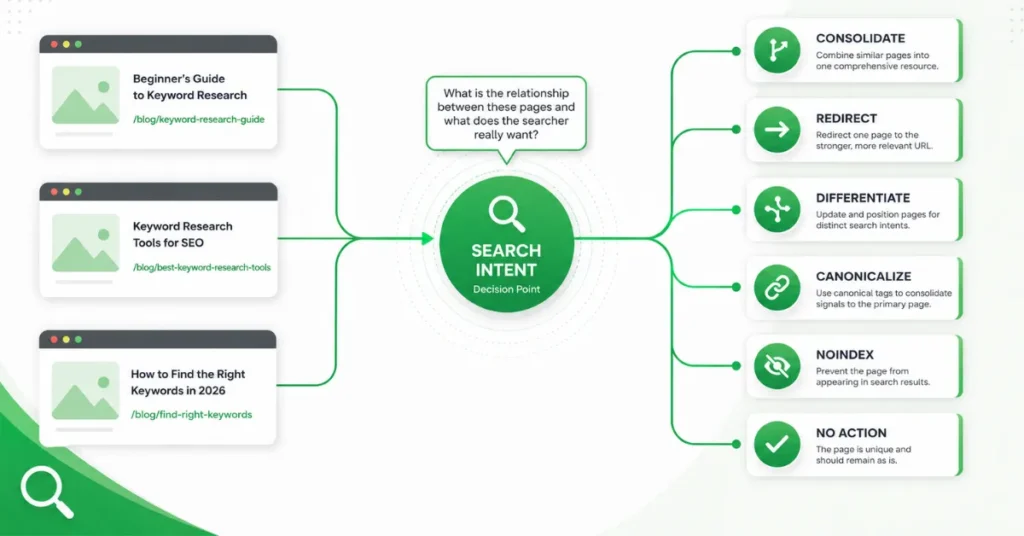
Keyword cannibalization is best treated as a page-intent and content-architecture problem, not something you should assume exists simply because two URLs appear for the same keyword.
Start by determining whether the pages genuinely serve the same search intent. If they do, identify which URL should be the primary destination and then choose the appropriate response: consolidate, redirect, differentiate, canonicalize, noindex, or leave the pages alone.
A practical workflow is:
Detect → Compare intent → Evaluate page value → Choose the primary URL → Apply the appropriate fix → Validate
Google Search Console can help with the diagnostic part of this process because its Performance report lets you examine queries, pages, clicks, impressions, CTR, and average position. You can also select a query and view the pages that Google showed for it.
Don’t fix ranking overlap. Fix genuine intent and page-purpose overlap.
First, Confirm That It Is Actually Cannibalization
Before changing any URL, determine whether the pages actually compete for the same user need.
Two URLs appearing for related queries is a reason to investigate—not automatic proof that one page is harming the other.
Ask:
- Do the pages satisfy the same search intent?
- Do they have essentially the same purpose?
- Is their information substantially overlapping?
- Would one stronger URL provide a better destination for that intent?
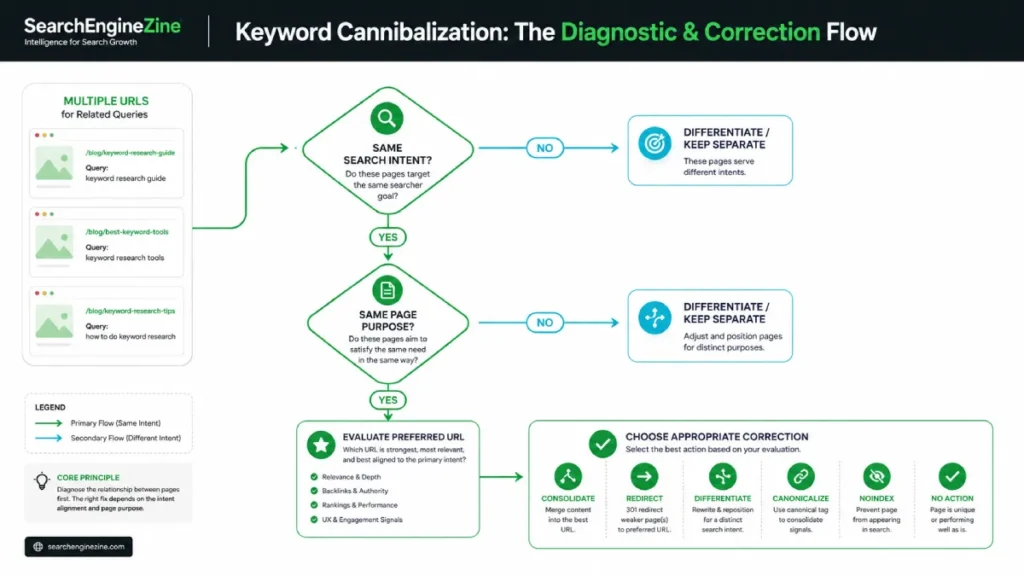
If the answers are mostly yes, consolidation or another corrective action may be appropriate.
If the pages serve clearly different intents, keeping both can be the better decision.
Use the SERP as a diagnostic clue
Search the target query and examine what each page is actually designed to accomplish.
For example, two pages might both mention “keyword cannibalization” while serving different purposes:
- One explains the concept.
- Another provides an audit or service.
- Another explains a technical implementation.
- Another targets a different stage of the user’s decision process.
Shared terminology does not make them duplicates.
Search intent should determine the relationship between the pages.
For a deeper treatment of intent analysis, see SearchEngineZine’s Keyword Intent Analysis guide.
How to Find Competing URLs
Google Search Console provides a practical starting point for investigating potential overlap.
1. Start with the query
Open Google Search Console → Performance → Search results.
The Performance report lets you analyze search traffic using dimensions such as queries and pages, alongside metrics including clicks, impressions, CTR, and average position.
2. Filter to the suspected query
Select the query you want to investigate.
Then open the Pages view.
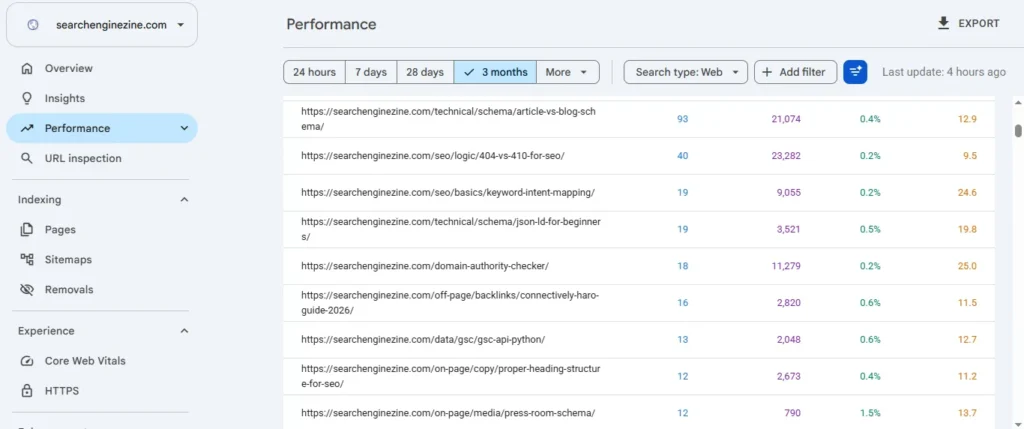
Google’s documentation specifically describes this workflow for seeing which pages from your site Google has shown for a given query.
3. Compare the URLs
For each URL, examine:
- Search intent
- Page purpose
- Main topic
- Content overlap
- Clicks
- Impressions
- CTR
- Performance trends
- Existing links or other valuable page signals
Don’t make the decision from average position alone. Google recommends focusing more on trends in impressions and clicks than position alone.
There is also an important Search Console reporting caveat: most performance data is assigned to the page’s canonical URL rather than to a duplicate URL. Therefore, Search Console data should be interpreted alongside the actual page and canonical relationship.
4. Inspect the pages themselves
Search data tells you what is happening.
The pages help explain why.
Compare their:
- titles;
- headings;
- content purpose;
- target audience;
- supporting information;
- internal links;
- calls to action.
How to Decide Which URL Should Be Primary
Once genuine overlap has been established, don’t simply choose the URL with the keyword in its title.
Ask:
Which URL is the most appropriate destination for this search intent?
Consider:
| Factor | What to evaluate |
|---|---|
| Search intent | Which page best satisfies the query? |
| Topic relevance | Which page most directly addresses the subject? |
| Content quality | Which page provides the stronger experience? |
| Existing performance | Which URL already demonstrates useful search visibility? |
| Links and authority | Does either URL have valuable external signals? |
| Content depth | Which page can become the strongest resource without unnecessary duplication? |
| User journey | Which URL makes the most sense as the destination? |
| Business purpose | Which page better serves the site’s intended outcome? |
The goal is not necessarily to preserve whichever URL currently has the highest position.
The goal is to establish clear ownership of the search intent.
For a broader framework for connecting search intent with page roles, see SearchEngineZine’s Keyword Intent Mapping breakthrough.
Choose the Right Fix for the Situation
There is no universal keyword-cannibalization fix.
The correct action depends on the relationship between the pages.
| Situation | Potential response |
|---|---|
| Two pages serve essentially the same intent and duplicate each other’s purpose | Consider consolidation |
| One page is replacing another and the old URL no longer has a separate purpose | Consider a permanent redirect |
| Pages cover related subjects but satisfy different intents | Differentiate and keep them separate |
| Pages are substantially duplicate or near-duplicate resources | Evaluate canonicalization |
| A page should remain accessible but should not appear in Search | Consider noindex where appropriate |
| Multiple URLs legitimately satisfy different intents | No corrective action may be necessary |
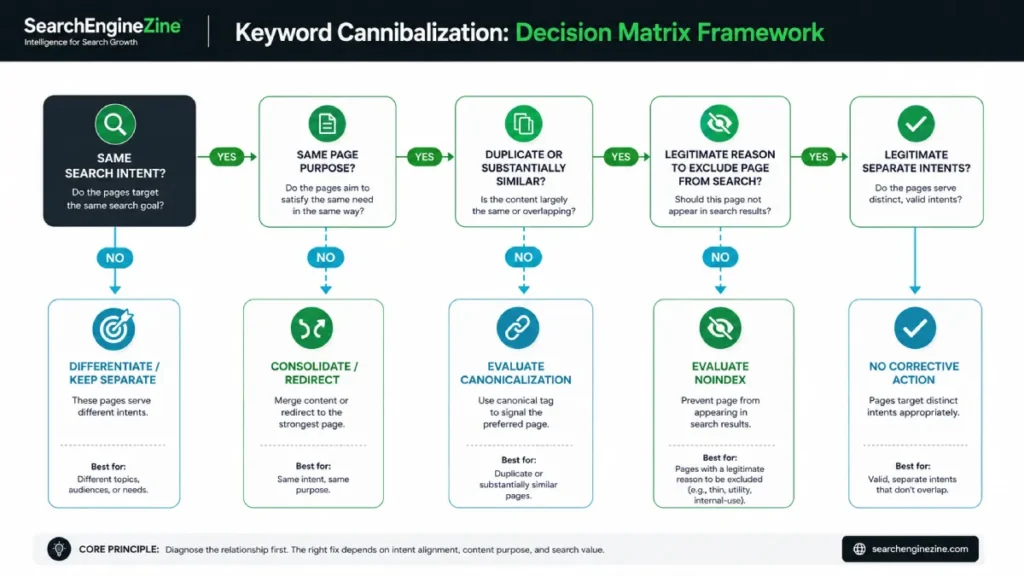
The objective is to fix the underlying page relationship, not manipulate URLs simply because their keywords overlap.
Consolidate overlapping pages
If two pages substantially serve the same intent and one stronger resource can satisfy the searcher better, consolidation may be appropriate.
The goal is to create one clear destination rather than maintain multiple pages performing essentially the same job.
Before consolidating, evaluate the value of both URLs. Don’t delete a page simply because another URL currently performs better.
Redirect a redundant URL
If another is genuinely replacing one URL, a permanent redirect can be appropriate.
Google recommends permanent server-side redirects such as 301 or 308 for permanent URL changes and documents consolidation of several pages into one as a legitimate redirect use case.
The redirect should point users and search engines toward the relevant consolidated destination. Avoid sending unrelated URLs to a generic page to eliminate them.
Differentiate pages with distinct search intent
This is one of the most important exceptions.
Consider:
- “keyword cannibalization” — informational intent
- “keyword cannibalization audit service” — commercial/service intent
These pages concern the same subject but can serve different user needs.
Rather than merging them automatically, make the distinction clear through:
- page purpose;
- content;
- titles;
- headings;
- internal linking;
- search-intent alignment.
Related topics do not automatically require consolidation.
Evaluate canonicalization carefully
Canonicalization is not a general-purpose keyword-cannibalization fix.
Google defines canonicalization as selecting the representative URL for duplicate or substantially similar content. Google may use signals such as redirects, sitemap inclusion, and rel="canonical" when determining the canonical URL, but a canonical declaration is a hint rather than a guarantee.
Therefore, ask:
Are these actually duplicate or substantially similar resources that should have one representative URL?
If the pages have materially different purposes, changing the canonical may not address the underlying problem.
See SearchEngineZine’s Canonical Tags guide for a deeper technical treatment.
Evaluate noindex carefully
noindex serves a different purpose: it tells Google not to index a page or show it in Search.
It should therefore not be used simply because two pages target related keywords.
Consider noindex only when there is a legitimate reason for the page to remain accessible while being excluded from Search.
Validate the Fix
Implementation is not the final step.
You need to determine whether the intended page relationship was actually established.
Validation workflow
- Record the URLs and queries involved before making changes.
- Implement the selected correction.
- Confirm that redirects, canonicals or indexing directives are technically correct.
- Monitor the relevant queries and pages in Search Console.
- Compare clicks, impressions, CTR and performance trends over time.
- Check whether the intended URL is appearing for the relevant queries.
- Reassess if the result differs from the intended outcome.
Search Console provides query and page performance data for this monitoring process.
For canonicalization issues, Google’s URL Inspection guidance can help determine which URL Google selected as canonical and investigate conflicting signals.
Don’t judge the change immediately.
The goal isn’t:
“The old URL disappeared.”
The goal is:
“The appropriate URL now serves the search intent and the site’s page architecture is clearer.”
Prevent Future Keyword Cannibalization
The best cannibalization fix is often the one you never need to make.
Before publishing a new page, ask:
- Does another URL already target this search intent?
- What is the primary purpose of the new page?
- Which existing page owns this topic?
- Is the new page genuinely different?
- Should the existing page be expanded instead?
- What internal links should connect the related resources?
A simple planning model is:
Search intent → Primary topic → Target URL → Supporting content
This approach makes page ownership explicit before another URL is created.
Keyword Cannibalization Decision Checklist
Use this sequence before changing any URL:
1. Detect
Are multiple URLs appearing for related queries?
↓
2. Verify
Do those URLs actually satisfy the same search intent?
↓
3. Evaluate
Which URL has the strongest relevance, purpose, and existing value?
↓
4. Decide
Should the pages be consolidated, redirected, differentiated, canonicalized, noindexed, or left alone?
↓
5. Implement
Apply the selected change correctly.
↓
6. Validate
Monitor the relevant queries and URLs to determine whether the intended outcome occurred.
The most important rule is:
Don’t fix ranking overlap. Fix genuine intent and page-purpose overlap.
That distinction helps prevent unnecessary redirects, consolidation, and indexing changes while keeping the focus on the user’s actual search need.




