
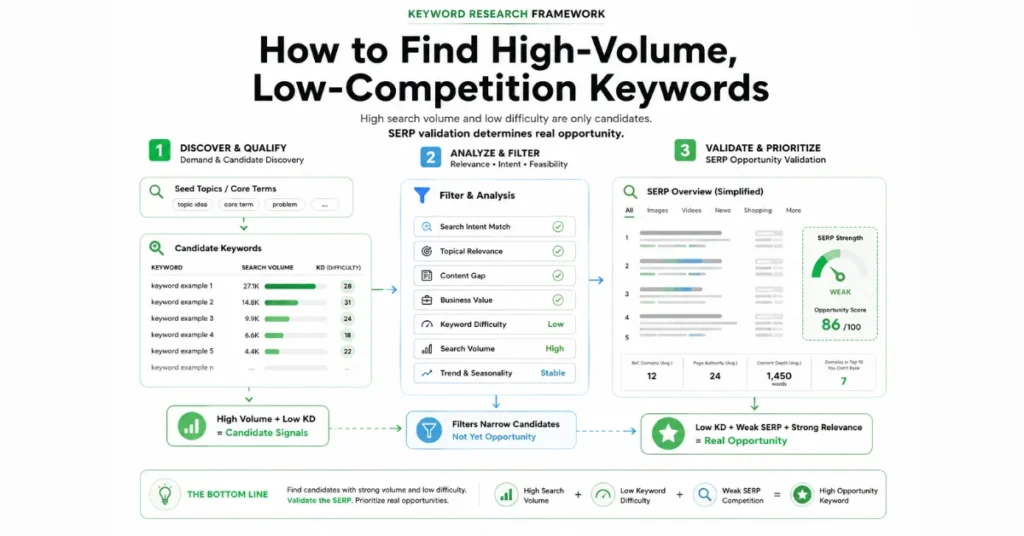
The most reliable way to find high-volume, low-competition keywords is to use a keyword research tool to discover and filter candidates, then inspect the actual Google SERP before deciding what to target.
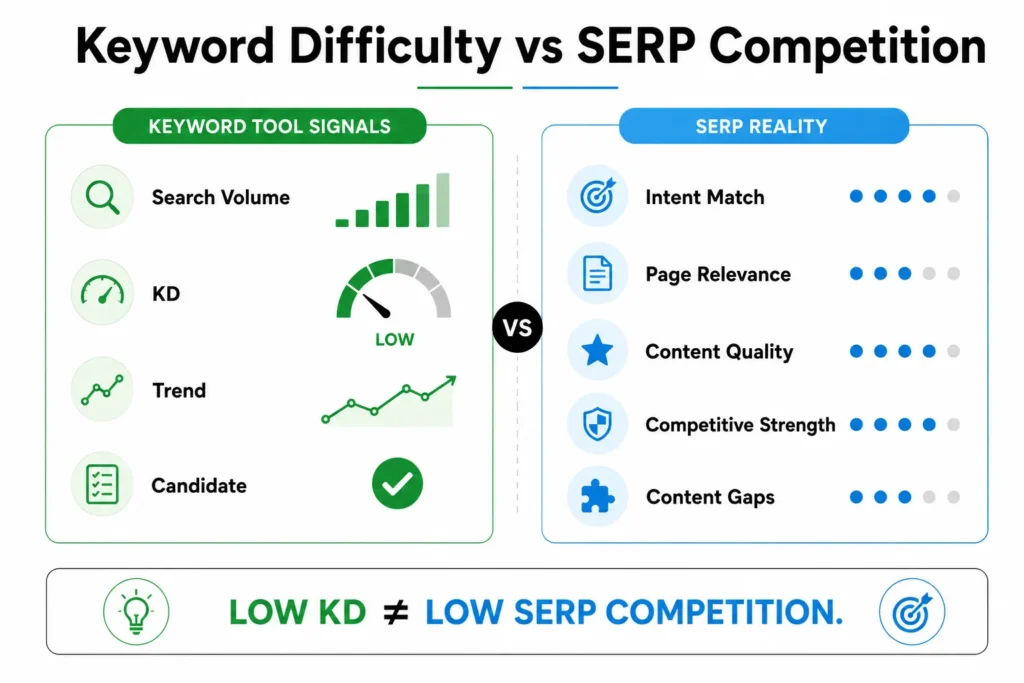
KWFinder can help you identify keyword ideas, search-volume data, Keyword Difficulty (KD), and competitor keyword opportunities. But a low KD score does not automatically mean a keyword is easy for your site to rank for.
A practical workflow is:
Seed keyword → KWFinder → volume/KD filter → SERP analysis → opportunity test → final keyword
The objective isn’t to find the keyword with the highest search volume. It’s to find a keyword with meaningful demand, strong relevance, appropriate intent, and a SERP where your site has a realistic opportunity to compete.
What Actually Makes a Keyword High-Volume and Low-Competition?
There is no universal search-volume number that makes a keyword “high volume,” and no universal KD threshold that makes one “low competition.”
The important distinction is that keyword metrics and actual ranking opportunity are not the same thing.
| Metric | What it tells you | What it doesn’t tell you |
|---|---|---|
| Search volume | Estimated search demand | Whether you can rank or how much traffic you will receive |
| Keyword Difficulty | A tool-based estimate of ranking difficulty | Whether your specific page can outperform the current SERP |
| SERP analysis | What currently appears for the query | Whether those rankings will remain unchanged |
| Search intent | What the searcher appears to want | How much demand exists for the query |
KWFinder defines search volume as the number of searches for a keyword over a specified period and recommends considering factors such as relevance and keyword difficulty alongside volume.
So treat these metrics as filters rather than final decisions. SearchEngineZine’s broader keyword research process also moves beyond isolated volume analysis toward intent, competitor research, long-tail opportunities, and keyword-to-content mapping.
A better model is:
Search demand + relevance + matching intent + realistic SERP competition = keyword opportunity
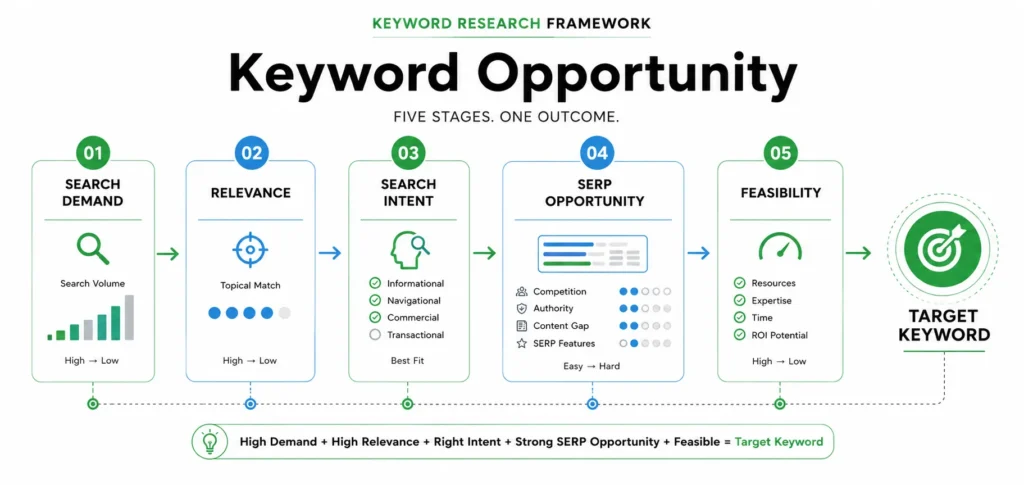
How to Find High-Volume, Low-Competition Keywords with KWFinder
1. Start with a relevant seed keyword
Begin with a topic directly connected to your website, audience, or business.
For example, an SEO website might start with:
keyword research
Don’t assume that a broad term is the target. Use it as the starting point for discovering more specific searches.
KWFinder allows keyword research by keyword or domain and provides keyword ideas, search-volume information, difficulty metrics, and competitor keyword research.
The objective at this stage is simple:
Build a candidate list.
2. Filter by search volume and Keyword Difficulty
Next, narrow the candidate list.
Look for keywords with:
- sufficient search demand;
- manageable difficulty for your website;
- strong topical relevance;
- clear intent.
Avoid universal rules such as:
“Only target keywords above 1,000 searches with KD below 20.”
What counts as competitive depends on the niche, query, SERP, and your site’s ability to compete.
KWFinder provides keyword-difficulty data and filtering, while its long-tail research functionality also surfaces search volume, intent, SERP content, and other keyword metrics.
Use those metrics to reduce thousands of possibilities to a shortlist worth investigating.
3. Expand into related and question keywords
Don’t stop with your original seed term.
Explore:
- related keywords;
- question-based searches;
- autocomplete variations;
- longer, more specific phrases;
- competitor keywords.
This can reveal more precise search needs and prevent your research from becoming dependent on one broad keyword.
The goal isn’t to collect hundreds of phrases.
It’s to find a smaller group of potentially valuable opportunities.
Don’t Trust Keyword Difficulty Alone: Check the SERP
This is the step that turns keyword research into actual SEO analysis.
Suppose KWFinder shows a keyword with attractive search volume and relatively low KD.
Don’t publish yet.
Search the keyword on Google and examine the results yourself.
Check search intent
First ask:
What type of page is currently satisfying this query?
Look at the dominant result formats:
- informational guides;
- tutorials;
- product pages;
- category pages;
- service pages;
- comparison pages;
- videos;
- tools or other interactive results.
If you’re planning a long informational article but the SERP consistently favors comparison pages or tools, your problem may be content-format mismatch, not keyword difficulty.
For a deeper treatment, see SearchEngineZine’s search intent analysis.
Look for weak or mismatched results
Next, examine the pages currently ranking.
Potential opportunity signals include:
- content that only partially answers the query;
- outdated information;
- superficial coverage;
- pages targeting a broader topic than the query;
- poor alignment with the dominant intent;
- important questions left unanswered.
One weak result doesn’t make a keyword easy.
The stronger question is:
Does the SERP leave enough room for a substantially better result?
Compare the ranking pages
Look beyond the domain name.
Ask:
- Does each page directly satisfy the query?
- Is the content sufficiently useful?
- Is the page focused on the specific topic?
- Are highly relevant specialist pages dominating?
- What information is missing?
- Could your page provide a materially better answer?
This is why:
Low KD ≠ low SERP competition
Your keyword tool provides a useful starting signal. The SERP provides the competitive context.
A Simple Keyword Opportunity Test
SearchEngineZine’s practical approach can be reduced to five checks:
1. Demand
Does the keyword have enough search demand to justify targeting?
2. Relevance
Is it genuinely connected to your website, audience, and business objective?
3. Intent
Can you create the type of page that satisfies the searcher’s apparent need?
4. SERP opportunity
Are there meaningful weaknesses, gaps, or mismatches among the current results?
5. Feasibility
Given your site’s current position and the quality of the competing pages, is this a realistic target?
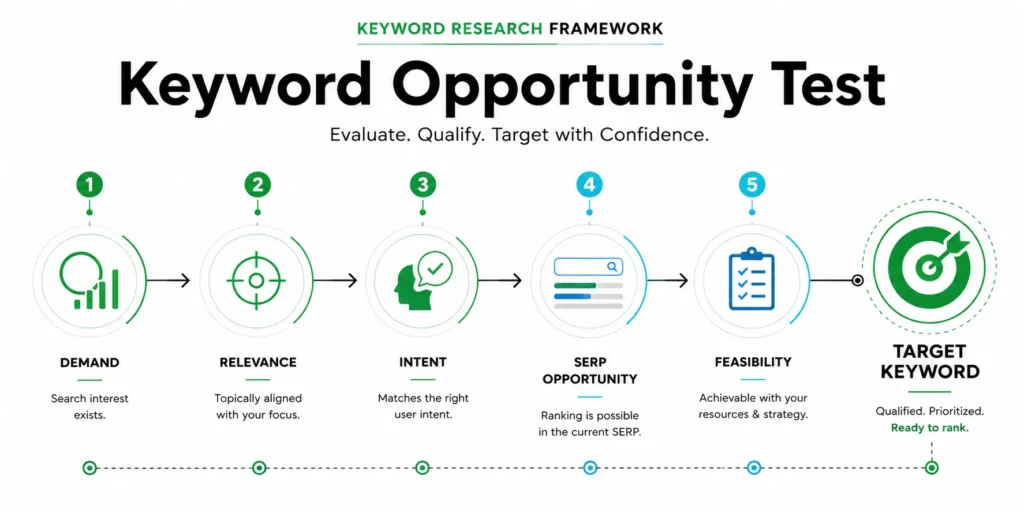
Think of the decision this way:
High volume + low KD = candidate
But:
Demand + relevance + matching intent + SERP opportunity + feasibility = target keyword
That distinction is the core of the process.
For a deeper competitor-focused approach, see SearchEngineZine’s competitor keyword gaps.
Where to Find More Keyword Opportunities
Keyword research tools are only one source of ideas.
Competitor keywords
Competitor research can expose queries that your initial seed keyword doesn’t reveal.
KWFinder supports researching competitor domains and their ranking keywords. Its keyword-gap functionality can also identify relevant terms a site isn’t ranking for or ranks poorly for.
The important part is what you do after discovering the keyword.
Don’t automatically copy the competitor’s target.
Check:
relevance → intent → SERP → feasibility
Google Search Console
Your own website can reveal another class of opportunities: queries for which Google already shows your pages.
Google Search Console’s Performance report provides data including clicks, impressions, CTR, and average position, with queries available as a reporting dimension.
Look for queries with:
- meaningful impressions;
- strong relevance;
- relatively few clicks;
- positions that could potentially be improved.
Google also recommends using the Queries report to identify popular queries and high-impression/low-CTR opportunities.
This makes Search Console particularly useful for discovering opportunities that are already connected to your site’s search visibility.
Semantic blind spots
Some opportunities won’t be obvious from a single seed keyword.
Look at:
- customer questions;
- competitor content;
- related terminology;
- support questions;
- emerging phrases;
- the language people use to describe a problem.
SearchEngineZine’s additional keyword ideas can serve as an additional keyword idea source.
The objective is not to generate the largest possible keyword list.
It’s to uncover search needs worth investigating.
Common Mistakes to Avoid
1. Choosing volume over relevance.
A high-volume keyword is not valuable if it attracts the wrong audience.
2. Treating KD as a ranking guarantee.
KD is an estimate, not a promise.
3. Ignoring the SERP.
A keyword can look attractive in a tool while the actual results remain highly competitive.
4. Assuming every long-tail keyword is easy.
Specificity does not automatically mean weak competition.
5. Ignoring search intent.
A relevant phrase can still be the wrong target if your proposed page doesn’t satisfy the searcher’s need.
6. Creating separate pages for overlapping searches.
Different keyword variations can represent the same underlying search intent.
7. Chasing traffic without business value.
The highest-volume keyword isn’t necessarily the most valuable keyword for your site.
How to Choose the Final Keyword
Once you have a shortlist, don’t simply sort it by search volume.
Prioritize candidates using this sequence:
Relevance → Intent → Demand → SERP opportunity → Feasibility → Business value
If two keywords have similar demand, the better target may be the one with clearer intent and a more realistic competitive landscape.
Likewise, a keyword with enormous volume isn’t automatically a better investment if the SERP is dominated by highly relevant, established pages.
A smaller keyword can be the stronger opportunity when it has:
- clear intent;
- meaningful demand;
- strong relevance;
- identifiable SERP weaknesses;
- realistic ranking potential.
The practical workflow is simple:
Use KWFinder to discover and filter. Use Google to validate. Use your own analysis to prioritize.
That is how you move from finding a low-difficulty keyword to finding a keyword worth targeting.




