

A Progressive Web App can be SEO-friendly, but service workers are not an SEO requirement and are not, by themselves, a Google ranking factor.
The important question is what your PWA delivers to users and search engines: crawlable URLs, indexable content, meaningful HTTP responses, accessible internal links, and a rendering architecture that reliably exposes the page content.
PWA SEO Service workers sit between the web application, browser, and network. They can intercept requests, return cached responses, and enable offline experiences.
That makes them important to audit when a PWA has unusual caching or routing behavior—but the larger SEO issue is usually the rendering and URL architecture around the service worker, not the mere presence of a service worker.
Google Search processes JavaScript through crawling, rendering, and indexing, and recommends server-side or pre-rendering where appropriate because it can make content faster and easier for crawlers to process.
What Actually PWA SEO Service Workers Do
A service worker is an event-driven JavaScript worker that can intercept network requests and control how resources are retrieved or cached. MDN’s Service Worker API documentation provides the underlying technical definition and behavior.
For SEO, that creates an important distinction:
| PWA component | Primary purpose | SEO significance |
|---|---|---|
| Service worker | Network interception, caching, offline behavior | Indirect |
| Web App Manifest | Installation and app metadata | Limited direct SEO relevance |
| Server-side rendering | Delivering HTML from the server | High |
| Static generation | Pre-building HTML | High |
| Client-side rendering | Building content in the browser | Requires careful implementation |
| Crawlable URLs | Giving pages independently discoverable addresses | High |
| Internal links | Connecting discoverable pages | High |
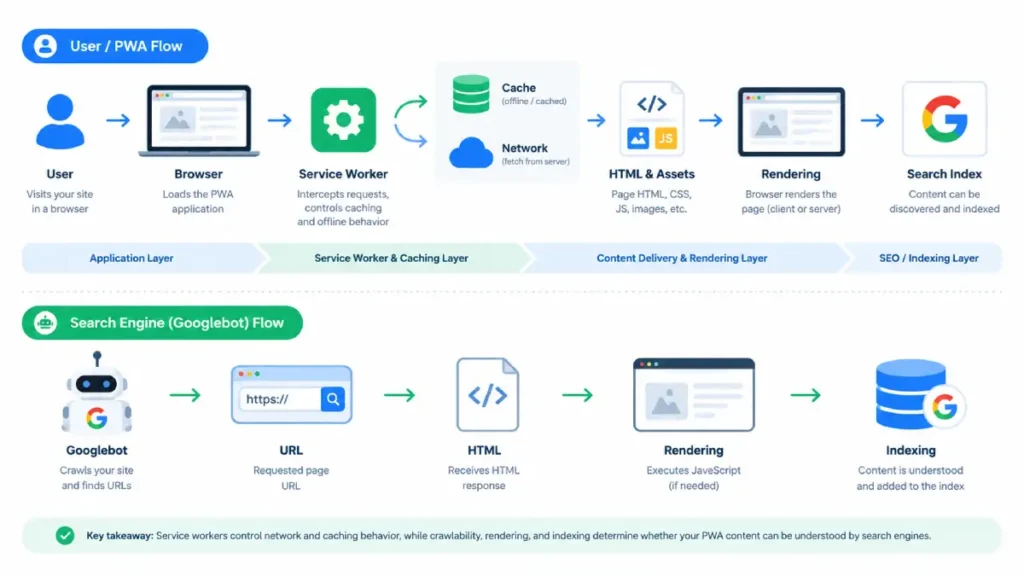
The key takeaway is simple: don’t treat service-worker configuration as a substitute for an indexable web architecture.
The Real SEO Risk: The App Shell
Many PWAs use an app-shell architecture in which the initial HTML contains a relatively small shell, and JavaScript subsequently creates the page content.
Google can render JavaScript, but its documented process still involves crawling first and rendering later. Google says that pages returning HTTP 200 responses can enter the rendering queue, after which rendered HTML can be used for indexing. Google’s JavaScript SEO documentation explains the crawling, rendering, and indexing process in more detail.
That means the SEO question should not be:
“Does this PWA use a service worker?”
Instead ask:
“What does a search engine receive and render for each important URL?”
If the initial response contains meaningful content and the rendered page preserves that content, the architecture is much easier to audit.
If important content exists only after complicated client-side execution, the implementation deserves closer testing. For a deeper examination of JavaScript rendering and dynamic architectures.
Service Worker Caching: Where SEO Audits Get Interesting
Service workers can intercept requests and return cached responses instead of going directly to the network.
That capability is valuable for performance and offline functionality, but aggressive caching can introduce a content-freshness problem.
For example, imagine this architecture:
URL request → Service Worker → cached HTML/app shell → JavaScript → API → final content
Now consider what happens when the cached representation is outdated, incomplete, or unsuitable for the requested route.
The problem isn’t that Google has a documented “service worker penalty.” Google does not state that service workers themselves are a ranking penalty.
The practical concern is whether the site’s implementation produces the correct, accessible content and HTTP behavior when pages are crawled and rendered.
That distinction matters when diagnosing a PWA.
Audit these service-worker behaviors
- Navigation requests — determine what response is returned for important URLs.
- HTML caching — check whether document responses can become unnecessarily stale.
- Cache versioning — verify that new deployments invalidate obsolete assets appropriately.
- Fallback behavior — test what happens when a requested page is unavailable offline.
- API dependencies — identify whether critical page content depends on client-side requests.
- Route handling — verify that every important URL works when requested directly rather than only after in-app navigation.
Service workers are designed to provide granular control over network requests and cached resources, so these behaviors should be tested deliberately rather than assumed.
MDN’s PWA caching guide explains how service workers can intercept requests and return cached responses instead of going directly to the network. For a broader technical audit of crawl and indexing behavior.
Rendering Matters More Than the PWA Label
Google’s current JavaScript SEO documentation makes the broader principle clear: search systems can render JavaScript, but server-side rendering or pre-rendering can make pages faster for users and crawlers while avoiding reliance on JavaScript execution.
For an SEO-focused PWA, think about rendering in three broad patterns:
| Rendering approach | SEO consideration |
|---|---|
| SSR | HTML is available in the initial server response |
| SSG / pre-rendering | HTML can be generated before the request |
| CSR | Important content depends more heavily on browser execution |
This does not mean CSR is automatically unindexable. Google explicitly supports JavaScript-powered websites.
The practical objective is to make important content reliably accessible to search engines while preserving the application’s interactive behavior.
For a deeper examination of JavaScript rendering and dynamic architectures, see [SearchEngineZine’s JavaScript Rendering SEO guide].
Crawlable URLs Still Matter
A PWA can use client-side routing, but each important search page should have its own meaningful URL.
Google recommends using normal crawlable <a href> links and the History API rather than fragment-based routing for JavaScript applications.
For example:
<a href="/products/seo-audit">
  SEO Audit
</a>
is fundamentally different from relying on a clickable <div> whose destination exists only inside a JavaScript event handler.
Google also recommends meaningful HTTP status codes and specifically discusses soft-404 problems in client-side applications.
This is why PWA SEO should be evaluated at the URL level, not simply at the application level.
A useful audit question is:
If I request this URL directly in a new browser session, does the server/application return the correct page state?
If the answer is no, the routing architecture deserves investigation.
Don’t Forget Canonicals, Metadata, and Structured Data
Each indexable PWA URL should have appropriate page-level SEO signals, including a unique title and appropriate canonicalization.
Google recommends descriptive titles and explains that canonical URLs can be specified in HTML; JavaScript can also modify them, but the implementation needs to remain consistent for a deeper explanation of canonicalization.
The same principle applies to structured data. Google supports JSON-LD and can process structured data generated with JavaScript, but implementations should be tested rather than assumed to work simply because the markup appears in the browser.
For structured-data implementation, [SearchEngineZine’s Schema resources] provide a related technical cluster.
Performance Is a Separate PWA Advantage
Service workers can make repeat visits faster by serving cached resources, but that does not automatically make the first visit fast.
The first-load experience can still depend on:
- server response time;
- HTML delivery;
- JavaScript bundle size;
- client-side data fetching;
- image loading;
- main-thread work;
- hydration;
- third-party scripts.
Therefore, don’t confuse offline or repeat-visit performance with initial-page SEO performance.
For performance-related work, [SearchEngineZine’s Core Web Vitals resources] provide supporting material.
A Practical PWA SEO Audit
For an SEO professional, the following sequence is more useful than simply checking whether a site is technically a PWA.
1. Test important URLs directly
Choose representative pages:
- homepage;
- category pages;
- product/service pages;
- articles;
- deep application routes.
Open each URL directly rather than navigating there through the application.
2. Compare source and rendered content
Check whether important content exists in the initial HTML and whether the rendered version contains the expected page.
Google recommends using tools such as URL Inspection to understand how Google sees JavaScript-powered pages.
3. Inspect service-worker navigation behavior
Determine:
- which requests are intercepted;
- which responses come from cache;
- how HTML is handled;
- how cache versions are updated;
- what happens when the network is unavailable.
4. Test routing and status codes
Confirm that:
- important routes return the correct content;
- invalid URLs return an appropriate 404 response;
- client-side routing doesn’t turn nonexistent URLs into generic 200 responses;
- internal links use crawlable URLs.
Google specifically warns about soft 404 problems in single-page applications.
5. Check SEO metadata
Verify each important page’s:
<title>;- meta description;
- canonical;
- robots directives;
- structured data;
- internal links.
6. Check the sitemap and internal architecture
Your sitemap should contain the canonical URLs you want Google to discover and index. For more on the relationship between XML and HTML sitemaps
For broader crawl and indexing architecture, see [SearchEngineZine’s Crawl & Index resources].
The Bottom Line
A service worker does not make a PWA SEO-friendly or SEO-unfriendly by itself.
The important relationship is:
PWA → rendering architecture → URL routing → HTTP responses → content accessibility → indexing
Service workers become relevant because they can control network requests and caching. But the SEO audit should focus on the observable outcome: whether every important URL can be discovered, requested, rendered, understood, and indexed with the correct content and metadata.
If you are auditing a PWA, start with the rendered page and URL behavior, then inspect the service worker to explain unexpected responses or caching behavior. That approach avoids treating a PWA technology as an SEO signal when the actual issue is architectural.
For a broader technical framework, SearchEngineZine’s technical SEO hub connects crawl/indexing, performance, structured data, mobile SEO, and site architecture resources.




