

What is orphan pages SEO?
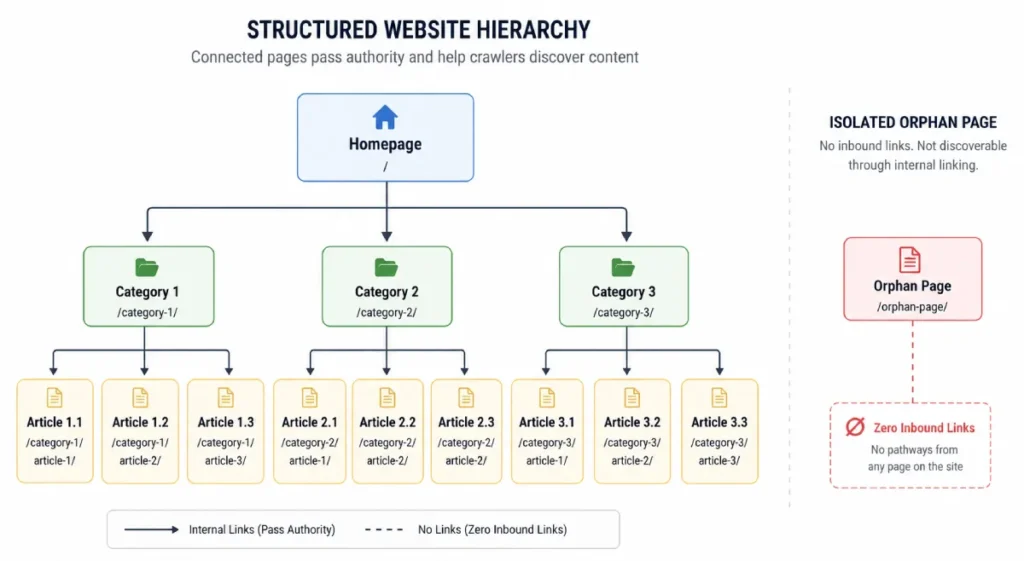
An orphan page is an indexable webpage on your server that has zero inbound internal links pointing to it from anywhere else on your website.
Because search engine crawlers rely on hyperlinked pathways to discover content, your site architecture structurally isolates orphan pages.
This creates significant penalties: search engine bots struggle to discover, index, or allocate link equity to these pages, leading to lost organic traffic and wasted server resources.
Why Orphan Pages Hurt Your SEO
- Crawl Waste & Budget Depletion: Search engine bots discover orphaned 200 OK pages primarily through XML sitemaps or historical access logs. Serving HTTP 200 responses for unlinked legacy pages drains server compute and burns budget that should be allocated to high-priority assets. Learn more about managing crawler efficiency in our guide on Crawl Budget Optimization.
- Zero Internal PageRank Distribution: Internal links distribute topological authority across your site architecture. Without inbound links, orphan pages receive negligible authority, severely limiting their ability to rank for competitive terms.
- Classification as “Crawled – Currently Not Indexed”: Pages isolated from client-side dynamic menus or SSR navigation trees face up to a 65% higher probability of being moved to low-priority search queues. For more on how Google handles rendering queues, see our analysis of The Indexing Pipeline.
- Topic Cluster Breakdown: Failing to link supporting articles into primary topic clusters reduces the main parent hub’s predictive ranking probability by roughly 18%. Map your content siloing correctly using our breakdown of Keyword Intent Mapping.
Common Technical Causes of Orphan Pages
Orphan pages rarely happen on purpose; they accumulate during technical site changes and enterprise CMS migrations:
- CMS Migrations & Dynamic Taxonomy Updates: When renaming categories or updating site structures, legacy URLs are frequently detached from navigation templates while remaining active on the server with a 200 OK status.
- E-Commerce Out-of-Stock Logic: Store platforms often remove out-of-stock product pages from sub-category grids while keeping the underlying URL live.
- PPC and Campaign Landing Pages: Specialized landing pages built without header/footer links frequently get automatically appended to your
sitemap.xmlby default CMS plugins. - Pagination & Infinite Scroll Drops: Modern web frameworks utilizing client-side rendering sometimes fail to inject canonical HTML internal links into secondary dynamic pages. Review structural DOM requirements in our DOM Depth SEO Playbook.
The Trilateral URL Discovery Framework
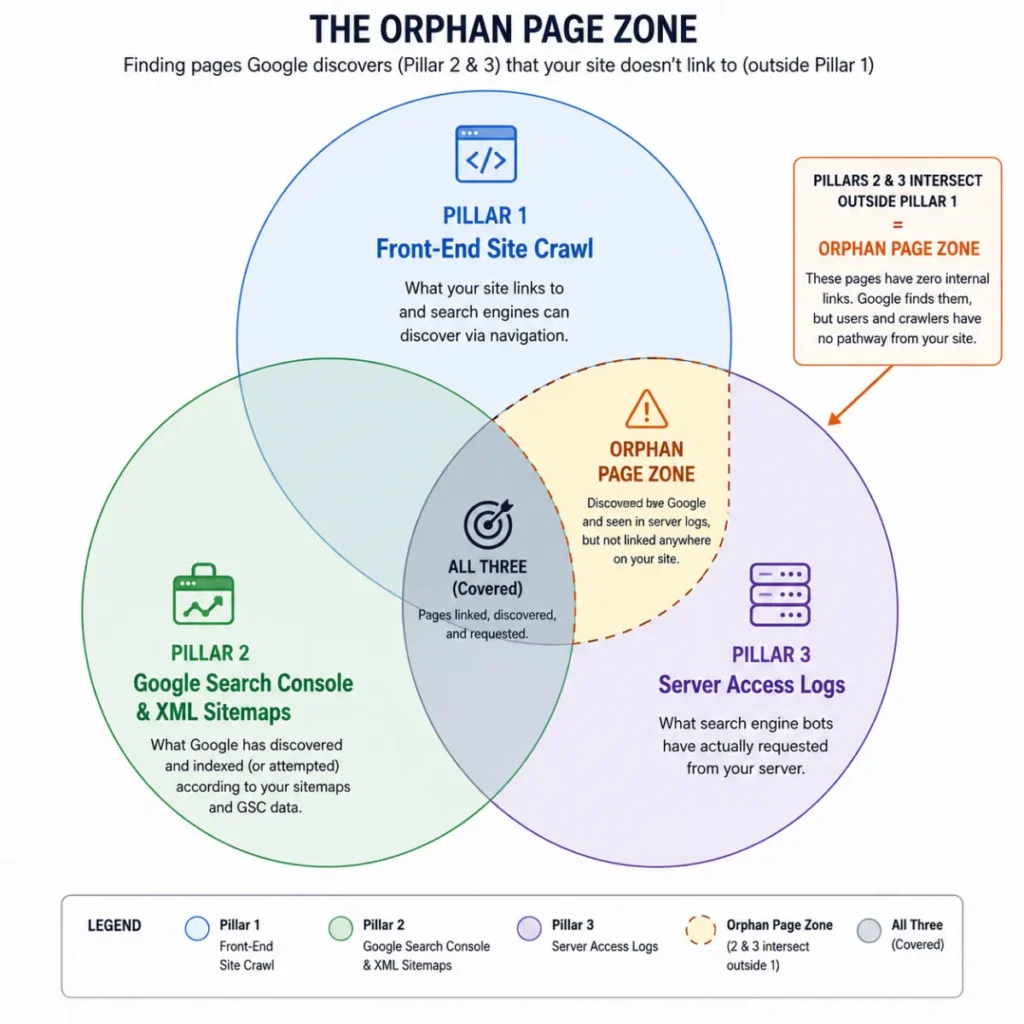
Standard site crawlers miss true orphan pages because they only follow visible HTML links. To locate isolated URLs, cross-reference three separate data sources:
| Pillar | Data Source | Purpose | Audit Export Tool |
| Pillar 1: Known Network | Front-End Site Crawl | Maps all currently hyperlinked HTML URLs. | Screaming Frog SEO Spider / Sitebulb |
| Pillar 2: Declared Network | Index & Sitemap Data | Captures explicitly submitted or indexed URLs. | Google Search Console & XML Sitemaps |
| Pillar 3: Ground Truth | Server Access Logs | Uncovers real search engine and AI crawler hits. | Server/CDN Logs (200 OK requests) |
Python Workflow: Identifying Orphan URLs
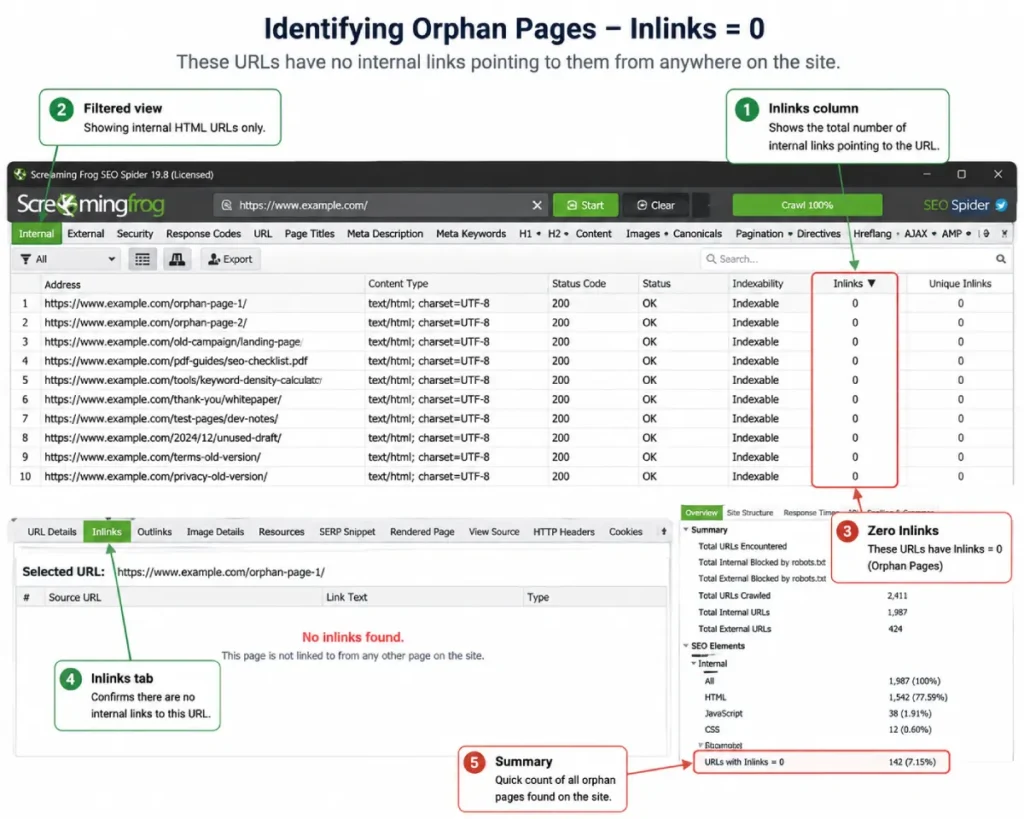
You can automate orphan page detection by matching your front-end crawl exports against Google Search Console sitemap data using Python.
How to Fix Orphan Pages: The 3-Step Decision Matrix
Once orphan pages are identified, take one of three targeted actions based on their business value and traffic history:
Option 1: Re-Integrate & Link (High Value)
When to use: The page contains high-quality, topically relevant content meeting clear user intent.
Action: Add contextual body links from a high-authority parent pillar page. Ensure the link is placed within 1–2 clicks of the root domain to transfer maximal topological authority. For long-tail content, consult our guide on Long Tail Discovery.
Option 2: 301 Redirect (Consolidate Equity)
When to use: The page is outdated or redundant but possesses valuable external backlinks.
Action: Execute a permanent 301 redirect to the most topically relevant live hub post (avoid redirecting everything to the homepage).
Option 3: Issue HTTP 410 Gone (Crawl Waste Pruning)
When to use: Thin, low-value legacy pages with zero traffic or external backlinks.
Action: Serve a 410 Gone header to immediately remove the URL from Googlebot crawl queues, saving server compute compared to a 200 OK or generic 404. Review our detailed comparison on 404 vs 410 for SEO.
Preventing Future Orphan Pages
- Automate XML Sitemap Management: Ensure your CMS dynamically removes URLs from
sitemap.xmlthe moment they are detached from internal navigation grids. - Enforce Migration Checklists: Require dev teams to run cross-table comparisons between staging links and live server logs before deploying new templates. Read more on structural evolution in The Evolution of Search Engines.
- Schedule Monthly Log Audits: Run monthly log file parses to catch search engine crawlers accessing legacy paths before those URLs degrade your site’s overall indexing performance. If your site has suffered performance drops, review our steps for Negative SEO Recovery.




