

Author bio schema helps search engines identify the person behind a website’s content by connecting an author’s name, profile page, professional details, and other relevant identity information through structured data.
For most editorial websites, the practical approach is to use Person markup on the author’s profile page and reference that author in the author property of each relevant Article or BlogPosting schema.
Google recommends using an appropriate author type and providing a valid author URL or sameAs property to help it understand who created the content.
However, author bio schema does not guarantee higher rankings, a knowledge panel, or a rich result. Its primary purpose is to describe entities and relationships accurately.
This tutorial explains how to implement author markup, connect it to article schema, validate the result, and avoid common technical SEO mistakes.
What Is Author Bio Schema?
Author bio schema is structured data that describes an author as a recognizable entity rather than merely displaying a name in an article byline.
The relevant Schema.org types and properties serve different purposes:
Person: Describes an individual author, including their name, professional role, and relevant profile information.ProfilePage: Describes a webpage whose primary focus is a particular person or organization.author: Connects an article or other creative work to its author.urlandsameAs: Help identify the author through a profile URL or reliable external identity references.
The official Schema.org Person vocabulary defines properties available for describing individuals. Google’s Article structured data documentation explains how to represent author information for articles eligible for Google’s supported search features.
An important distinction: author schema describes identity and authorship. A visible biography provides context for readers. Both should agree, but one does not replace the other.
How to Implement Author Bio Schema Step by Step
Step 1: Create a complete author profile
Before adding markup, create a dedicated author page with a consistent name, professional biography, relevant experience, and links to genuine professional profiles.
Include information that helps readers assess the author’s relevance to the subject. For an SEO professional, this might include technical SEO experience, areas of specialization, published work, and verifiable professional contributions.
Keep the displayed biography accurate and up to date. Do not invent qualifications, certifications, or affiliations to make the profile appear more authoritative.
Step 2: Add Person schema using JSON-LD
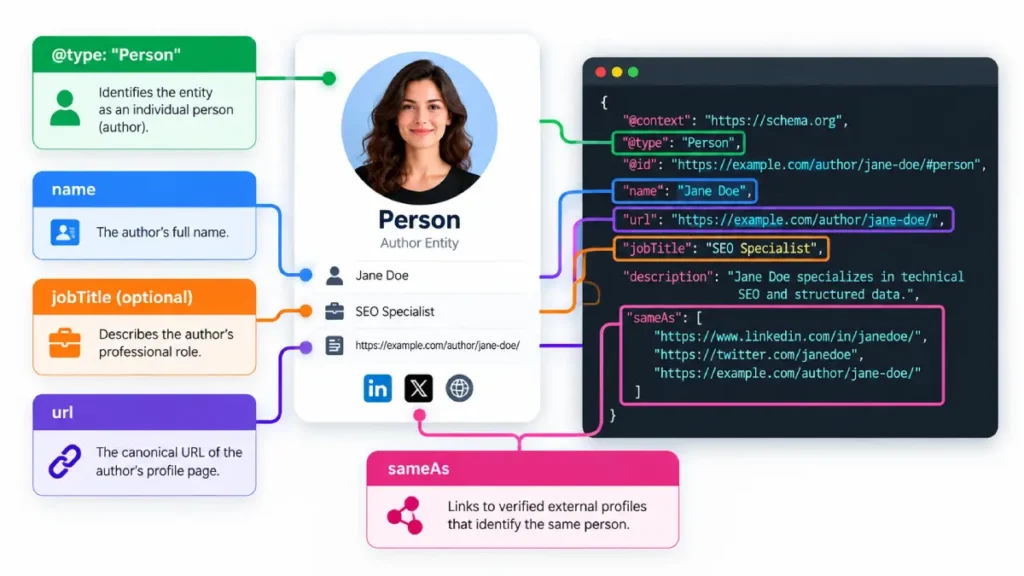
JSON-LD is a practical format for implementing structured data because the markup can be maintained separately from the page’s visible HTML.
The following example is a template for an author profile. Replace the example name, URLs, and professional details with verified information before implementation.
<script type="application/ld+json">
{
  "@context": "https://schema.org",
  "@type": "Person",
  "@id": "https://example.com/author/jane-doe/#person",
  "name": "Jane Doe",
  "url": "https://example.com/author/jane-doe/",
  "jobTitle": "SEO Specialist",
  "description": "Jane Doe specializes in technical SEO and structured data.",
  "sameAs": [
    "https://www.linkedin.com/in/example-profile/"
  ]
}
</script>
The @id supplies a stable identifier for the person within your site’s structured-data graph. Reuse that identifier when referencing the same author elsewhere.
The sameAs value should point to a genuine profile that identifies the same individual. Do not use unrelated social accounts, generic search pages, or profiles belonging to someone else.
Only include properties that accurately describe the author. Additional fields are not automatically beneficial simply because they are available in Schema.org.
Step 3: Connect the author to article schema
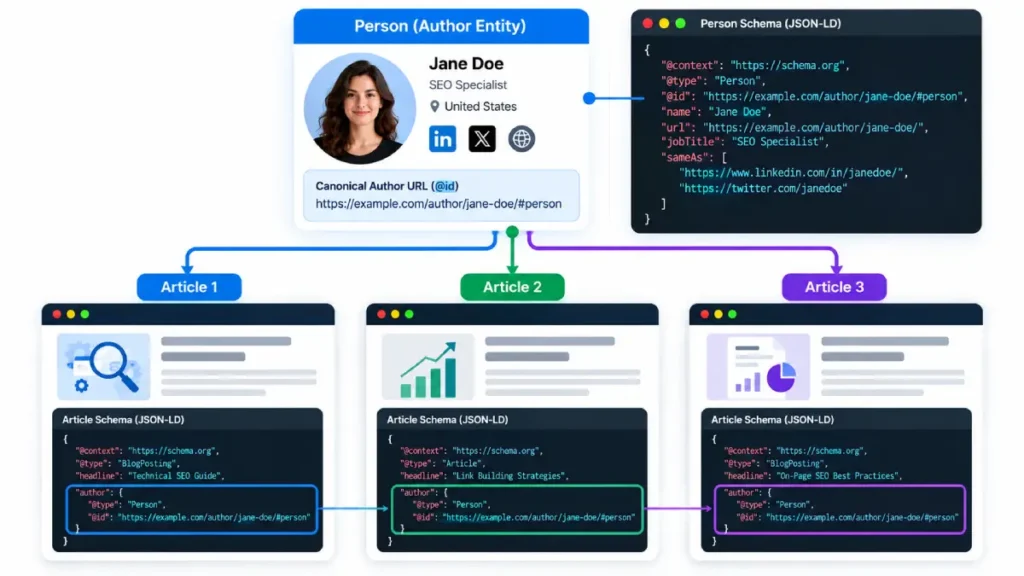
A profile page identifies the author, but individual articles should also identify their authors explicitly.
For example, an article can reference the same person using the following JSON-LD structure:
<script type="application/ld+json">
{
  "@context": "https://schema.org",
  "@type": "BlogPosting",
  "@id": "https://example.com/seo-guide/#article",
  "headline": "A Practical SEO Guide",
  "author": {
    "@type": "Person",
    "@id": "https://example.com/author/jane-doe/#person",
    "name": "Jane Doe",
    "url": "https://example.com/author/jane-doe/"
  },
  "publisher": {
    "@type": "Organization",
    "name": "Example Publishing"
  }
}
</script>
This is an illustrative template, not a complete production implementation. Add accurate publication dates and representative image URLs where applicable, and ensure the publisher details match the actual website.
The key relationship is the shared author @id. It makes the intended identity connection explicit rather than creating a different person entity for every article.
Google recommends marking up each author separately when an article has multiple authors. The author.name property should contain the author’s name alone, not a job title, publisher name, or introductory wording such as “Written by.”
Step 4: Add ProfilePage markup where appropriate
If an author has a dedicated profile page, you can describe the page itself using ProfilePage structured data and identify the person featured on it.
This is different from using Person markup alone: Person describes the individual, while ProfilePage describes the webpage centered on that individual.
Review Google’s ProfilePage structured data guidelines before implementing this type. Use it only when the page meets the relevant guidelines; an author box embedded in every article is not automatically a qualifying profile page.
For an editorial website, a clean implementation may therefore include:
ProfilePageon a qualifying author profile URL.Personto describe the author.BlogPostingorArticleon individual editorial URLs.- An
authorreference connecting each article to the same person.
Avoid creating redundant markup without a clear purpose. If your CMS or SEO plugin already generates these entities, extend or configure the existing graph rather than adding competing copies.
Common Author Schema Mistakes to Avoid
| Mistake | Better implementation |
|---|---|
Using Person as the article’s only type | Use an appropriate article type and connect its author property to the person. |
| Using different author IDs across articles | Maintain a consistent, canonical person identifier. |
| Marking up a fictional or unverified biography | Use accurate, publicly supportable information. |
Putting a job title inside author.name | Keep the name separate and use jobTitle when appropriate. |
| Adding unrelated social profiles | Link only to accounts that genuinely identify the author. |
| Publishing schema that contradicts the visible byline | Keep the structured data and displayed author information consistent. |
| Assuming markup guarantees rankings | Evaluate implementation accuracy and search performance separately. |
One additional consideration: if several contributors share a common editorial account, do not automatically label that account as a Person. Determine whether the actual author is an individual or a publishing organization, then use the appropriate entity type.
How to Validate Author Bio Schema
After checking the author markup, review your wider structured data implementation to identify inconsistencies or duplication between article, author, and publisher entities.
- Check Schema.org validity. Use the Schema.org Validator to identify structural and vocabulary issues.
- Check Google-supported article markup. Use the Rich Results Test to check eligibility-related issues for supported search features.
- Inspect the rendered page. Confirm that the author name, profile link, and article byline are visible and consistent with the markup.
- Check entity relationships. Verify that the article’s author reference points to the intended person and that the profile URL resolves correctly.
- Test a sample of templates. Review posts with single authors, multiple authors, guest contributors, and any special editorial layouts.
- Monitor after deployment. Use Google Search Console to inspect indexed URLs and monitor relevant search appearance reports where available.
Passing a validator does not mean Google will display a particular search enhancement or fully accept every inferred entity relationship. Validation confirms technical properties of the markup; search appearance remains at Google’s discretion.
Does Author Bio Schema Improve E-E-A-T?
Author markup can help search engines interpret the relationship between a content item and its creator. A useful author profile can also help readers understand the person’s relevant experience and expertise.
However, schema is not a shortcut to demonstrating Experience, Expertise, Authoritativeness, and Trustworthiness (E-E-A-T). Google evaluates content quality and other signals through broader systems; adding a Person object does not independently establish expertise or guarantee ranking improvements.
For practical SEO, combine accurate author markup with a useful biography, clear editorial responsibility, credible supporting evidence, and content that demonstrates relevant knowledge. A broader author entity optimization strategy can help you maintain consistent author identities across your website and relevant professional profiles.
Final Implementation Checklist
Before publishing author bio schema, confirm that:
- The author has a genuine, accessible profile page.
- The
Personentity uses accurate information and a stable@id. - Every applicable article identifies its actual author.
- Multiple authors are represented separately.
- Profile URLs and external identity links are valid.
- Existing plugin-generated markup has been checked for duplication.
- The rendered page and structured data agree.
- Validation and a sample of live URLs have been reviewed.
The recommended approach is to build a consistent author identity across the profile page and article markup, validate the relationship, and maintain it as the editorial team changes. Accurate structured data supports clearer entity identification without promising a ranking benefit it cannot guarantee.




